• We’re currently investigating an issue related to the forum theme and styling that is impacting page layout and visual formatting. The problem has been identified, and we are actively working on a resolution. There is no impact to user data or functionality, this is strictly a front-end display issue. We’ll post an update once the fix has been deployed. Thanks for your patience while we get this sorted.

The sound Windows makes when web browsing

SanDiegoPC

Senior member
In XP, you could shut this off under the SOUNDS panel in the control panel. There was an option that said "Begin Navigation" so you could shut off the click from the speakers when you go to a website.

In Windows 7 and MSIE8, I do not see that option. It's not under the TOOLS menu in the Internet Exploder, and it's not inthe system Control Panel.

Where is it?
 
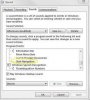
Win7 Ultimate here. But I opened up a Win7 Home Premium virtual machine and see the same "Start Navigation" option, which is set to "Windows Navigation Start" by default.

Maybe it's something to do with your particular sound card? Mine is a built-in Realtek on my "real" PC and the built-in "Microsoft Virtual Machine Auido Device Driver" on my virtual PC.
 

Attachments

  • Win7Ultimate.jpg
    Win7Ultimate.jpg
    15.5 KB · Views: 10
Last edited:
I'm using win7 pro this worked for me- control panel-hardware and sounds- under sounds choose "change system sounds". under the sounds tab scroll down to windows explorer, the start navigation is there change it to none, click apply-ok.
 
Back
Top