The sound Windows makes when web browsing

SanDiegoPC

Senior member
Jul 14, 2006
460
0
0
In XP, you could shut this off under the SOUNDS panel in the control panel. There was an option that said "Begin Navigation" so you could shut off the click from the speakers when you go to a website.

In Windows 7 and MSIE8, I do not see that option. It's not under the TOOLS menu in the Internet Exploder, and it's not inthe system Control Panel.

Where is it?
 

blackangst1

Lifer
Feb 23, 2005
22,902
2,360
126
With IE open, go into your sound profile on the bottom right (the icon). I beleive there you can mute IE sounds.
 

RebateMonger

Elite Member
Dec 24, 2005
11,586
0
0
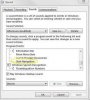
Win7 Ultimate here. But I opened up a Win7 Home Premium virtual machine and see the same "Start Navigation" option, which is set to "Windows Navigation Start" by default.

Maybe it's something to do with your particular sound card? Mine is a built-in Realtek on my "real" PC and the built-in "Microsoft Virtual Machine Auido Device Driver" on my virtual PC.
 

Attachments

  • Win7Ultimate.jpg
    Win7Ultimate.jpg
    15.5 KB · Views: 10
Last edited:

humanure

Senior member
Dec 28, 2005
441
0
0
I'm using win7 pro this worked for me- control panel-hardware and sounds- under sounds choose "change system sounds". under the sounds tab scroll down to windows explorer, the start navigation is there change it to none, click apply-ok.