Beavermatic
Senior member
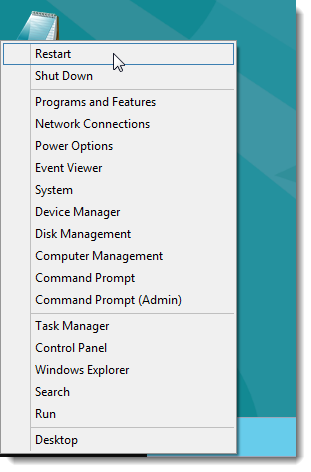
Here's a nifty trick noone really knows... your start button list isn't gone from Windows 8. You have to right click on the start button itself.
Left-click takes you to the tile start screen, right click gives you a windows 7/xp-like list of all the old options from the start menu
Move your mouse to the bottom left on the screen on the dekstop and hover over the start box that appears, and right-click.
see? now that wasn't so bad, was it?
🙂

also, there seems to be a bit of confusion about the Start screen.... Most are trying to treat it as a "ALL PROGRAMS\FOLDER\SUBFOLDER\FILE" replacement. It's not meant to work like that. It's literally just a quicklaunch. Only apps needed immediately or on the fly should have a tile added there. Also, multi-monitor is where the new start and Desktop really shine.. beleive it or not.
ex:

Your actual "Apps" screen is your "ALL PROGRAMS\FOLDER\SUBFOLDER\FILE" hierarchy list, and it even retains that style (albeit a new layout), but for the most part, still displays the same info as "ALL PROGRAMS" list. All searching is done from here as well. CHARMS -> SEARCH option takes you right to it, or right-click Start Button, and choose Search.
ex:

Left-click takes you to the tile start screen, right click gives you a windows 7/xp-like list of all the old options from the start menu
Move your mouse to the bottom left on the screen on the dekstop and hover over the start box that appears, and right-click.
see? now that wasn't so bad, was it?
🙂
also, there seems to be a bit of confusion about the Start screen.... Most are trying to treat it as a "ALL PROGRAMS\FOLDER\SUBFOLDER\FILE" replacement. It's not meant to work like that. It's literally just a quicklaunch. Only apps needed immediately or on the fly should have a tile added there. Also, multi-monitor is where the new start and Desktop really shine.. beleive it or not.
ex:
Your actual "Apps" screen is your "ALL PROGRAMS\FOLDER\SUBFOLDER\FILE" hierarchy list, and it even retains that style (albeit a new layout), but for the most part, still displays the same info as "ALL PROGRAMS" list. All searching is done from here as well. CHARMS -> SEARCH option takes you right to it, or right-click Start Button, and choose Search.
ex:
Last edited: