Hi all. Looks like I'm going to be building a budget system for a family member and the CPU choice is an i5 2500 (non K). Normally I put a after market HSF on all my CPUs but since this build is for another and wanting to keep costs down I'm thinking just keeping the retail HSF on it to help keep costs down. My question is how good are the retail HSF on this cpu? I'm wondering how loud the cpu will get under load in FPS gaming? The case will have good cooling performance so I don't think cooling will be a concern. More concerned just how loud it may get. I can add a cheap HSF but if I can save $20-$30 by not doing that so much the better.


The i5 2500 Retail HSF... How Cool and Quiet is it?
- Thread starter Skott
- Start date
You are using an out of date browser. It may not display this or other websites correctly.
You should upgrade or use an alternative browser.
You should upgrade or use an alternative browser.
Crap Daddy
Senior member
- May 6, 2011
- 610
- 0
- 0
I used the stock for the i5-2500K for a while. I assume it's the same. Was very quiet and OK cooling at 1600MHz, the default clocks for easy apps and desktop 32C. But when doing a handbrake encoding with all 4 cores 100% load in turbo mode, the temps were up over 80C. That's when I decided to ditch it. In BFBC2 it is around 70C but it's quiet. Too quiet...

IntelEnthusiast
Intel Representative
- Feb 10, 2011
- 582
- 2
- 0
The stock HSF (heatsink/fan) on the Intel® Core i5-2500, i5-2500K and I7-2600 and i7-2600K all share the same HSF. This HSF is fine for use at stock speeds. If you are going to overclock the processor (on the "K" processor) you are going to want to add a 3rd party HSF.
Christian Wood
Intel Enthusiast Team
Christian Wood
Intel Enthusiast Team
No, no overclocking will be done. Planning to use a basic budget H61/67 mobo so nothing fancy.
Then you will most likely be fine with the stock HSF. Just think of all the OEMs (Dell, HP, etc) that use stock HSFs in their desktops.

Zap
Elite Member
- Oct 13, 1999
- 22,377
- 7
- 81
Why WOULDN'T the stock heatsink be fine for stock speeds?
I swear...
Seriously guys, you don't always have to try making things more difficult.
PS: Enable a fan profile in BIOS to keep it quiet and you are good to go.
Actually they may not use the actual Intel PIB HSF but some standardized unit they can purchase by the container, to go with their tray CPUs.
I swear...
Seriously guys, you don't always have to try making things more difficult.
PS: Enable a fan profile in BIOS to keep it quiet and you are good to go.
Then you will most likely be fine with the stock HSF. Just think of all the OEMs (Dell, HP, etc) that use stock HSFs in their desktops.
Actually they may not use the actual Intel PIB HSF but some standardized unit they can purchase by the container, to go with their tray CPUs.

RussianSensation
Elite Member
- Sep 5, 2003
- 19,458
- 765
- 126
Why WOULDN'T the stock heatsink be fine for stock speeds?
I swear...
I think that's a legitimate question. The stock heatsink on my Core i7 860 was such a pile of crap, that I refused to run distributed computing or gaming on the system until I got an aftermarket cooler. I initially tried, but my temps went way into the 80s at 100% load, not to mention it was loud at those temperatures too. Also I tend to be fairly lazy when it comes to dust cleaning. Right now with a clean Megahalems, I average 62-65*C at 3.9ghz 100% loaded. That means if I don't clean the heatsink for months, I am still in the 70-75*C range. However, with a stock Intel heatsink, that would take my mid-to-high 80s on the 860 well into the 90s.
Last edited:
PreferLinux
Senior member
- Dec 29, 2010
- 420
- 0
- 0
My i5 2500K at stock only gets to 70 C in LinX (no AVX, 74 C with AVX), but I believe it used to get 80 C before I took it off and put it back on (when I upgraded to a B3 motherboard). Mine's quiet even when it is running LinX at 3.6 GHz, and getting 83 C! (And no, I don't have a fancy case or anything either.)I used the stock for the i5-2500K for a while. I assume it's the same. Was very quiet and OK cooling at 1600MHz, the default clocks for easy apps and desktop 32C. But when doing a handbrake encoding with all 4 cores 100% load in turbo mode, the temps were up over 80C. That's when I decided to ditch it. In BFBC2 it is around 70C but it's quiet. Too quiet...

Phynaz
Lifer
- Mar 13, 2006
- 10,140
- 819
- 126
The stock heatsink on my Core i7 860 was such a pile of crap
Stock heatsink on my 870 works great, 8 threads 100% loaded and I may break 70c on a hot day. Can barely hear the thing either.
Noise is gonna be hit and miss. Try it and see if it's tolerable to you. The last couple of stock intel one's I've tried made whining sounds at higher speeds so I replaced them with cheap aftermarket ones. It's not like you'd need a high end one to get alot better temps than the stock one at stock speeds.
RussianSensation
Elite Member
- Sep 5, 2003
- 19,458
- 765
- 126
Stock heatsink on my 870 works great, 8 threads 100% loaded and I may break 70c on a hot day. Can barely hear the thing either.
Oh really?
Professional reviewers struggled to keep a Core i7 870 operational at 100% load on a stock heatsink at reasonable temperatures.
1. LegionHardware got 91*C with a stock cooler and it took a Thermalright MUX-120 (similar to Thermalright 120) to bring the temps down to 64*C.
2. Xbitlabs easily broke 90*C at 4.0ghz on the 870 with the MUX-120, which means at stock + Turbo it was for sure hovering in the mid-60s with that aftermarket cooler.
3. Hardware Canucks got 79-80*C and again it took the Thermalright MUX-120 to bring the temps on the highest cores to 63*C.
4. Nordic Hardware got 79.5*C on the stock cooler with the i7 870.
5. Elite PC Reviews got 86*C at 100% load on the 870 with the stock cooler.
6. PureOverclock got 79*C with the stock cooler on the 870.
I had to lower my voltage to 1.152V just to get into the low 80s at 100% load on the 860:
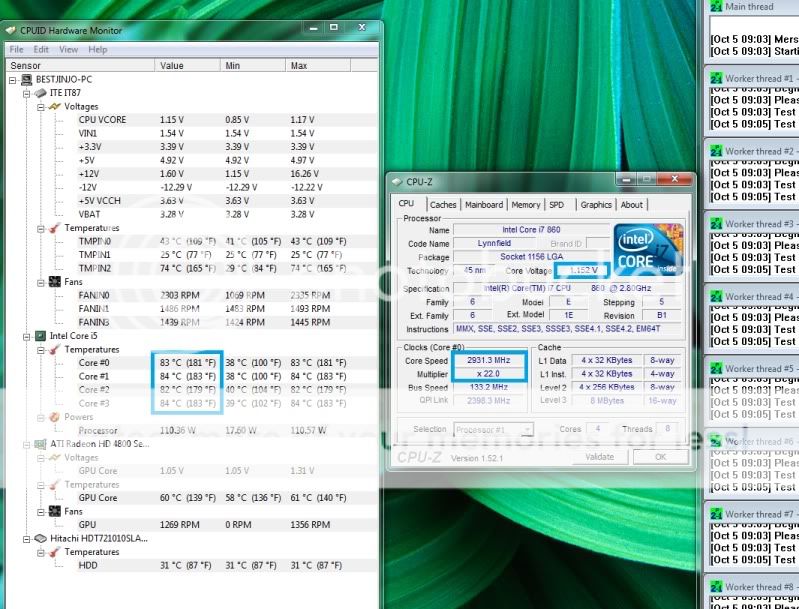
There can only be 4 possible explanations:
1) Your CPU isn't truly loaded to 100% on all 8 threads;
2) The software which reports 70*C is incorrect;
3) You have extremely low ambient temperatures (0-10*C);
4) Your chip is not operating at full frequency when loaded.
So I call BS on your claims of your 870 barely breaking 70*C on a "hot day" when loaded to 100% on all 8 threads on the stock cooler. Or you have a 1 in a 100,000 lucky chip

Last edited:

StinkyPinky
Diamond Member
- Jul 6, 2002
- 6,992
- 1,284
- 126
Stock fan is ok. Not that noisy. We have a few Dell machines at work and the fan on it (which is stock I presume??) is actually pretty quiet.
Zap
Elite Member
- Oct 13, 1999
- 22,377
- 7
- 81
1) Your CPU isn't truly loaded to 100% on all 8 threads;
Well, obviously since you are involved with DC you need cooling capable of handling the heat from continuous 100% loads. However, not everyone will keep their CPU running 100% all the time. Somehow I don't think "a budget system for a family member" will be loaded up 100%.

lopri
Elite Member
- Jul 27, 2002
- 13,328
- 709
- 126
Don't forget Pentium D's.Why WOULDN'T the stock heatsink be fine for stock speeds?
Somehow I don't think "a budget system for a family member" will be loaded up 100%.
Agreed - well, at least until the unwitting allow malware to get to it
TRENDING THREADS
-
 Discussion Zen 5 Speculation (EPYC Turin and Strix Point/Granite Ridge - Ryzen 9000)
- Started by DisEnchantment
- Replies: 25K
-
Discussion Intel Meteor, Arrow, Lunar & Panther Lakes + WCL Discussion Threads
- Started by Tigerick
- Replies: 24K
-
 Discussion Intel current and future Lakes & Rapids thread
- Started by TheF34RChannel
- Replies: 23K
-

-


AnandTech is part of Future plc, an international media group and leading digital publisher. Visit our corporate site.
© Future Publishing Limited Quay House, The Ambury, Bath BA1 1UA. All rights reserved. England and Wales company registration number 2008885.
 Facebook
 Twitter