Thanks to ATOT I am graduating to laptop repair

MrSquished

Lifer
Jan 14, 2013
26,709
24,881
136
that is I'm about to open up a 2 year old Dell XPS Touch 15 and try to replace the fried 500GB SSD hard drive. I taught myself how to build PC's almost 20 years ago and Anandtech Forums was one of the main sources of learning along with a couple other websites. Since then I've built around 10 desktops - about 5 for myself and 5 for friends and family.

Now this goddamn expensive laptop crashed a couple days ago - a mere WEEK after my additionally purchased SquareTrade warranty expired. Talk about bad timing. A fucking SSD hard drive to boot. No pun intended. But thanks to ATOT giving me the balls to build PC's that long time I ago I decided to delve into the land of laptop repair. Pray for it to be routine.

So god bless all of you people that make this forum great. No need for Trump to make it great again. Cheers!
 
  • Like
Reactions: InYourFace

renz20003

Platinum Member
Mar 14, 2011
2,714
634
136
That shouldn't be too terrible. I'm assuming it's a bit more complicated than removing a plastic cover to access the ssd?
 

Skeeedunt

Platinum Member
Oct 7, 2005
2,777
3
76
Well, it will either be routine, or soldered to the motherboard. Good luck.
 

KillerBee

Golden Member
Jul 2, 2010
1,750
82
91
I had good luck bringing an SSD back to life that wasn't seen in BIOS by doing this.

Stick it in another computer and only connect the power cable - run for about 10 minutes and then connect the Data cable and reboot.

It's worth a shot to try - I'm 1 for 2 so far with it working :grinning:
 

VirtualLarry

No Lifer
Aug 25, 2001
56,587
10,227
126
I had good luck bringing an SSD back to life that wasn't seen in BIOS by doing this.

Stick it in another computer and only connect the power cable - run for about 10 minutes and then connect the Data cable and reboot.

It's worth a shot to try

That's what Crucial tech-support will tell you, if you tell them your (Crucial) SSD is "bricked". It works for some people, not everyone though.
 

KillerBee

Golden Member
Jul 2, 2010
1,750
82
91
That's what Crucial tech-support will tell you, if you tell them your (Crucial) SSD is "bricked". It works for some people, not everyone though.

yep you called it - it actually worked for me - though my OCZ 240G SSD is still dead no matter what I try :(

PS...even tried throwing it in the oven at 350 for a bit - no joy
 
Last edited:

lxskllr

No Lifer
Nov 30, 2004
60,881
11,225
126
Laptops can be a pita. I can work on them, but I don't enjoy it. Still beats a tablet or phone.
 

MrSquished

Lifer
Jan 14, 2013
26,709
24,881
136
Well that was short-lived. Got the back cover off no problem then BAM. No visible hard drive. This was Dells top of the line 15 inch laptop 2 years ago so it's quite thin so of course they layout is more cramped and different than a cheaper thicker laptop. Most tutorials I read the hard drive was always visible just by taking the cover off.

All I could see was just the battery, the mobo, ram, 2 large fans, some copper heatsink striping and what I think is the video card and then a bunch of cables. I believe I see what must be the tip of the SSD under one of the fans. I hope it's a 2.5" and not the rarer 1.8" and it's not soldered to the mobo as somebody mentioned. I unscrewed all the mobo screws and started to try to pry the whole thing off very gently so to not pop a cable. I did it as strong as I thought it was safe a few times and nothing. So I'll take it to the computer repair shop on the other side of town. They quoted me 75 bucks.

I failed ATOT, I failed :(
 

lxskllr

No Lifer
Nov 30, 2004
60,881
11,225
126
You tried. They sometimes require more force to open than seems prudent. They also like to hide screws. Is it being a bitch, or did you miss a screw? $75 is fairly cheap insurance to keep from really breaking something.
 

ch33zw1z

Lifer
Nov 4, 2004
39,838
20,433
146
hold up, you got the manual?

get your service tag out and find the manual. we can help lol

It's probably M.2 or mSATA
 

Skeeedunt

Platinum Member
Oct 7, 2005
2,777
3
76
I do hope you're following the manual (not sure if that's the right model) and not just rummaging around in there.
 

MrSquished

Lifer
Jan 14, 2013
26,709
24,881
136
I do hope you're following the manual (not sure if that's the right model) and not just rummaging around in there.

I was just rummaging around in there figuring I wouldn't do anything stupid if I encountered too much difficulty. Everything is screwed back in as it was.

I wish that was the manual, the hard drive is clearly visible there with the back cover removed. On my XPS 15 touch the entire bottom half of the laptop is a battery with the top half being mobo and fans and ram, no hard drive to be seen.
 

ch33zw1z

Lifer
Nov 4, 2004
39,838
20,433
146
I grabbed the manual for the 9550 model instead, I think that's the touch model. Much different.

Again, using the service tag, you can find out exactly what it came with, then you can determine where the device is inside the laptop.
 

MrSquished

Lifer
Jan 14, 2013
26,709
24,881
136
http://imgur.com/aCqGjh3

probably mSATA, check there.

edit: re: your last post, it's in there somewhere. support.dell.com input your service tag, grab the manual, and link us to it so we can help.

Thanks. I put in the Service Tag and here is the manual: http://downloads.dell.com/manuals/a...s_laptop/xps-15-9530_owner's manual_en-us.pdf

It's not the right manual though. I got the extended battery so if you see where the hard drive is in the picture, well that's all battery on my unit. The hard drive is under the motherboard.
 

ch33zw1z

Lifer
Nov 4, 2004
39,838
20,433
146
look at the picture i linked, should be under the IO board cable, under that is the mSATA card.

"removing the mSATA card" in the manual :)
 

SKORPI0

Lifer
Jan 18, 2000
18,503
2,426
136
you could try searching youtube for a video dis-assembly or replace ssd.

is this it?
No. OP mentioned that the drive is under the mobo. Searches on a XPS 15 touch all show that the drive is on the right side.

Probably the 9550, not the (2013) 9530.

https://www.youtube.com/watch?v=0U-mhEivvqE
The Dell XPS 15 comes in two variants. One has a hard drive, small SSD and small battery, the other has a single M.2 NVMe SSD and a large battery. Here's how you get the back off both models and a close-up look at the components inside and the differences between the two models.
 
Last edited:

MrSquished

Lifer
Jan 14, 2013
26,709
24,881
136
No. OP mentioned that the drive is under the mobo. Searches on a XPS 15 touch all show that the drive is on the right side.

Yep that is correct. I looked at all the XPS 15 Touch manuals and videos. All have the hard drive on the bottom right next to the battery - where for me with the extended battery extends for the whole bottom of the laptop.
 

zinfamous

No Lifer
Jul 12, 2006
111,994
31,557
146
Well that was short-lived. Got the back cover off no problem then BAM. No visible hard drive. This was Dells top of the line 15 inch laptop 2 years ago so it's quite thin so of course they layout is more cramped and different than a cheaper thicker laptop. Most tutorials I read the hard drive was always visible just by taking the cover off.

All I could see was just the battery, the mobo, ram, 2 large fans, some copper heatsink striping and what I think is the video card and then a bunch of cables. I believe I see what must be the tip of the SSD under one of the fans. I hope it's a 2.5" and not the rarer 1.8" and it's not soldered to the mobo as somebody mentioned. I unscrewed all the mobo screws and started to try to pry the whole thing off very gently so to not pop a cable. I did it as strong as I thought it was safe a few times and nothing. So I'll take it to the computer repair shop on the other side of town. They quoted me 75 bucks.

I failed ATOT, I failed :(

Turn in your card and your password.

Your post count will be divided and appropriately distributed to the more needy, less nooby members.

I'm sorry it had to end this way, but this was the contract you signed.
 
  • Like
Reactions: bigboxes

SKORPI0

Lifer
Jan 18, 2000
18,503
2,426
136
MG_7695.JPG


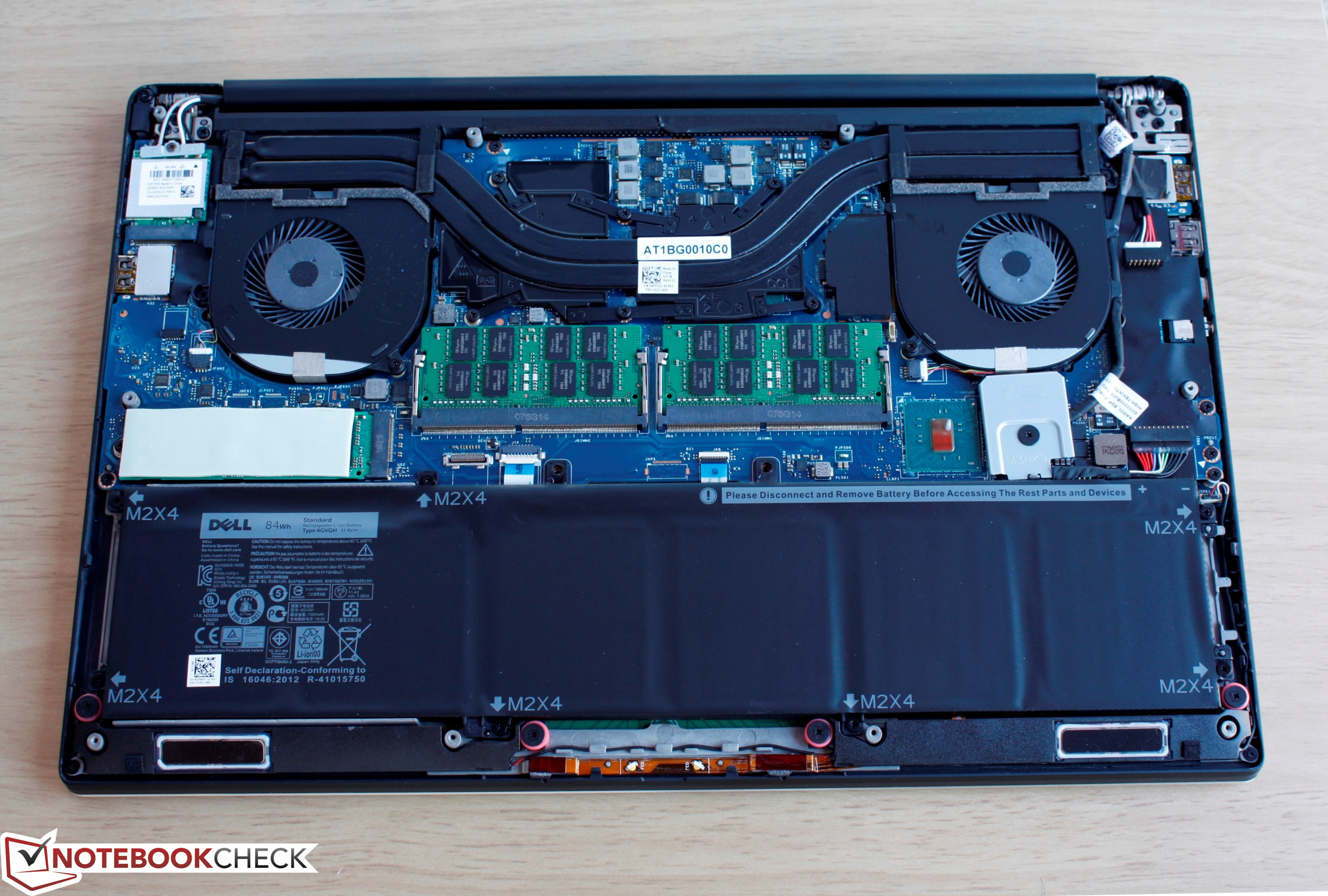
Looks like a M.2 NVMe SSD (white rectangle) top left of the large battery.

Dell-XPS-15-9550-Disassembly-20.jpg
 
Last edited:
  • Like
Reactions: monkeydelmagico

ch33zw1z

Lifer
Nov 4, 2004
39,838
20,433
146
there's the mSATA SSD :p

going through the manual, this doesn't look bad to tear down at all. I've definitely seen worse lol
 

Skeeedunt

Platinum Member
Oct 7, 2005
2,777
3
76
What Skorp said. OP, are you sure you know what you're looking for in an M.2 SSD? It looks like a stick of RAM.
 

MrSquished

Lifer
Jan 14, 2013
26,709
24,881
136