

- Nov 21, 2024
- 196
- 18
- 41
good day dear Friends - hello everyone 🤩
hello dear friends,
update: thread is solved now🤩🏖️:
finally got there - see on the right side - the drop down with the menu of the Post-Types
thread is sovled - i am happy,. 🎊 🤩
greetings


see the original-posting below
at the moment i am working on a new WordPress-project. 🎊
and currently i am facing one certain issue: How to check if the post-type dropdown in the Query Loop block is populated with data?
outline: for a little test i have to do some quick lookup - i need to know if a "Post-Tpye" is visible in the so called "Post Type" drop-down?
Then we'll know exactly where to start.
see some background: - and probably this may help here - since it has to do with the same topic - at least somehow
Using Query Loop with Custom Post Type
https://wordpress.stackexchange.com/questions/418242/using-query-loop-with-custom-post-type
How to check if the post-type dropdown in the Query Loop block is populated with data?
outline: for a little test i have to do some quick lookup - i need to know if a "Post-Tpye" is visible in the so called "Post Type" drop-down?
some musings and assumptions: (how to achive this)
well i have made up my mind - and i think - that it should be doable like so:
.... therefore i go to the the Query Loop Block
Inherit Query → OFF and then i should check:
Is the "Post Type" dropdown visible?
Are the certain post tpye - in my case "Foo-bar" selectable?
Does there "Test-story" appear?
all i need to know and i need to check is:
can i , I see post type "Foo-bar" in the dropdown
Or
No, the dropdown doesn't appear.
Then we'll know exactly where to start.
see some background: Using Query Loop with Custom Post Type
https://wordpress.stackexchange.com/questions/418242/using-query-loop-with-custom-post-type
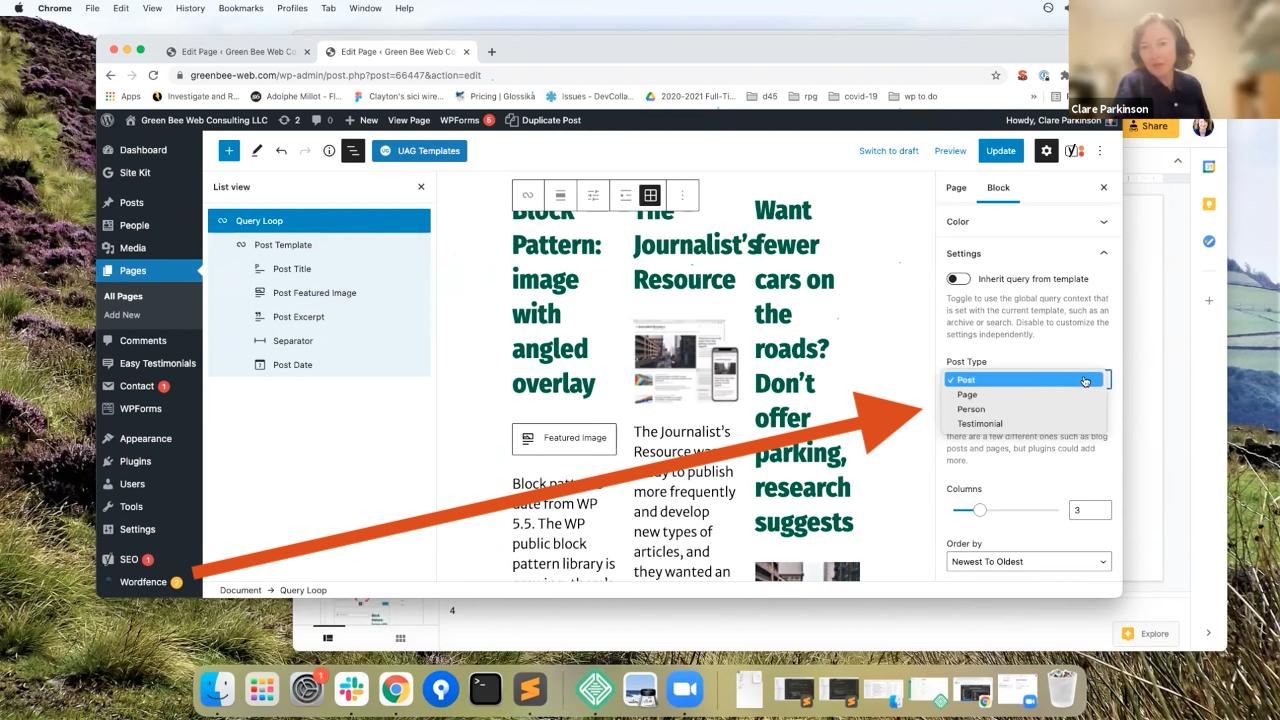

The post-type dropdown in the Query Loop block is populated with data from the REST API endpoint:
and yes - lets take for example:
/wp-json/wp/v2/types
The question is: so how to make sure the public custom post type is in a drop down menu - well therefore i think its necessary that it is registered with show_in_rest as true for it to be included within that data.
again - the background is: How to check the Post Type in the query-loop block:
well i think that i was recommended to go like so!
see some assumptions:
a. well to correctly configure the post type in the WordPress Gutenberg editor using the Query Loop block: we must select the outer container block. The Query Loop consists of several nested blocks, and only the parent block contains the settings for post type, number of posts, categories, and sorting.
b. Here's how to select the outer "Query Loop" block:
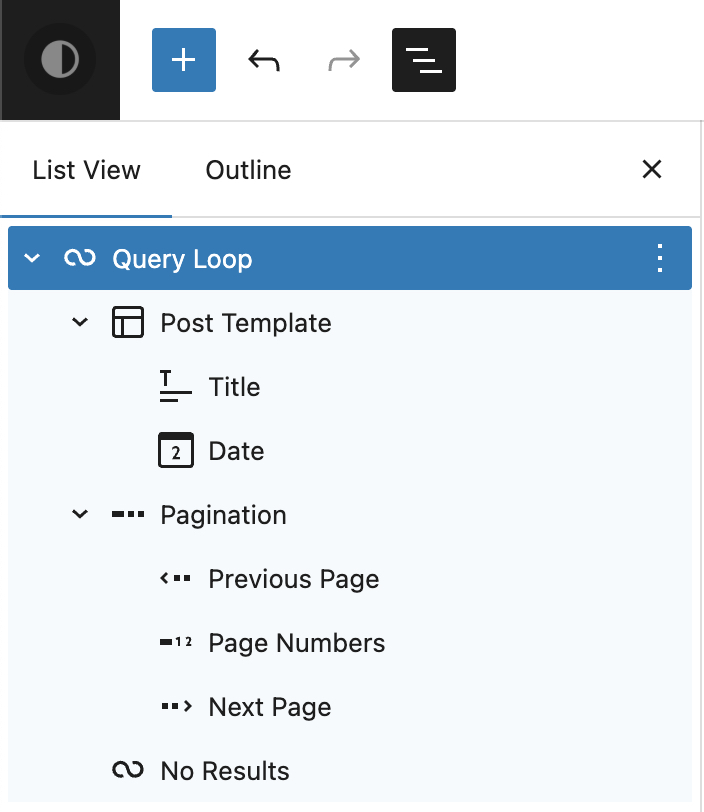
Use List View (Recommended):
here we can do the following - we can click the icon that looks like three horizontal lines in the top left corner of the editor (List View). In the tree structure, find "Query Loop" and click it. This is the most reliable way to select the parent block.
c. Use Breadcrumbs:
Click an element within the loop (e.g., the post title).
In the editor footer, click the block path (Breadcrumbs) and select "Query Loop."
d. Why this is important:
If we have selected the outer block, the "Post Type" option will appear under "Query" in the right-hand settings sidebar. Here we can specify whether to use "Posts," "Pages," or custom content types.
.....well - these are some more theoretical assumptions - Can you confirm them - is it possible to do so!?
Look forward to hear from you
greetings 🤩
update: some additional sources i have found:


 developer.wordpress.org
 wordpress.org
update: some additional sources i have found:
https://wordpress.org/plugins/post-type-switcher/
https://developer.wordpress.org/reference/functions/register_post_type/
https://wordpress.org/documentation/article/query-loop-block/#adding-the-query-loop-block
on a sidenote: Well - i am thinking of the - List View. we definitely need to have that parent block selected to see the options.
That said, if we do that and "Foo-bar" still isn't in the list, it's almost certainly because show_in_rest is missing in our code.
Gutenberg relies on the REST API to populate those dropdowns. If that setting is off (or missing) in our CPT registration, the editor is basically blind to it. Flip that to true, and I bet it appears instantly.
And what about the "inherit" options?!: could the status of the "inherit"-Status be a show stopper - so that the drop down
is not populated with data.. if the inherit is in the Wrong position!??!
whats you idea here?
see some musings on this topic.. See some options to do the fix:
Click the Query Loop block
Not:
the post title
not the paragraph
not an inner block
Click the outer "Query Loop" block
we can recognize it by:
if we see the blue border ..... icon with multiple lines/cards
Open the right sidebar
If it's not visible:
wee need to click in the top right corner
we need to find the "Query" (or "Query Loop") section
There you'll find this crucial option:
Inherit query from template
Default for block themes:
ON
MUST be OFF, otherwise:
no Post Type Selector
no control
FacetWP won't work
Turn this OFF
NOW the Post Type Selector appears
Only then will you see:
Post type → Dropdown
Post
Page
EDIH Hubs
Posts per page
Order / Order by
This is not a bug, but by design:
very very important: As long as "Inherit query" is active, WordPress uses the global page query.
Well what do you think - will help to fix the thing - the issue?!
i look forward to hear from you
greetings.
hello dear friends,
update: thread is solved now🤩🏖️
: finally got there - see on the right side - the drop down with the menu of the Post-Types
thread is sovled - i am happy,. 🎊 🤩
greetings

see the original-posting below
at the moment i am working on a new WordPress-project. 🎊
and currently i am facing one certain issue: How to check if the post-type dropdown in the Query Loop block is populated with data?
outline: for a little test i have to do some quick lookup - i need to know if a "Post-Tpye" is visible in the so called "Post Type" drop-down?
Then we'll know exactly where to start.
see some background: - and probably this may help here - since it has to do with the same topic - at least somehow
Using Query Loop with Custom Post Type
https://wordpress.stackexchange.com/questions/418242/using-query-loop-with-custom-post-type
How to check if the post-type dropdown in the Query Loop block is populated with data?
outline: for a little test i have to do some quick lookup - i need to know if a "Post-Tpye" is visible in the so called "Post Type" drop-down?
some musings and assumptions: (how to achive this)
well i have made up my mind - and i think - that it should be doable like so:
.... therefore i go to the the Query Loop Block
Inherit Query → OFF and then i should check:
Is the "Post Type" dropdown visible?
Are the certain post tpye - in my case "Foo-bar" selectable?
Does there "Test-story" appear?
all i need to know and i need to check is:
can i , I see post type "Foo-bar" in the dropdown
Or
No, the dropdown doesn't appear.
Then we'll know exactly where to start.
see some background: Using Query Loop with Custom Post Type
https://wordpress.stackexchange.com/questions/418242/using-query-loop-with-custom-post-type
The post-type dropdown in the Query Loop block is populated with data from the REST API endpoint:
and yes - lets take for example:
/wp-json/wp/v2/types
The question is: so how to make sure the public custom post type is in a drop down menu - well therefore i think its necessary that it is registered with show_in_rest as true for it to be included within that data.
again - the background is: How to check the Post Type in the query-loop block:
well i think that i was recommended to go like so!
see some assumptions:
a. well to correctly configure the post type in the WordPress Gutenberg editor using the Query Loop block: we must select the outer container block. The Query Loop consists of several nested blocks, and only the parent block contains the settings for post type, number of posts, categories, and sorting.
b. Here's how to select the outer "Query Loop" block:
Use List View (Recommended):
here we can do the following - we can click the icon that looks like three horizontal lines in the top left corner of the editor (List View). In the tree structure, find "Query Loop" and click it. This is the most reliable way to select the parent block.
c. Use Breadcrumbs:
Click an element within the loop (e.g., the post title).
In the editor footer, click the block path (Breadcrumbs) and select "Query Loop."
d. Why this is important:
If we have selected the outer block, the "Post Type" option will appear under "Query" in the right-hand settings sidebar. Here we can specify whether to use "Posts," "Pages," or custom content types.
.....well - these are some more theoretical assumptions - Can you confirm them - is it possible to do so!?
Look forward to hear from you
greetings 🤩
update: some additional sources i have found:
register_post_type() – Function | Developer.WordPress.org
Registers a post type.
Query Loop block
Go back to the list of Blocks The Query Loop block is an advanced block that allows you to display posts based on specified parameters, like a PHP loop without the code. You can think of it as a more complex and powerful Latest Posts Block. With various block patterns integrated into the block...
update: some additional sources i have found:
https://wordpress.org/plugins/post-type-switcher/
https://developer.wordpress.org/reference/functions/register_post_type/
https://wordpress.org/documentation/article/query-loop-block/#adding-the-query-loop-block
on a sidenote: Well - i am thinking of the - List View. we definitely need to have that parent block selected to see the options.
That said, if we do that and "Foo-bar" still isn't in the list, it's almost certainly because show_in_rest is missing in our code.
Gutenberg relies on the REST API to populate those dropdowns. If that setting is off (or missing) in our CPT registration, the editor is basically blind to it. Flip that to true, and I bet it appears instantly.
And what about the "inherit" options?!: could the status of the "inherit"-Status be a show stopper - so that the drop down
is not populated with data.. if the inherit is in the Wrong position!??!
whats you idea here?
see some musings on this topic.. See some options to do the fix:
Click the Query Loop block
Not:
the post title
not the paragraph
not an inner block
Click the outer "Query Loop" block
we can recognize it by:
if we see the blue border ..... icon with multiple lines/cards
Open the right sidebar
If it's not visible:
wee need to click in the top right corner
we need to find the "Query" (or "Query Loop") section
There you'll find this crucial option:
Inherit query from template
Default for block themes:
ON
MUST be OFF, otherwise:
no Post Type Selector
no control
FacetWP won't work
Turn this OFF
NOW the Post Type Selector appears
Only then will you see:
Post type → Dropdown
Post
Page
EDIH Hubs
Posts per page
Order / Order by
This is not a bug, but by design:
very very important: As long as "Inherit query" is active, WordPress uses the global page query.
Well what do you think - will help to fix the thing - the issue?!
i look forward to hear from you
greetings.
Last edited:






 Facebook
 Twitter