• We’re currently investigating an issue related to the forum theme and styling that is impacting page layout and visual formatting. The problem has been identified, and we are actively working on a resolution. There is no impact to user data or functionality, this is strictly a front-end display issue. We’ll post an update once the fix has been deployed. Thanks for your patience while we get this sorted.

Seeking Assistance Windows 7 "Cannot Clear Browsing Data"

synoptic12

Senior member
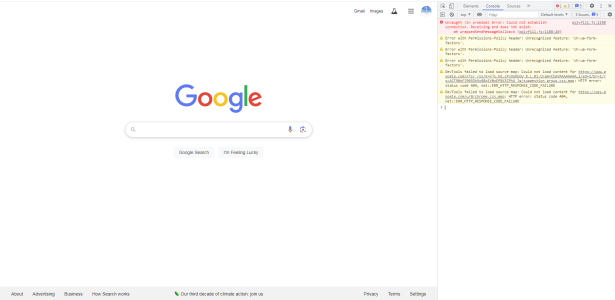
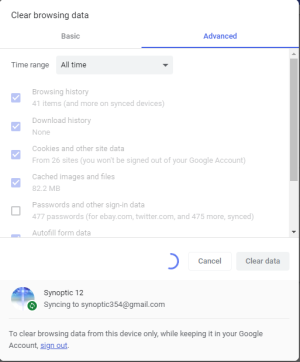
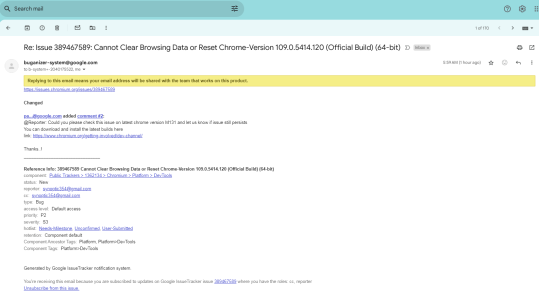
Seeking assistance on Windows 7 Chrome: Version 109.0.5414.120 (Official Build) (64-bit). I cannot 'Clear Browsing Data' as the buffering (circle) is continuous and is 'locked'. I also cannot reset Chrome as only a few options are deleted. I do not wish to re-install Chrome due to the Official Build being out of date. Enclosed are a few pics. All help is very much appreciated.
* Possible Problem Link: https://groups.google.com/a/chromium.org/g/chromium-extensions/c/JPtI0_DZP-I?pli=1

Developer Tools 2.png
 

Attachments

  • Browsing Data 1.png
    Browsing Data 1.png
    39.1 KB · Views: 3
Quote from OP: " I do not wish to re-install Chrome due to the Official Build being out of date".

Outdated Might be it the reason.


However, you can leave it alone and try to install the portable version. It affect less by the rest of the system and can always erase and reinstall.


😎
 
Quote from OP: " I do not wish to re-install Chrome due to the Official Build being out of date".

Outdated Might be it the reason.


However, you can leave it alone and try to install the portable version. It affect less by the rest of the system and can always erase and reinstall.


😎
I would have to concur with you as Chrome being 'outdated'. Irrespective of that, the PC is still fairly fast with no other symptoms. Most likely, I'll let it stand due to having more issues if I try any other alternatives. Thank you very much for the courtesy.
 
You could delete \Users\%username%\AppData\Local\Google\Chrome\User Data\Default\Cache folder while not running Chrome.
I'm fully aware of that. However, that may bring additional issues which I do not wish to bother with. As using an 'outdated' browser is cause in itself as to not meddle too much. Sent some reports to Google who has helped me in the past significantly. At this point, it very well may be history in trying to rectify;again, an 'outdated browser' . Thanks for your assistance.

* The problem is signing back in. I do not wish to go through all those steps whereas a mishap could cause a pain in the neck.
 
I've never seen it cause any problems, but....such is the beauty of the recycle bin. If you have any problems, just restore it.
 
take a backup of your chrome profile before playing with it. export passwords/bookmarks if they're of interest.

I would take a look at Windows Event Viewer (especially around the time of this problem) and check for any ntfs/disk warnings/errors.

I just downloaded Chrome on my Win7 VM and it installed (what I assume is) the final Win7 version just fine (v109.0.5414.120).

One curious thing though - when I went to remove Chrome, the "confirm uninstall" window wouldn't appear (it showed up as an available window on the taskbar though), but I gave the window the focus and pressed the Enter/Return key and it uninstalled fine. It probably didn't clear my browsing data though, at a guess I should have pressed space then enter to clear browsing data. Alternatively just nuke AppData\Google after uninstall.
 
take a backup of your chrome profile before playing with it. export passwords/bookmarks if they're of interest.

I would take a look at Windows Event Viewer (especially around the time of this problem) and check for any ntfs/disk warnings/errors.

I just downloaded Chrome on my Win7 VM and it installed (what I assume is) the final Win7 version just fine (v109.0.5414.120).

One curious thing though - when I went to remove Chrome, the "confirm uninstall" window wouldn't appear (it showed up as an available window on the taskbar though), but I gave the window the focus and pressed the Enter/Return key and it uninstalled fine. It probably didn't clear my browsing data though, at a guess I should have pressed space then enter to clear browsing data. Alternatively just nuke AppData\Google after uninstall.
Thanks very much. I cannot afford to have any issues or not to have a browser. My friend is an IT security person but I hate to botrher him over this problem.
 
I uninstalled and re-installed Chrome. The problem is fixed but I cannot re-install mail checker or ad block any longer with the last version for Windows 7 > 109.0.5414.120. The wording states "Not compatible with my browser". * Any work around? I really hate ads. I really liked mail checker. Now I cannot install.

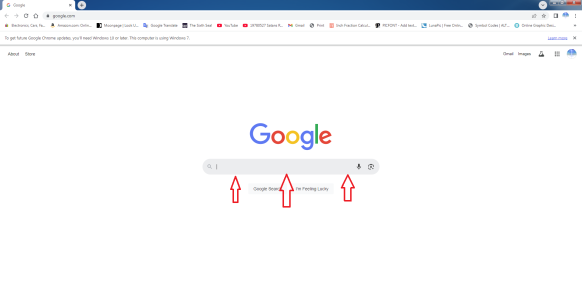
** The Google search box is grayed yet when I open a “New Page” the search box reverts to white. Any ideas of what is causing the ‘Grayed’ search box? However, when I click inside the gray search box (Home Page) it turns white. Any input here?
Google home page.png
 
Back
Top