
• We’re currently investigating an issue related to the forum theme and styling that is impacting page layout and visual formatting. The problem has been identified, and we are actively working on a resolution. There is no impact to user data or functionality, this is strictly a front-end display issue. We’ll post an update once the fix has been deployed. Thanks for your patience while we get this sorted.

Question Samsung EVO Select UHS-1 Performance

BarkingGhostar

Diamond Member
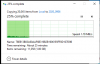
Surface Pro gen 7 with Windows 10. The Samsung EVO Select UHS-1 Performance claims to have a write speed of 90 MB/s but I'm getting like 1MB/s write speed.
1599399162972.png

Is the write performance based on large files sizes only?
 
Thing was formatted exFAT so I cancelled the file move and reformatted NTSF. The first 40% was nice but then it dropped back down to sub-2MB/s. The drive Windows 10 installed was from 2006, which is two years before USB3.0 was released, which seems like a joke if the USB hardware is truly USB2 in origin.
 
The advertised write speed is only sequential write speed, for smaller write sizes you have to take things like access times into account, which on flash media are often extremely high for write operations.
 
So, would it have been quicker had I broke out 7zip and created a single file to move instead? It just seems like my 7-8 year old PC was much, much faster and the only way I see a difference is the USB2 vs 3. I just got a generic USB Type-C port replicator and I'll try it on it.
 
Back
Top