Follow along with the video below to see how to install our site as a web app on your home screen.
Note: This feature may not be available in some browsers.
We’re currently investigating an issue related to the forum theme and styling that is impacting page layout and visual formatting. The problem has been identified, and we are actively working on a resolution. There is no impact to user data or functionality, this is strictly a front-end display issue. We’ll post an update once the fix has been deployed. Thanks for your patience while we get this sorted.
I am trying to create a cable for my home networking with RJ45 connectors and Cat5e cable
Noticed this wiring diagram and it shows only 4 wires are used for data transmission (other 4 wires are unused)
Can someone confirm if this is correct and does this affect the data transmission speed?
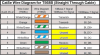
When making the Gigabit cable, out of these pins, which pins control the data speed
When it's connected with pins 1,2,3 and 6, my internet still working with almost 40% speed
Which pins are critical in 568B format?
1000BASE-T uses all four pairs bi-directionally using hybrid circuits and cancellers. Data is encoded using 4D-PAM5; four dimensions using PAM (pulse amplitude modulation) with five voltages, −2 V, −1 V, 0 V, +1 V, and +2 V. While +2 V to −2 V may appear at the pins of the line driver, the voltage on the cable is nominally +1 V, +0.5 V, 0 V, −0.5 V and −1 V.
You should look at the LED light on switch/router/NIC port to tell whether it's operated at gigabits speed. You also did not mention how did you test the speed. And wired or wifi?
This site uses cookies to help personalise content, tailor your experience and to keep you logged in if you register.
By continuing to use this site, you are consenting to our use of cookies.