Ridiculous temperatures.

Smelly_

Junior Member
Nov 29, 2011
13
0
0
http://gyazo.com/b4e0c17e3af60dfc81b1e48c8a0afdfa.png

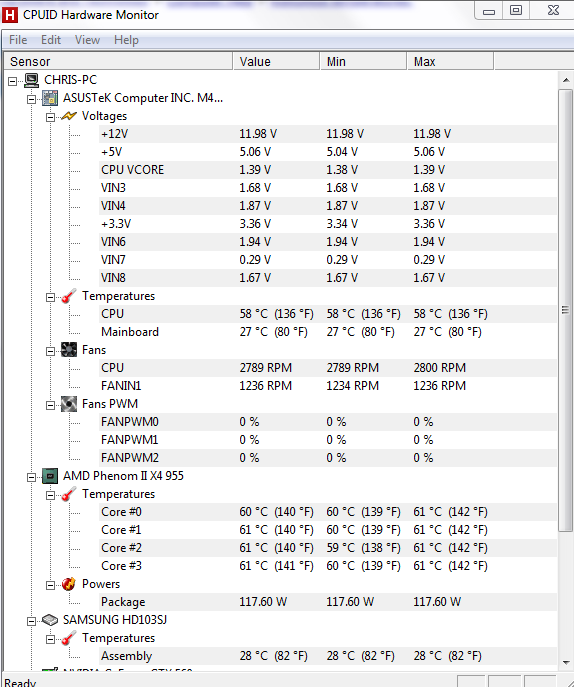
CPU is an AMD Phenom 955 X4, temperature is it idling after idling for a couple of hours. Its max temperature is, according to AMD, "62C" however I hit 77C last night. The GPU is a GTX 560 which maxes out under load at 56C, the Motherboard doesn't go above 38C from what I've seen & the chassis is a cheap GZ-X6.
I'm planning to dust it, but I'm not sure which "brand" of compressed air would be best. Whilst I'm competant with computers, I'm not confident enough to change CPU fans or reapply paste so I'd obviously prefer to use that option(s) as a last resort.

What steps should I take, Anandtech?
 

Motorheader

Diamond Member
Sep 3, 2000
3,682
0
0
Do you have cool'n'quiet installed? Are you overclocking the processor?

The idle temp isn't too far out of range but I can see your concern and would try to get it lower if it were mine.

What cpu cooler/fan combination are you using? Do you smoke near the rig which would lead to more dirt/dust getting stuck to the fans and heatsink and have a negative impact on their ability to cool the processor.

Sometimes bios updates to the board can have a positive impact to settings like default voltages and fan speed.
 
Last edited:

BoomerD

No Lifer
Feb 26, 2006
66,720
15,117
146
First guess...CPU cooler not installed correctly. (presuming no wild overclocks)
Second guess...lots of accumulated dust.
 

Smelly_

Junior Member
Nov 29, 2011
13
0
0
Do you have cool'n'quiet installed? Are you overclocking the processor?

The idle temp isn't too far out of range but I can see your concern and would try to get it lower if it were mine.

What cpu cooler/fan combination are you using? Do you smoke near the rig which would lead to more dirt/dust getting stuck to the fans and heatsink and have a negative impact on their ability to cool the processor.

Sometimes bios updates to the board can have a positive impact to settings like default voltages and fan speed.

I've checked the Bios & Cool'n'quiet is enabled, I am not overclocking the processor. When it's idling it's alright, but it shoots up once you start using it for games or most other intensive things. I don't smoke & nor does anybody in the house. I do have a cat, however, & that's obviously one of the factors.

Here's a picture of the voltages & some other information:
6370c0ba9c7577fb38d06c6ea3ca5ad2.png


First guess...CPU cooler not installed correctly. (presuming no wild overclocks)
Second guess...lots of accumulated dust.

The second one is most certainly something I believe is contributing to it, which is why I'm actively looking for a decent spray duster (if you know of a good one you use, link it ;)! ) Here's an image of the PC pre-560 upgrade
5d1d2554308bf8d3f3f5549f246bbf4b.png
 

BoomerD

No Lifer
Feb 26, 2006
66,720
15,117
146
I use a vacuum cleaner with the hose attached to the exhaust side to blow out my computer case. It works VERY well...just be careful when doing it. Vacuum cleaners CAN cause static charges...and those can be fatal for your components.

Otherwise, just buy some cans of compressed air at Office Depot or where ever you choose. There's not much difference in them...it's air in a can. :p
 

Motorheader

Diamond Member
Sep 3, 2000
3,682
0
0
Even though the picture is a bit blurry you can see accumulation of dust on the cooler. Cleaning should definitely help it cool the processor better. If that is an AMD OEM cooler it likely has screws on the corner or clips that hold the fan to the heatsink - you may want to take that off and clean the underside of the fan with a q-tip and allow the compressed air to do a better job of removing debris.

You do have a rear exhaust fan so it's not likely you are having latent heat issues.

I have cats and wall-to-wall carpet so I do regular cleaning - at least once a month. I do just what boomer noted - put the hose on the exhaust port of my Oreck portable vac and modified the crevice attachment to force the air to come out more concentrated. I do this either outside or in my garage and it works great.
 

BoomerD

No Lifer
Feb 26, 2006
66,720
15,117
146
Even though the picture is a bit blurry you can see accumulation of dust on the cooler. Cleaning should definitely help it cool the processor better. If that is an AMD OEM cooler it likely has screws on the corner or clips that hold the fan to the heatsink - you may want to take that off and clean the underside of the fan with a q-tip and allow the compressed air to do a better job of removing debris.

You do have a rear exhaust fan so it's not likely you are having latent heat issues.

I have cats and wall-to-wall carpet so I do regular cleaning - at least once a month. I do just what boomer noted - put the hose on the exhaust port of my Oreck portable vac and modified the crevice attachment to force the air to come out more concentrated. I do this either outside or in my garage and it works great.

heh-heh...yes, definitely do this outside. From the looks of that pic, the dust storm will rival anything in the middle east!
 

Smelly_

Junior Member
Nov 29, 2011
13
0
0
heh-heh...yes, definitely do this outside. From the looks of that pic, the dust storm will rival anything in the middle east!

I lol'd :awe: . Any tips on how to hold the can/what technique to use to reduce the risk of liquid coming out?
 

Motorheader

Diamond Member
Sep 3, 2000
3,682
0
0
There shouldn't be liquid if it unless it is just compressed air - sometimes nitrogen is added to prevent liquid.
 

corkyg

Elite Member | Peripherals
Super Moderator
Mar 4, 2000
27,370
240
106
Most air cans have a caveat that says to keep it verical when spraying - don't tilt it. I prefer a vacuum with special non-conductive tools attached that prevent static discharge. I use this kit I got from my friendly local Oreck shop.
vactools.jpg
 

mfenn

Elite Member
Jan 17, 2010
22,400
5
71
www.mfenn.com
I lol'd :awe: . Any tips on how to hold the can/what technique to use to reduce the risk of liquid coming out?

The propellant is under pressure inside and that's what can come out in liquid form. It is a complete non issue if you drip some on the computer, it evaporates almost instantly.

Also, are those temps idle or load? They are a bit high for idle, but perfectly fine for load (certainly not "ridiculous").
 

bryanl

Golden Member
Oct 15, 2006
1,157
8
81
Most air cans have a caveat that says to keep it vertical when spraying - don't tilt it.
Unless you're trying to remove dents from a car fender, in which case you want to hold the can upside down and spray mostly propellant to make the metal very cold. :)
 

Smelly_

Junior Member
Nov 29, 2011
13
0
0
The propellant is under pressure inside and that's what can come out in liquid form. It is a complete non issue if you drip some on the computer, it evaporates almost instantly.

Also, are those temps idle or load? They are a bit high for idle, but perfectly fine for load (certainly not "ridiculous").

That's idle. Under load it'll shoot up into the 70s & I'd be willing to bet it would hit 80+ under Prime95.
 

Ketchup

Elite Member
Sep 1, 2002
14,559
248
106
Has the system always had such high tempts, or did this just start recently? If so, what were the temps like before this started?
 

Smelly_

Junior Member
Nov 29, 2011
13
0
0
Has the system always had such high tempts, or did this just start recently? If so, what were the temps like before this started?

I'd say its always had higher than average temps in terms of the CPU, I'd personally put this down to the stock cooler, possibly lowish quality paste used, not exactly an ideal case & the amount of general dust the system collects. Admittedly I didn't check the temps after a "hardcore" games session for a good few months; I only checked it 2 nights ago because of the GTX560 I've installed.

In case anybody is interested, I just fired up BF3 to test how long it took to hit 70C & it took about 20 minutes of the first 20 minutes of the campaign.
 

monkeydelmagico

Diamond Member
Nov 16, 2011
3,961
145
106
If the cleanup doesn't drop your temps >60 under load you are going to have to try to reseat the stock cooler or try an upgraded CPU cooler. If you can remove the side and install a video card you can do this too. Since you are putting some $$ into this with a new GTX560 it might be a wise choice. Here's a great tutorial with a dedicated section just for applying thermal grease. http://www.tomshardware.com/reviews/cooling-air-pressure-heatsink,3058.html
 

Smelly_

Junior Member
Nov 29, 2011
13
0
0
Just dusted it out using http://www.amazon.co.uk/dp/B000J6CSB...SIN=B000J6CSBY (was quite fun actually). Will post back temps once it's properly heated up.

Update: Right now it's hovering at about 31-35C, a large difference. I'll post back temps after playing a bit of BF3.

Update#2: Played a few minutes of BF3, nothing too heavy but enough to put a bit of load on it & it's only risen a little bit. Massive difference (about 20C under what it was right now) & there was only a little bit of dust around the CPU fan/heatsink. Cheers to all the helped.
 
Last edited:

Motorheader

Diamond Member
Sep 3, 2000
3,682
0
0
Great to hear. Decent air flow around the processor definitely helps and that is quite a drop.