
• We’re currently investigating an issue related to the forum theme and styling that is impacting page layout and visual formatting. The problem has been identified, and we are actively working on a resolution. There is no impact to user data or functionality, this is strictly a front-end display issue. We’ll post an update once the fix has been deployed. Thanks for your patience while we get this sorted.

Question Renewed HDD from Amazon, send it back?

nOOky

Diamond Member
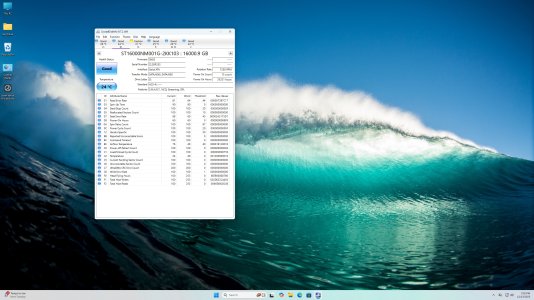
I purchased a renewed Seagate Exos 16TB drive. It is out of the 5 year warranty as of last November. I hooked it up and ran Crystal disk on it and it showed up as below. Even though the drive health is good, I am not okay with paying over half price of new for a 5 year old drive. Thoughts? New HDD are so scarce and expensive now, I want a reliable drive for NAS duty. My question on the drive software is which value for power on hours is correct? If it's over 35,000 hours that over 4 years which seems reasonable given it's intended use.
 

Attachments

  • Seagate Exos 16TB (1).jpg
    Seagate Exos 16TB (1).jpg
    891 KB · Views: 16
A little confused by the question.

You knowingly bought a discounted used drive off Amazon and you're now unhappy that it appears to be used and you want to send it back?

Is the issue that you thought it would be less used than it is?

The MTBF for a Seagate Exos drive is supposed to be 2.5 million hours, so given this drive didn't crap out in 35,000 hours, I figure it'll keep trucking for a long time before it finally gives out.
 
I agree with @GodisanAtheist but also I'd add that sometimes drive stats like power on hours are massively inaccurate. For example, I once installed a SSD and WD Black 1TB in my system simultaneously, and the latter's power-on hours were about 1.5x the SSD's when logically they should have been fewer if anything due to OS HDD auto power down settings.
 
Looks like it was on most of the time - very few power on times. I don't really see how you can complain if you knew it was used when you bought it, but once again, to each their own.
 
Last edited:
I'm not complaining it was used I knew that, not sure where I said it wasn't? I'm disappointed that it is over 5 years old and has been running for over 4 years. Most of the reviews show quite a bit less use on these renewed drives, so it seems like a crap shoot and I ended up with a more used one. However my original question was about interpreting the results of the scan, I'm having trouble finding out what the values actually represent. I have not had time to sit down and research it, but will later. My post was initiated to see what folks thoughts were on using a renewed drive, I may just end up sending it back and getting new.
 
I'm not complaining it was used I knew that, not sure where I said it wasn't? I'm disappointed that it is over 5 years old and has been running for over 4 years. Most of the reviews show quite a bit less use on these renewed drives, so it seems like a crap shoot and I ended up with a more used one. However my original question was about interpreting the results of the scan, I'm having trouble finding out what the values actually represent. I have not had time to sit down and research it, but will later. My post was initiated to see what folks thoughts were on using a renewed drive, I may just end up sending it back and getting new.
Well, all the parameters dealing with sector health appear to be okay, but if I had anything that I wanted to preserve for posterity, it would be on a new drive.
 
I'll link to my thoughts in an older thread. Basically, HD resellers are abusing the term "refurbished" but that's OK if you understand and accept the premise.
(It made tons of sense when we bought 12TB server pulls for $80.)


MTBF is a completely useless metric. If you do the math, that's over 285 years lol.

One question for OP is who was the seller? If it's one of the reputable used HD vendors, you get a "warranty" from them. The two popular outfits have been goHardDrive and Server Part Deals. (Some of us here have bought from the former.) I realize reliability is the main concern, but I hate losing money when a PC part fails prematurely.

I'm okay with 35k power on hours if I have confidence in that model line. I don't personally touch Seagate, but Exos should be fine.

What's sad is spinning rust was pretty cheap about 18 months ago. (I know I know, RAMpocalypse is end of world-level stuff. 😛 )
 
Really for something like a NAS, you probably want multiple drives for redundancy, depending on the NAS setup and software. But at least two drives mirrored for a basic setup.
 
Thanks for the replies folks. Amazon gives 90 days return so I am installing it in the NAS along with a backup WD Black drive that I have sitting around and I'll see how it goes. It will be backed up by the WD drive and now I'm curious to see how long it lasts. It is a bit noisy, but so is the WD drive, I am putting the NAS away from my desk anyway. I should have installed an NAS a year ago and not waited until spinning disks became so scarce and expensive, but it wasn't on my mind back then. I'll keep it running and if something changes by March I may change my mind lol.
 
I'm not complaining it was used I knew that, not sure where I said it wasn't? I'm disappointed that it is over 5 years old and has been running for over 4 years. Most of the reviews show quite a bit less use on these renewed drives, so it seems like a crap shoot and I ended up with a more used one. However my original question was about interpreting the results of the scan, I'm having trouble finding out what the values actually represent. I have not had time to sit down and research it, but will later. My post was initiated to see what folks thoughts were on using a renewed drive, I may just end up sending it back and getting new.
I kinda missed this post, so I'll try to answer. Looking at S.M.A.R.T. values is very difficult, so it's best just to rely on a tool like CrystalDiskInfo to guide us, as you have. I might be able to learn Greek before I make sense of those counters, so don't worry about it.

In practice, the #1 way to interpret S.M.A.R.T. tests is the error log. In my experience, the existence of errors can be predictive of future disk failure.

TBH I doubt you got an outlier "more used" drive. Most likely, the power on hours was reset for some drives, giving buyers a false impression.

Who was the merchant and besides the long return window, is there any warranty?

Finally, it sounds like you're using mirroring (RAID-1)? I don't do it properly, but consider the 3-2-1 backup rule if your data is highly valuable.
 
90 day return/6 month Amazon warranty fulfilled by Worldwide Product Importer whoever that is... I am using the Exos in RAID 1 along with a WD Black drive for now. Last year I upgraded all of the storage on 3 desktop PC's I have and this fall I bought a new laptop and replaced the OS drive with the largest I could at 2TB and also installed a 4TB storage drive in it for backup. Only lately have I worried about backing up all of the PC's onto a NAS with a UPS. In the event of fire I'm screwed but I suppose I could grab the NAS if there's time. I also have most of my cell phone photos backed up to Google photos also and I pay for extra storage.
 
Back
Top