• We’re currently investigating an issue related to the forum theme and styling that is impacting page layout and visual formatting. The problem has been identified, and we are actively working on a resolution. There is no impact to user data or functionality, this is strictly a front-end display issue. We’ll post an update once the fix has been deployed. Thanks for your patience while we get this sorted.

Remotely admin PC

ncage

Golden Member
Guys i'm getting my parents a PC for Christimas (Windows 7 x64) and i want to be able to remotely administer / troubleshoot from over the internet because i live two hours from them. I could of course open the port on their firewall for Remote Desktop but i don't know if i'm crazy about that. I don't mind buying something if the cost is minimal. I checked into GoToAssist from citrix...way way way way too expensive. Is PCAnywhere or anything like that much better than remote desktop? I believe remote desktop with windows 7 now uses certificates.Any help would be appreciated.

thanks,
Ncage
 
Another vote for LOGMEIN. It works, and for your purpose, it is freeware.
 
thanks guys for the help. To bad they don't give the pro version for non-commercial use for free but i understand they have to make money. Of course you will miss some of the extras that come with RDP like being able to trasfer files/ect (have to get the paid pro account for that) but i think its what i'll defintely go with it because i don't have to open a port in their firewall. If they need a file i'll just download it from their connection when i log in. It looks just like GOToMyPC but its cheaper which is awesome. If i remember correctly last time symantec had to remote in my machine because my NIS liscence was screwed up this is what they used so i'm sure its an awesome product.

thanks again,
Ncage
 
There basically three options,

1. Get a Windows 7 version that supports Remote Desktop.
http://www.microsoft.com/windows/windows-vista/features/remote-desktop-connection.aspx

http://www.neowin.net/news/main/09/03/16/windows-7-rdp-changes-improve-virtual-desktop-performance.

2. Use a service like Logmein.

Logmein offers free service but it is quite limited. Log to the site and find out what level of service you need and how much it would cost you.

https://secure.logmein.com/US/comparisonchart/comparison_chart_results.aspx?compare=pf

3. Use UltraVNC.

UltraVNC is the most flexible solution and it is free. However if you are not familiar with it it might take 30 min to an hour to learn and set it.

http://www.ezlan.net/vnc.html

http://www.ezlan.net/myip.html
.
 
crossloop is also good, but it takes a little work on their end (they have to tell you a code to login)

I use logmein for all of the computers that I help support for the non tech-savvy folks, i use crossloop for the tech-savvy
 
If you're worried about opening the default RDP port, you could use port redirection on the router, or even change the port that RDP uses on their machine.
 
Did they take out the request assistance feature in win7? I used that once with my mom, we both opened up Messenger and she requested assistance, once that was done I had full control of her pc. It's been a long time sense I've used windows however.

I do that to support my friends macs over ichat. They just give me their desktop over ichat, it works great.

I'd be leery to use VNC unless the server you install encrypts the connection. Here at work we always tunnel VNC over ssh.
 
I use TeamViewer, the freebie version. Works pretty well for me.

Team viewer software aspect is actually a subset of UltrVNC.

I'd be leery to use VNC unless the server you install encrypts the connection. Here at work we always tunnel VNC over ssh.

UltraVNC has installed in Encryption module that uses 128bit AES. So there nothing in the consumer arena that can be claimed as better.

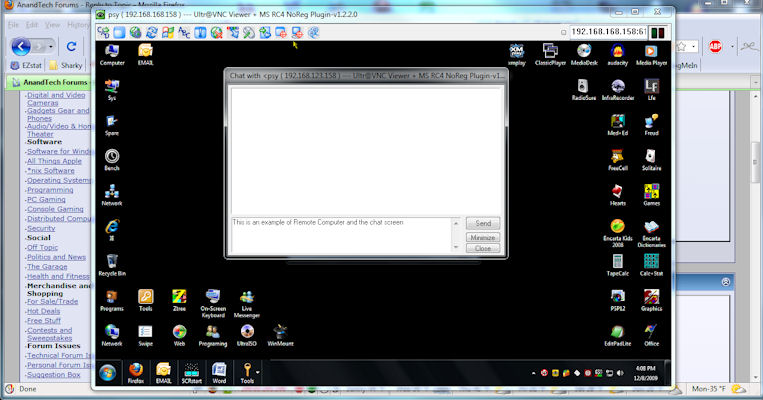
Beside the remote control it has build in File transfer, and Chat.

Because it basically duplicate the whole computer much more is available on the Remote Computer than any other solutions.

However it since one port has to be opened through the Router/Software Firewall, and a dynamic IP has to be configured, it might be a problem if there is Nobody on the other side that can do it at the first setup.
Otherwise by far it is the Best solution.

File transfer looks like this.

vnc_file.jpg


This pic shows a computer (currently on AT Forums) controlling an other computer with the Chat window open.

vnc-chat.jpg
 
Last edited:
I've got (free) accounts with both logmein and teamviewer. I definitely prefer teamviewer. Try them both, see what works for you. You really can't go wrong with either one (if it works for you).
 
I've got (free) accounts with both logmein and teamviewer. I definitely prefer teamviewer. Try them both, see what works for you. You really can't go wrong with either one (if it works for you).

The big difference between these two free products, is that Teamviewer requires a person to manually authorize each remote admin session.

Logmein allows you to remotely admin a completely unattended computer.
 
The big difference between these two free products, is that Teamviewer requires a person to manually authorize each remote admin session.

Logmein allows you to remotely admin a completely unattended computer.

That isn't true. Team Viewer gives you the option to allow remote connectivity to an unattended machine.
 
The big difference between these two free products, is that Teamviewer requires a person to manually authorize each remote admin session.

Logmein allows you to remotely admin a completely unattended computer.

Both Teamviewer and logmein allow unattended remote control. I think that teamviewer may install itself with that option set to require authorization, but you can check a box to change that.

Teamviewer also has a more useful help-the-helpless setup. Say your granny calls and says "the thing is doing that thing again!" Instead of bashing your head against the wall trying to decipher her ramblings, you just tell granny to go to teamviewer.com, click the "start full version" button, then read you the (teamviewer client) number. You can then connect to her without any setup and solve her computer issues, which almost always seem to involve a game of Solitaire.
 
Have you found a restriction in Logmein Free's licensing? As far as I can tell, Logmein Free is not restricted to non-business use. When you register it, it asks if you will be using it for business or home use.

I was just going by the website, I haven't tried using it in a business setting. The free version is only listed under "Products for Personal Use", and the description for the free version states that it provides "Basic access to a remote PC or Mac for individuals".

I suppose one could go ahead and use it in a business setting if there is not a technical or licensing limitation, and the user doesn't need any of the advanced "Pro" features.
 
When you download and install Logmein it installs the Pro version. However, after a while the Pro aspect is disabled (unless you pay) and you are left with the Free.

LogMeIn, https://secure.logmein.com/US/comparisonchart/comparison_chart_results.aspx?compare=pf

Free

* Remote access and control of your PC or Mac
* Wake-on-LAN

Pro
# File sharing
# Remote-to-local Printing
# Drag-&-drop file transfer
# Desktop sharing
# Diagnostic toolkit

In contrast Teamviewer Free, http://www.teamviewer.com/licensing/index.aspx

Remote support of unattended PCs and servers free of additional charges for the host installations <javascript:void(0);>, incl. the ability of remote reboot and reconnect.

Troublefree use behind firewalls and routers

File transfer, chat and real VPN channel <javascript:void(0);>

VoIP (Audio) and Video

Multi-Platform Support <javascript:void(0);>
Windows / Apple Mac OS X (*)

And as I said above UltraVNC (as a bonus for the extra effort of installation 😉 ), provides more that both the above.

There is one more point to UlraVNC.

VNC goes from your computer to the remote computer via the ISPs.
You are Not going through any additional private servers.
.
 
I use logmein free, then if I need to do a file transfer ill just connect to my computers FTP, or login to something like AIM.

You could also use another free logmein program, hamachi, to VPN together and just do it over sharing.
 
another vote for the request assitance option. its built in, doesn't require leaving a port open, and afaik is still there in windows 7
 
Back
Top