• We’re currently investigating an issue related to the forum theme and styling that is impacting page layout and visual formatting. The problem has been identified, and we are actively working on a resolution. There is no impact to user data or functionality, this is strictly a front-end display issue. We’ll post an update once the fix has been deployed. Thanks for your patience while we get this sorted.

Question Reallocation event count warning

Hello,

Could you please help me? Is this a major problem? How can I fix it? Will the HDD fail soon?

Thanks
 

Attachments

  • photo_2021-05-12_00-55-26.jpg
    photo_2021-05-12_00-55-26.jpg
    120.8 KB · Views: 17
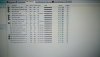
What is the drive? It looks like it only has one reallocated event count, which probably means a single sector was reallocated? That said, I would back up anything important, as it could get worse going forward. If under warranty, you could also RMA it.
 
A drive has actually more physical sectors than what is shown to the user. A reserve.
When write to physical sector fails, a new sector from reserve is taken into use.
The drive has a LBA to sector mapping. We see LBA. After reallocation consecutive LBAs
are no longer physically consecutive, which affects HDD disk access (of those LBAs).

(SSD's do reallocations for wear leveling too, but seek of physical sector in SSD is cheap
compared to HDD.)


Note that Reallocated Sectors Count and Current Pending Sectors are both 0.
There has thus been one attempt to reallocate, but no success nor immediate need to try again(?)

If writes to some sectors start to fail (and cause reallocations), then that physical location probably has an issue. That could escalate.
 
The drive is healthy.
There is a G-Sense event and a CRC error. Which likely means the pc got bumped or something while running.
This don't take much to trigger, my drive has several G-Sense events.
The "Data" column is the actual number (in hex). So "Reallocated Sectors Count" is actually 0.
 
Back up your important data. Then do a surface scan with HDDScan. If the count increases or your drive slows down randomly or gets stuck during scan, replace the drive.
 
Back
Top