
• We’re currently investigating an issue related to the forum theme and styling that is impacting page layout and visual formatting. The problem has been identified, and we are actively working on a resolution. There is no impact to user data or functionality, this is strictly a front-end display issue. We’ll post an update once the fix has been deployed. Thanks for your patience while we get this sorted.

Question Question for the Excel Gurus

Texun

Platinum Member
I have a simple column spreadsheet (sample below) where employees add daily data and I need the spreadsheet to automatically show the monthly totals at the EOTM. Manually it's a simple =sum, but I prefer them to remain hidden and auto fill after the month has ended.

I thought this would be simple and maybe I'm overthinking something, but I've tried variations of =sum, =if, now, and a couple others but have not made much progress.
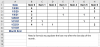

1609530301698.png

Any help would be appreciated.
Thanks and Happy New Year!
 
You could try something like this in cell B9
=if(today()>$A$9,SUM(B2:B8),"Month not finished")

Not elegant, you have to define the last day of the month for each month.
 
You could try something like this in cell B9
=if(today()>$A$9,SUM(B2:B8),"Month not finished")

Not elegant, you have to define the last day of the month for each month.

Thank you. I'll take a swing at it tomorrow at work. I just need it to work and elegance isn't that important. I'd try an abacus if I thought it would work.

Really do appreciate the tip.
 
Back
Top