Evening all,
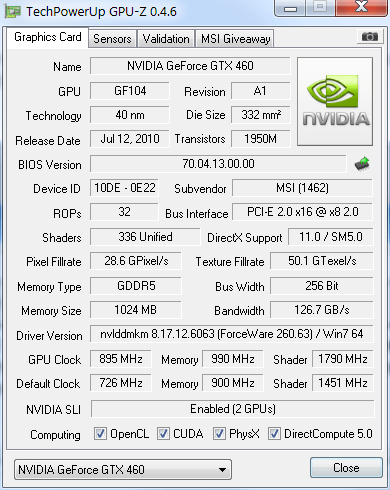
So I recently grabbed an MSI- NVIDIA GeForce GTX 460 768MByte graphics card, and after installing it and downloading all the most recent drivers, I noticed CPU-Z is only reporting the Memory on the card as 256 MBytes.
After making sure all my drivers, BIOS, and Windows 7 Professional 64bit were updated, I ran dxDiag and my windows device manager to see if they could tell me if I am missing my 512 MBytes on my graphics card somehow, but those two utilities did not report on the memory size of my card. So, my question is, is there a configuration option in windows that I may be missing, a better utility to see if CPU-Z is not giving me correct information, or any general information that may give me better insight to this? I do run a secondary graphics card to drive 2 of my 3 monitors, with my GTX powering my main monitor. It does seem that my graphics card is under-performing to what other similar systems running a lower end graphics card are doing on the same game.
System:
Windows 7 Professional 64 bit
Intel Q6600
Asus P5N-D
2x4 GB DDR2 800 RAM
650W PSU
MSI 460 GTX 768mB driving 1680x1050 widescreen monitor (main monitor)
ATI Radeon HD 2400 Pro driving 2 side monitors
So I recently grabbed an MSI- NVIDIA GeForce GTX 460 768MByte graphics card, and after installing it and downloading all the most recent drivers, I noticed CPU-Z is only reporting the Memory on the card as 256 MBytes.
After making sure all my drivers, BIOS, and Windows 7 Professional 64bit were updated, I ran dxDiag and my windows device manager to see if they could tell me if I am missing my 512 MBytes on my graphics card somehow, but those two utilities did not report on the memory size of my card. So, my question is, is there a configuration option in windows that I may be missing, a better utility to see if CPU-Z is not giving me correct information, or any general information that may give me better insight to this? I do run a secondary graphics card to drive 2 of my 3 monitors, with my GTX powering my main monitor. It does seem that my graphics card is under-performing to what other similar systems running a lower end graphics card are doing on the same game.
System:
Windows 7 Professional 64 bit
Intel Q6600
Asus P5N-D
2x4 GB DDR2 800 RAM
650W PSU
MSI 460 GTX 768mB driving 1680x1050 widescreen monitor (main monitor)
ATI Radeon HD 2400 Pro driving 2 side monitors