• We’re currently investigating an issue related to the forum theme and styling that is impacting page layout and visual formatting. The problem has been identified, and we are actively working on a resolution. There is no impact to user data or functionality, this is strictly a front-end display issue. We’ll post an update once the fix has been deployed. Thanks for your patience while we get this sorted.

Question Power switch for open frame test bench

Kledgie

Member
Hey guys. Never done this before. How do I go about powering on the rig on something like this?

I would need to buy a power switch? Any help/advice would be great.
 
Look at the front panel header diagram for your motherboard and find the pins for the front panel power switch. Grab a screen driver, or something made of metal, and press it against those pins to bridge them. That's, essentially, all a power switch does.

 
Last edited:
Rather than a "screen driver", I'd try a screwdriver 😉 but really, I'd grab the switch/wire/connector out of an old computer case or next time I was passing by some mom 'n pop computer shop, check their dumpster for thrown away systems or ask them to pull and save one for me for $2... or they're on ebay via slow boat from China if you're not in a hurry.


... or more expensive but fast delivery from amazon.


... or then there's me, wanting to do it fancy, I'd take a piece of acrylic, bend in a U-shape, cement it to the product tray, put a hole in it for a panel mount switch (solder wire+connector on), something fancy smantzy like this:


G25650B.jpg
 
Last edited:
Somebody does sell a power switch directly mounted onto a pin header connector (or you could DIY make that) but I can't recall where I saw it, has been a few years.

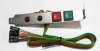
Something else I saw that would be my 2nd choice is this, buy ready to go or DIY make something similar using a slot bracket. There's probably a cheaper seller out there somewhere.


ATXbracket-2.jpg
 
Look at the front panel header diagram for your motherboard and find the pins for the front panel power switch. Grab a screen driver, or something made of metal, and press it against those pins to bridge them. That's, essentially, all a power switch does.

Oh man, he's just got the mobo laying on the box too. Maybe I should just do that haha.
 
lamptron monetary swtich.


Make sure you get the dimeter correct for the hole.
It comes in 12 - 16 - 22

I also recommend the wiring harness for them as well, unless u pretty savey with electrical.
 
What motherboard do you intend to use? More and more motherboards are coming with onboard power and reset switches for this kind of thing (test bench/outside of case testing and benchmarking).
 
^ True but I wouldn't want to run a system in that long term so it seems like, as just a testbed, it would be best for it to be able to handle any random mobo thrown onto it whether it has a power/reset switches already or needs that added.
 
As mentioned above, just get a power switch, with it's 2 attached wires, from an old or discarded case, and plug them into the power switch connectors, on the board. Just press the button on the switch to power up.
 
Oh man, he's just got the mobo laying on the box too. Maybe I should just do that haha.

Just don't lay it on the anti-static bag... I recall a topic, maybe not here, where it took days for someone to mention (so we realized the reason their setup wouldn't post was...) that they had the mobo's anti-static bag under it, thinking that was a good thing when it wasn't, because it's conductive.
 
Last edited:
Back
Top