• We’re currently investigating an issue related to the forum theme and styling that is impacting page layout and visual formatting. The problem has been identified, and we are actively working on a resolution. There is no impact to user data or functionality, this is strictly a front-end display issue. We’ll post an update once the fix has been deployed. Thanks for your patience while we get this sorted.

Question POP mail for a google email account

This should be super easy but for some reason the credentials aren't lining up.


Does Google have some App password that I need to create to use on my client instead of the google account pswrd to log in to the web page??
 
You don't do POP3 and 2 steps authentication at the same time.

Indeed. But this is where you generate the needed password for Pop access. It overrides the 2 step verification for your email client.
 
Thanks for the replies fellas. Over the past day or so I've been digging through the help desk and found a few things out, and it's not looking good.


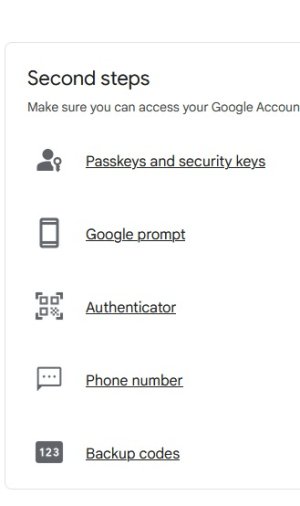
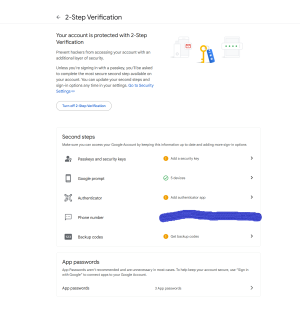
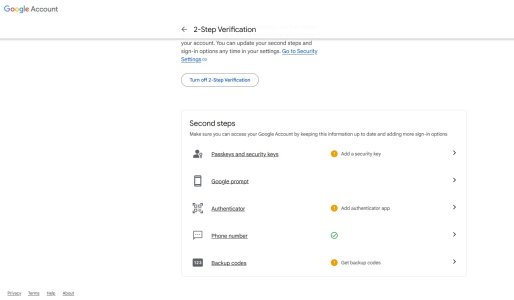
There is no option to create an App Password in 2-Step Authentication. Each reason in the Help guide does not apply. Then I read Google is getting rid of App Password or something 3rd quarter 2024.

All I really need it for is to get email receipts to store locally for several reasons like google shutting down the gmail account for inactivity, which would create an ever bigger problem ...
 
Thanks for the replies fellas. Over the past day or so I've been digging through the help desk and found a few things out, and it's not looking good.


There is no option to create an App Password in 2-Step Authentication. Each reason in the Help guide does not apply. Then I read Google is getting rid of App Password or something 3rd quarter 2024.

All I really need it for is to get email receipts to store locally for several reasons like google shutting down the gmail account for inactivity, which would create an ever bigger problem ...
Odd. Because I tried it to verify before posting. 🙁 I still use it for QuickBooks while I use imap for everything else.

Edit: In fact, I just created another App password.
 
This should be super easy but for some reason the credentials aren't lining up.


Does Google have some App password that I need to create to use on my client instead of the google account pswrd to log in to the web page??

Which mail client are you trying to use? To do things normally with POP+gmail you need a mail client that supports oauth. You *can* go down the app password route, but for the sake/sanity of many of my more technophobic ( / disorganised with passwords) customers, I try to avoid it.

Thunderbird for example supports oauth, you should be able to use the standard account creation tool in TB, give it your email address and password, specify POP and that should be it.

PS - gmail acts a bit squirrelly if you try to use multiple mail accounts with POP to access a single account. My solution is to use POP on the 'master' mail client and IMAP on the rest and accept the limitations that come with it.
 
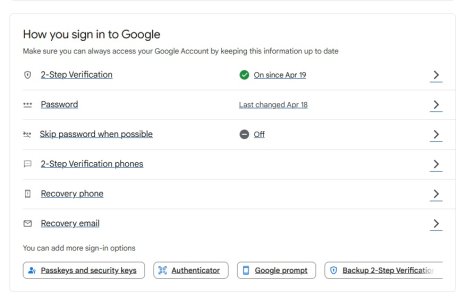
Here are some better screen shots. I've always had 2-step enabled but recently toggled it to see if that changed the option to make App Password available.


NoAppPasswordOption.jpg

2-Step_Enabled.jpg
 
I was an Outllook Express user then Windows Live Mail which I'm still currently using. I did try MS Edge and still didn't see it.

Are there any decent clients that allow you to import old WLM emails and then also export and store new emails?
 
I was an Outllook Express user then Windows Live Mail which I'm still currently using. I did try MS Edge and still didn't see it.

Are there any decent clients that allow you to import old WLM emails and then also export and store new emails?
Thunderbird can. ImportExportTools is the add-on you need. First I'd suggest running a compact in WLM first and clean out any mails you don't want.

WLM is hopelessly out of date, hence no oauth support and your current problem.
 
Thunderbird can. ImportExportTools is the add-on you need. First I'd suggest running a compact in WLM first and clean out any mails you don't want.

WLM is hopelessly out of date, hence no oauth support and your current problem.
He is trying to use POP3 in 2024. :tearsofjoy:
 
He is trying to use POP3 in 2024. :tearsofjoy:

And? Provided his reasoning is sound and he has an effective data backup solution for his needs, there's nothing to mock IMO.

I think a lot of poor saps who blindly trust the cloud with their stuff are likely going to have a rude awakening eventually.

I think using WLM always was a thoroughly bad idea because unless the user knows a lot more about its innards than I do, WLM's data storage technique is such that if your computer / Windows install dies, you've got these binary blobs (e.g. the contacts list, the calendar) that are of very little use even if you have them backed up. WLM is a far greater liability these days because AFAIK there's no way to do a new install of it: Microsoft designed the installer so that it retrieves the packages from their site, and they've since removed the download packages from their site so people can't use it any more. I've tried a number of 'offline installers' and none have worked.
 
Back
Top