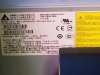
I have a stock HP z420 with a old ATI HDTV card. After doing some compatibility research I bought a new Geforce 1650 OC. My PSU is 600 watt. I spent about 3 hours trying to get the monitor to run on it. I could get the BIOS screen but the picture would either freeze on the Windows 10 screen or simply put the monitor to sleep before reaching Windows. Thankfully it has 2 PCIe slots. I put the ATI card in its original slot and the new Geforce in the lower one. I booted to windows from the ATI card. I put the new Geforce card in the lower PCI slot. Using the device manager I confirmed the new card was listed and installed Geforce drivers, latest chipset and BIOS drivers. Device manager now recognized the Geforce card and I can plug the monitor into it and essentially get what I should.... The problem is I have to start the PC off of the old card (or I just have the same black screen) then switch the cord back to the working Geforce after it boots to Windows. I cannot take the old card out or even switch their positions on the PCIe's. Is there a way to get it to recognize the new card without the old one? Do I need to change the priority somehow? I've never seen this issue. I attached a pic of my PSU specs if that helps.

-
We’re currently investigating an issue related to the forum theme and styling that is impacting page layout and visual formatting. The problem has been identified, and we are actively working on a resolution. There is no impact to user data or functionality, this is strictly a front-end display issue. We’ll post an update once the fix has been deployed. Thanks for your patience while we get this sorted.
Question PC doesn't like 2nd video card
- Thread starter greymanic
- Start date


TRENDING THREADS
-
 Discussion Zen 5 Speculation (EPYC Turin and Strix Point/Granite Ridge - Ryzen 9000)
- Started by DisEnchantment
- Replies: 25K
-
Discussion Intel Meteor, Arrow, Lunar & Panther Lakes + WCL Discussion Threads
- Started by Tigerick
- Replies: 25K
-
 Discussion Intel current and future Lakes & Rapids thread
- Started by TheF34RChannel
- Replies: 24K
-

-
