

FeuerFrei
Diamond Member
I went and plugged a car jump-starter battery into my computer's USB port to recharge.
BUUUT instead the pc's complaining that I overloaded the USB port.
And threatens to disable the port entirely unless I unplug the listed usb devices and hit "Reset." Uh oh.
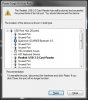
{ SEE ATTACHMENT }
Same alert for two items - a card reader, and keyboard. Hit "Reset" on one alert and the alert for the other device pops up. Alternates. Endless circle, as long as I hit reset.
Already disconnected the USB keyboard and hit "Reset." But I still get the alert highlighting the keyboard on the usb device list, advising to unplug it.
Card reader is integrated into front panel of the Dell pc, so I'd have to open the case and look for a cable to unplug.
Question is: do I have to unplug those highlighted devices right now, or can I just shutdown the pc .... and let them be disabled .... to reenable later ... somehow. BIOS?
Hoping to avoid permanent damage. Keyboard's working (typed this) ... not sure it ever failed.
[ I have edited this post for clarity. ]
BUUUT instead the pc's complaining that I overloaded the USB port.
And threatens to disable the port entirely unless I unplug the listed usb devices and hit "Reset." Uh oh.
{ SEE ATTACHMENT }
Same alert for two items - a card reader, and keyboard. Hit "Reset" on one alert and the alert for the other device pops up. Alternates. Endless circle, as long as I hit reset.
Already disconnected the USB keyboard and hit "Reset." But I still get the alert highlighting the keyboard on the usb device list, advising to unplug it.
Card reader is integrated into front panel of the Dell pc, so I'd have to open the case and look for a cable to unplug.
Question is: do I have to unplug those highlighted devices right now, or can I just shutdown the pc .... and let them be disabled .... to reenable later ... somehow. BIOS?
Hoping to avoid permanent damage. Keyboard's working (typed this) ... not sure it ever failed.
[ I have edited this post for clarity. ]
Attachments
Last edited:


