• We’re currently investigating an issue related to the forum theme and styling that is impacting page layout and visual formatting. The problem has been identified, and we are actively working on a resolution. There is no impact to user data or functionality, this is strictly a front-end display issue. We’ll post an update once the fix has been deployed. Thanks for your patience while we get this sorted.

Northbridge Freq/speed.

choliscott

Senior member
Hi Folks, Currently I have my 1090t at 4 ghz, 2000 mhz NB, between 30-35c

My question is how much of an improvement will I get if I was to increase NB or is there really not too much of an improvement on the O/C ?

Thanks
 
Northbridge speed affects L3 cache read/write speeds and latency. It will do the same for system memory as well. The faster the NB, the better.

Actual performance increases will depend on how far you overclock your NB and the application being run, but if you can hit 2.6 ghz or higher, you might see 10%+ performance across the board.

If you really want to know what it can do for you, give it a try. Just be aware that you may have to bump up your NB and CPU-NB voltages to achieve stability.
 
It depends on the applications. More memory-sensitive applications will benefit from faster NB, and vice versa. For example, Cinebench will not respond to increased NB speed but Linpack will. (Even though both are floating-point heavy apps)

Also keep in mind: What needs to be accompanied in order to take advantage of higher NB frequencies is likewise higher memory frequencies. Using DDR2-800 there may not be a noticeable difference whether the NB is @2600MHz or @3000MHz. The logic is simple - If memory can't feed data fast enough fast NB isn't going to matter. Some say ideal ratio is 1:2 (memory:NB) and others 1:3, so you may want to experiment yourself.
 
Last edited:
+1 to whats been said, well put.

I noticed a difference in a few gaming benches when using a higher NB speed back when I had my 955, it is absolutely something you should OC in addition to core speed on Phenom 2's.
 
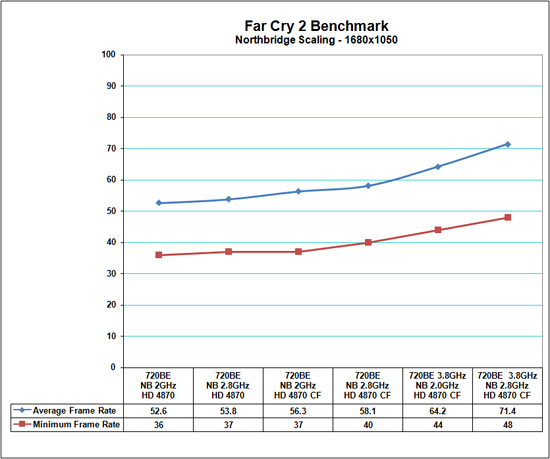
Here is a chart that Gary did for Anand on NB scaling in conjunction with an OC in FC2:

fc2720nba.jpg


At stock processor speeds with a single video card there is a 2% increase in average and minimum frame rates. We did not expect much as the data pipeline is not under a lot of stress at this point. As we move to our CrossFire X configuration at stock CPU speeds there is a 3% increase in average frame rates and 8% in minimum frame rates.

Now it gets interesting as we overclock our CPU to 3.8GHz and are able to feed the data pipelines in a proper manner, at least we thought so. By increasing our NB speed to 2.8GHz, the average frame rates increase 11% and minimum frame rates increase 9%. We have noticed similar results at 1920x1200 in this game and in other applications.

Article here.


FC2 is not one of the 'better' games for AMD but the gains from the NB up-clocking (in conjunction with the processor OC) were pretty good.

There are not a great many 'comps' out there on NB scaling in gaming but the consensus seems to be 'go for it'.


--
 
For example, Cinebench will not respond to increased NB speed but Linpack will.

Incorrect. I was able to record gains in Cinebench R10 and R11.5 scores by increasing NB speed on an Athlon II x4 635 which doesn't even have L3 cache. R10 was more sensitive than R11.5, granted.

R10's OpenGL test responded best to NB speed increases.

A Thuban should produce better gains from NB speed increases than a Propus. Should.
 
Back
Top