• We’re currently investigating an issue related to the forum theme and styling that is impacting page layout and visual formatting. The problem has been identified, and we are actively working on a resolution. There is no impact to user data or functionality, this is strictly a front-end display issue. We’ll post an update once the fix has been deployed. Thanks for your patience while we get this sorted.

New Roku gear

Kaido

Elite Member & Kitchen Overlord
Available for pre-order today, shipping October 9th:

https://www.engadget.com/2016/09/26/roku-2016-ultra-premiere-express/
  1. Roku Express: ($30) IR-based remote
  2. Roku Express Plus: ($40) Adds composite cables for legacy support
  3. Roku Premiere: ($80) Adds 60FPS 4K, RF-based remote
  4. Roku Premiere Plus: ($100) Adds HDR, Ethernet port, MicroSD slot, RF remote with headphone jack
  5. Roku Ultra: ($130) Adds optical audio port, USB port, lost remote button (on the player itself)
  6. (upcoming) Hitachi Roku 4K TV lineup (I've seen Roku's built into Best Buy's Insignia brand, as well as JVC & TCL sets)

For now, Roku's more expensive players are only supporting the HDR10 standard, and there's no word if they'll ever be able to support the competing Dolby Vision standard. You'll also be able to play Dolby Atmos via HDMI pass-through (which makes your receiver deal with all the decoding). On the software front, a new "night listening" mode will compress the dynamic range of audio (so booming explosions don't shake the walls) and Roku's Universal search feature now works across 100 different services (the most recent being HBO Now).
 
So the premiere plus looks to be the one to get.

Yeah, although the remote finder would be killer...I've been looking for mine for days & have resorted to using the iPhone app to control my Roku, lol.
 
I have a Roku 4k TV. Haven't even opened it up yet, still collecting dust in the garage.
 
I have a Roku 4k TV. Haven't even opened it up yet, still collecting dust in the garage.

I've setup a couple Insignia's & they are great. My Mitsubishi DLP is finally crapping out (just replaced the bulb too, dangit!) & I will probably replace it with a TCL 65" 4K Roku TV. What did you end up getting?
 
I've setup a couple Insignia's & they are great. My Mitsubishi DLP is finally crapping out (just replaced the bulb too, dangit!) & I will probably replace it with a TCL 65" 4K Roku TV. What did you end up getting?

Whatever BB's house brand is. Inignia I think. Though I thought $600 for a 55" 4k tv seemed too cheap at the time so I don't expect too much out of it. I just haven't got around to swapping my TV's yet.
 
Whatever BB's house brand is. Inignia I think. Though I thought $600 for a 55" 4k tv seemed too cheap at the time so I don't expect too much out of it. I just haven't got around to swapping my TV's yet.

It's actually pretty great! My dad has one.
 
It's actually pretty great! My dad has one.

I really, really wish the included remote had voice activated search like the Roku boxes do. I think that would be a really handy feature as I hate...hate having to type out letters manually with a remote. But I wanted to have a built in Antenna coaxial so I wouldn't have to swap sources, with this, I can just select the Antenna icon. Plus having yet another box to deal with only makes things more complicated, especially for my wife and her stupid son....and yes he's stupid, sadly it is what it is. So that's why I specifically bought this rather than a Roku Box.
Now if Roku would make a box with built in coaxial input, that would be great too. I hope to see more Smart TV's feature Roku, especially higher end TV's, rather than their own funky UI. Samsung's is just ok but LG's UI is horrible...I mean really bad and I hate it. I don't even remember Sony's but I had a hard time finding a smart TV with a good UI so despite how cheap this one is, Roku has the best interface Imo.
 
I really, really wish the included remote had voice activated search like the Roku boxes do. I think that would be a really handy feature as I hate...hate having to type out letters manually with a remote. But I wanted to have a built in Antenna coaxial so I wouldn't have to swap sources, with this, I can just select the Antenna icon. Plus having yet another box to deal with only makes things more complicated, especially for my wife and her stupid son....and yes he's stupid, sadly it is what it is. So that's why I specifically bought this rather than a Roku Box.
Now if Roku would make a box with built in coaxial input, that would be great too. I hope to see more Smart TV's feature Roku, especially higher end TV's, rather than their own funky UI. Samsung's is just ok but LG's UI is horrible...I mean really bad and I hate it. I don't even remember Sony's but I had a hard time finding a smart TV with a good UI so despite how cheap this one is, Roku has the best interface Imo.

Yeah, for sure. Roku is the best by far. If you want one with a headphone jack, TCL released their 55" UP130 (premium) model that has a headphone jack on the remote. Same price, $599:

https://www.amazon.com/TCL-55UP130-55-Inch-Ultra-Smart/dp/B01C6XHQWS/

fwiw, PLEX recently added DVR capabilities, so it might be worth throwing together a PLEX box with an OTA antenna or whatever you use, and then loading the PLEX channel on your Roku TV.
 
Wow, you have to go up to the $100 one just to get Ethernet...that's scary. I NEVER stream over WiFi if I can avoid it, a wire is just more stable. Though I've been known to use WiFi for remote rooms without an Ethernet drop.
 
Wow, you have to go up to the $100 one just to get Ethernet...that's scary. I NEVER stream over WiFi if I can avoid it, a wire is just more stable. Though I've been known to use WiFi for remote rooms without an Ethernet drop.

FWIW, the new wireless stuff is fantastic. I took the plunge earlier this year & went 100% wireless at home, after a decade of hardwiring Ethernet into every place I moved into. All of my Roku's have been perfect (granted, I picked up a really nice TP-Link Archer C3200, which was not cheap unfortunately). I do agree that a wire is always better if you can do it, but I've been pretty happy with my modernized wireless setup.

The only thing that's a pain is if I have to tweak the network, like changing my wireless password...I have like 20 devices that I have to manually update now lol. Smartphones, tablets, laptops, set-top boxes, etc.
 
Hopefully they fixed the red push issue they had before. I think I read they still don't support 24hz output for 4k streaming. The option is 4k/60p. Maybe they were wrong and I hope they were.
 
FWIW, the new wireless stuff is fantastic. I took the plunge earlier this year & went 100% wireless at home, after a decade of hardwiring Ethernet into every place I moved into. All of my Roku's have been perfect (granted, I picked up a really nice TP-Link Archer C3200, which was not cheap unfortunately). I do agree that a wire is always better if you can do it, but I've been pretty happy with my modernized wireless setup.

The only thing that's a pain is if I have to tweak the network, like changing my wireless password...I have like 20 devices that I have to manually update now lol. Smartphones, tablets, laptops, set-top boxes, etc.
The problem I have with wireless bandwidth is that it's shared, rather than per station like Ethernet. A single 4k stream could easily saturate many home WiFi setups. That can be a bit of a rude awakening for some.

Sent from my mobile device.
 
Anyone get their Premiere+ or Ultra yet? The specs say it has Dolby passthrough so just want to make sure it can do some Atmos before I buy.
 
Anyone get their Premiere+ or Ultra yet? The specs say it has Dolby passthrough so just want to make sure it can do some Atmos before I buy.

I have the ultra and it will play atmos from a Dolby digital+ source but no lossless audio at all. Atmos videos on vudu are in a Dolby digital plus format and work fine. The movie files I have with truehd atmos will not play the audio.

Anything with DTS-HD MA, DTS:X, or Dolby TrueHD will not have audio.
 
More new Roku stuff!

http://variety.com/2017/digital/news/roku-smart-tv-market-share-1201951095/

* 13% of all smart TVs sold in the U.S. are now based on the company’s app platform
* One in eight TVs sold in the U.S. are running its apps, according to IHS data relayed by Roku
* TCL...is back at CES this week to introduce new 4K HDR Roku TVs. China-based TCL is now using Roku’s platform exclusively for all of its TV sets sold in the U.S., and is now the 6th largest TV brand in the U.S.
* At CES, Roku will show off new 4K HDR TVs featuring Dolby Vision HDR. In addition to TCL, Roku is continuing to work with Hisense, Hitachi, Insignia and Sharp to make Roku TVs. The company also teamed up with Element Electronics to introduce new Roku TVs later this year. Altogether, Roku wants to offer consumers a choice of 150 different TV sets from a variety of manufacturers in 2017.
 
I think i might purchase the TCL 32" Roku TV soon for our workout room. Be nice to use the row machine and watch some netflix or something else via Roku. Ill have to check out this new roku stuff link also. Big fan of my 2 other Roku devices.
 
Ohh even better. Thanks

Yup! Two tips:

1. Most Roku TV's have a headphone jack on the back, which can be controlled by the Roku remote (which is nice because most soundbars & receivers require a separate remote). I have a nice set of Klipsch 2.1 computer speakers (3.5mm plug) on my TV & it sounds awwwwwwesome.

2. Roku has an Android/iPhone app that does "wireless headphones" too...just plug your headphones into your smartphone & fire up the app and it will stream the audio to those (essentially turn any wired headphones into wireless ones) instead of the TV's speakers, so if you're going to be exercising, you don't have to crank the audio up loud because you can just use headphones instead. I have some neckband headphones that do a good job of staying in place while exercising, similar to these ones:

https://www.amazon.com/Sony-Street-MDRG45LP-Stereo-Headphone/dp/B00165R90C/
 
Yup! Two tips:

1. Most Roku TV's have a headphone jack on the back, which can be controlled by the Roku remote (which is nice because most soundbars & receivers require a separate remote). I have a nice set of Klipsch 2.1 computer speakers (3.5mm plug) on my TV & it sounds awwwwwwesome.

2. Roku has an Android/iPhone app that does "wireless headphones" too...just plug your headphones into your smartphone & fire up the app and it will stream the audio to those (essentially turn any wired headphones into wireless ones) instead of the TV's speakers, so if you're going to be exercising, you don't have to crank the audio up loud because you can just use headphones instead. I have some neckband headphones that do a good job of staying in place while exercising, similar to these ones:

https://www.amazon.com/Sony-Street-MDRG45LP-Stereo-Headphone/dp/B00165R90C/
Would that work with Bluetooth headphones also? We use rowing machine a lot and hard sometimes to keep phone on our person lol

Small 2.1 would be nice also over built in speakers
 
Would that work with Bluetooth headphones also? We use rowing machine a lot and hard sometimes to keep phone on our person lol

Small 2.1 would be nice also over built in speakers

Good question, not sure but I don't see why not (unfortunately don't have any BT headphones to test with). The transmission occurs within the Roku app itself & then pipes out the audio to the system, so in theory it should work fine. I found one comment on the Roku blog from last year that said it worked but had static, so maybe that has been resolved by now (comment was 8 months ago).

Yeah, I have a 65" TCL & the speakers are worse than my iPhone's speakers. I plugged in my Klipsh ProMedia 2.1's to the TCL and they rock! The big reason I got the TCL is for ease-of-use for my family...being able to control the (very nice) computer speakers via the tiny remote is awesome. I had a Vizio soundbar before, and not only did it sound far worse than my high-end computer speakers, but it also required a separate remote control, which was lame.
 
Good question, not sure but I don't see why not (unfortunately don't have any BT headphones to test with). The transmission occurs within the Roku app itself & then pipes out the audio to the system, so in theory it should work fine. I found one comment on the Roku blog from last year that said it worked but had static, so maybe that has been resolved by now (comment was 8 months ago).

Yeah, I have a 65" TCL & the speakers are worse than my iPhone's speakers. I plugged in my Klipsh ProMedia 2.1's to the TCL and they rock! The big reason I got the TCL is for ease-of-use for my family...being able to control the (very nice) computer speakers via the tiny remote is awesome. I had a Vizio soundbar before, and not only did it sound far worse than my high-end computer speakers, but it also required a separate remote control, which was lame.
Does the Sharp version have this same 2.1 speaker connection?
 
Does the Sharp version have this same 2.1 speaker connection?

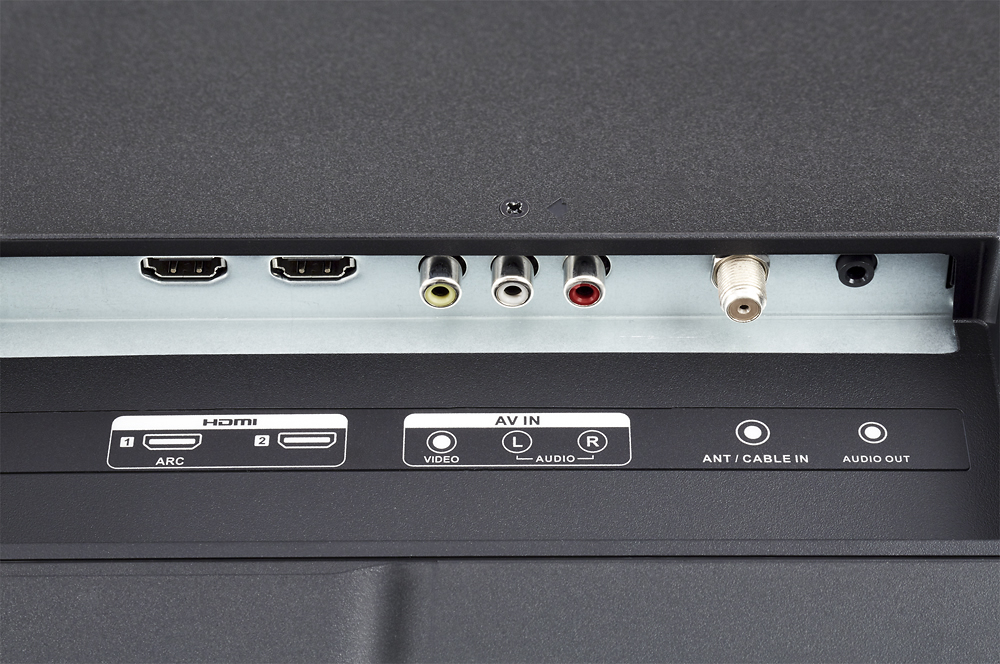
Yup, audio output jack on the right side:

4862800cv11d.jpg;maxHeight=550;maxWidth=642


I would assume that it works the same as the TCL. On my 65" TCL, when I plug speakers into that 3.5mm minijack, it mutes the onboard TV speakers & sends the audio to the plugged-in 2.1 speakers, which then lets me control the volume from the Roku remote. I turn the volume up on my 2.1 speakers to 50% manually & just leave it there, that way the Roku remote can adjust the volume properly. I would image it works the same on the Sharp (would have to confirm in actual usage, but given the same port is there & it's the same remote & OS software, should be the same).
 
Yup, audio output jack on the right side:

4862800cv11d.jpg;maxHeight=550;maxWidth=642


I would assume that it works the same as the TCL. On my 65" TCL, when I plug speakers into that 3.5mm minijack, it mutes the onboard TV speakers & sends the audio to the plugged-in 2.1 speakers, which then lets me control the volume from the Roku remote. I turn the volume up on my 2.1 speakers to 50% manually & just leave it there, that way the Roku remote can adjust the volume properly. I would image it works the same on the Sharp (would have to confirm in actual usage, but given the same port is there & it's the same remote & OS software, should be the same).

Picked one up on the way home. So far so good. Got netflix and amazon up and running. I need to do whole home antenna someday, maybe this spring with an outdoor one. Right now i just have a mohu leaf on our main TV.

On the audio out, do those speakers need power? You mentioned a Klipsch 2.1 set up? What about just 2 speakers? Would love something small with no power that is better than the built in ones if possible someday. Might scour craigslist for something.
 
Back
Top