• We’re currently investigating an issue related to the forum theme and styling that is impacting page layout and visual formatting. The problem has been identified, and we are actively working on a resolution. There is no impact to user data or functionality, this is strictly a front-end display issue. We’ll post an update once the fix has been deployed. Thanks for your patience while we get this sorted.

New PCIe SSD slow speeds on Lenovo notebook

alexous

Junior Member
Hello everybody! My laptop is V310-15isk (type 80SY) which, according to the platform specs and what Lenovo Support claims, supports M.2 PCIe 3.0 x2 drives (which are B+M keyed). So I:
1) updated to the latest BIOS very recently
2) got a brand new Western Digital SN500 M.2 and installed in parallel with the factory 2.5" SATA 2 HDD
3) made a clean W10 1903 installation (USB created with Rufus, UEFI boot)
4) updated Windows
5) updated drivers with Driver Easy and Driver Booster after Windows Update

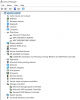
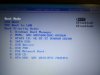
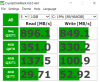
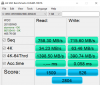
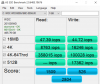
However, I experience slow speeds with the SSD as you can see from the attached photos. The drive is recognized as one lane drive (PCIe 3.0 x1) instead of two and thus, the lower speeds. Even the previous SATA 850 Evo had better benchmarks in 4K random read/write values (45/135). Does anyone have an idea on what is going on?
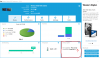
WD Dashboard issue.png
Device manager.png
bios boot.jpgcdm.png
AS_mbpersec.png
AS_iops.png
 
Theres possibly only 2 pcie lanes available for SSD/M2 drives and as you have 2 drives then they both may only have 1 pcie lane each? it would explain how you're getting roughly half the quoted performance? though in all seriousness, you're not going to be able to tell the difference between a SATA3 SSD 550MB/s and an M2/NVME SSD 1800MB/s in use except in benchmarking unless you are continually editing and moving a lot of large files
 
Theres possibly only 2 pcie lanes available for SSD/M2 drives and as you have 2 drives then they both may only have 1 pcie lane each? it would explain how you're getting roughly half the quoted performance? though in all seriousness, you're not going to be able to tell the difference between a SATA3 SSD 550MB/s and an M2/NVME SSD 1800MB/s in use except in benchmarking unless you are continually editing and moving a lot of large files

I understand your thinking. But how can I check it?
 
Nope, they may help, but for a clear CMOS you gotta remove the laptop's CMOS battery and press the power button for like 10-15 seconds. Place it back in, and then it will be reset.

In case I perform that, what is going to be the consequence in the stored TPM keys for Bitlocker?
 
Any thoughts? I still haven't performed clearing the CMOS. I just decrypted the SSD by turning off the BitLocker.
 
May as well clear cmos then as that was your only issue with reseting the bios previously, losing the secure keys, I think it may well be a system restriction and a support ticket if the bios reset doesn't work would be my next port of call, I can't seem to find any detailed info about pcie lane layout though am sure it will be restricted compared to a desktop, especially on lower cost laptops
 
Okay thanks for the reply ubern00b. However, it's odd to have restrictions on speed since the notebook officially supports M.2 PCIe 3.0 x2 ssd's...
 
What's your os on? If the m2 ssd remove /disconnect the hdd and see if anything changes, again bios reset should of been done early on as a first measure imo anyway
 
The OS WIndows 10 1903 x64 installed via UEFI method (clean installation)
So first you mean to remove the 2.5 HDD and check the speeds again? Correct?
 
Back
Top