• We’re currently investigating an issue related to the forum theme and styling that is impacting page layout and visual formatting. The problem has been identified, and we are actively working on a resolution. There is no impact to user data or functionality, this is strictly a front-end display issue. We’ll post an update once the fix has been deployed. Thanks for your patience while we get this sorted.

New Intel PC Build ( 700 USD)

Foxslink

Member
Hi folks,
My old man is in the US so this is my chance to get a new PC build. Main reason is that my motherboard has a broken PCIE so I will sell my current PC. right now i think the best value intel CPU to get would be a i5 or i7 and a Z170 LGA 1151 board that , im not sure about the Mo/bo so id like to know what you'd recommend. The idea is to use it mostly for gaming, this is what i got listed so far:
http://pcpartpicker.com/user/Foxslink/saved/hHFf7P

I could also go for Kingston Ram instead of Gskill, which one is better?
http://www.newegg.com/Product/Product.aspx?Item=N82E16820104531&nm_mc=AFC-C8Junction&cm_mmc=AFC-C8Junction-PCPartPicker, LLC-_-na-_-na-_-na&cm_sp=&AID=10446076&PID=3938566&SID=

Another option is to go for another Cooler instead of Hyper 212, like :
Cryorig: https://www.amazon.com/s/ref=nb_sb_noss?url=search-alias%3Dcomputers&field-keywords=Cryorig+H5+Universal+be+quiet&rh=n%3A541966%2Ck%3ACryorig+H5+Universal+be+quiet

or Be Quiet! Shadow Rock Slim

https://www.amazon.com/Quiet-Shadow-Rock-Cooler-LGA775/dp/B00HPXZF2I/ref=sr_1_1?s=pc&ie=UTF8&qid=1472936091&sr=1-1&keywords=Shadow+Rock+Slim

SSD would be one of these 2:
Samsung 750: https://www.amazon.com/Samsung-750-EVO-2-5-Inch-MZ-750500BW/dp/B01G844L88/ref=sr_1_4?ie=UTF8&qid=1472970921&sr=8-4&keywords=ssd+samsung+750+evo

Sandisk X400: https://www.amazon.com/SanDisk-X400-SATA-512G-SD8SB8U-512G-1122/dp/B0196FPT1Y/ref=sr_1_1?ie=UTF8&qid=1472970852&sr=8-1&keywords=Sandisk+X400+512GB

What do you think is best?
I look forward to hearing from you
 
Your are fine with your PCpartpicker list. I would go with that. do you have or are planning on adding a video card later? What case are you using?
 
I'm partial to the Samsung 850 EVO SSD, but otherwise I think your setup is fine. You didn't mention a video card though. Which GPU are you using?
 
I was able to save $100 by choosing more balanced parts. The extra money could go towards a GPU, like the new 4GB RX460 ($110).

You had chosen a vanilla i7, which can't overclock and paired it with an overclocking Z170 chipset. There were a few options to save money (or spend more for a K i7) but I decided the best balance for your budget was to keep a quality Z170 MOBO and go with a cheaper but overclockable CPU. Once overclocked the i5-6600K should beat that stock i7 in most tasks.

The MOBO I chose to include in the build is a Micro ATX vs the full size ATX. However this smaller MOBO actually has better quality features, like the ALC1150 audio and Intel NIC vs the Asus board you chose, which had ALC887 audio and a cheap Realtek NIC. The smaller MOBO will let you choose a smaller case as well and it can still house full sized graphics cards. If you want to stick with a full sized ATX board there's an option with the ASRock Extreme 3. It also has the ALC1150 and Intel NIC, and can currently be had for around the same ~$110. The only reason to choose a larger ATX board though is if you know you will have more than 2 expansion cards / GPUs.

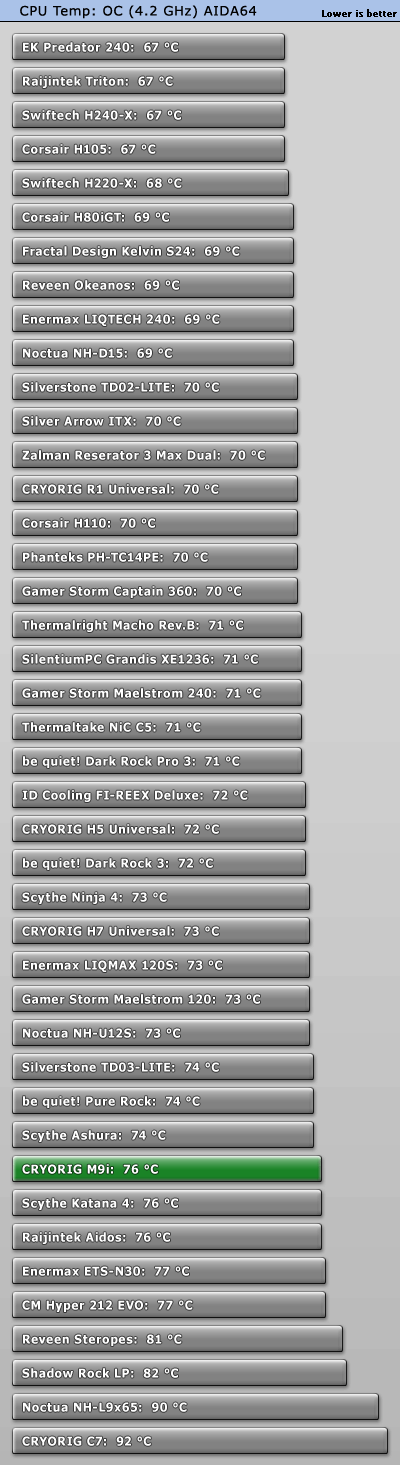
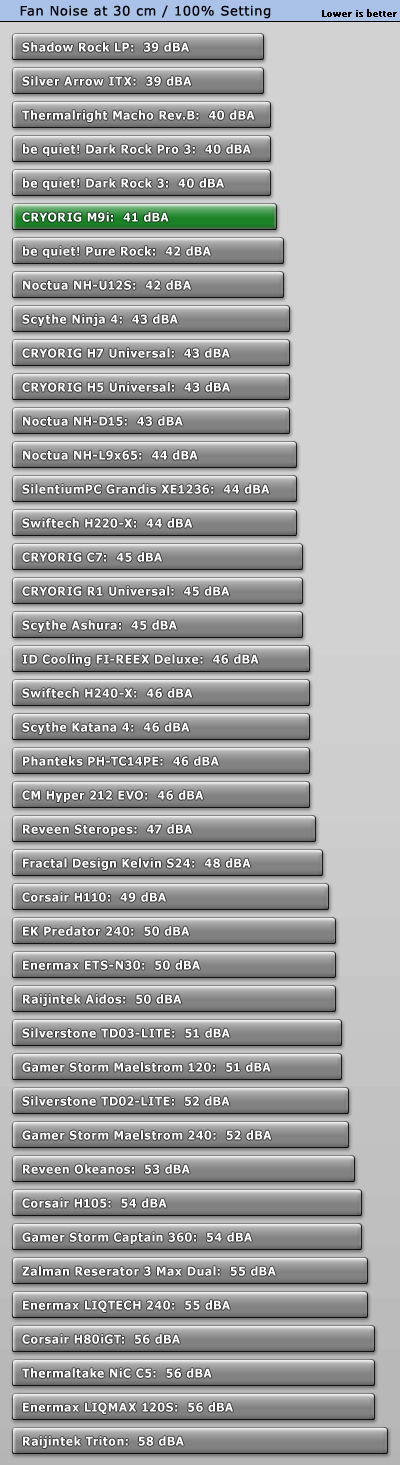
The CPU cooler I chose is a fairly new option that seems to beat the old and often recommended Hyper 212. Reviews suggest this new Cryorig M9i is slightly cooler and quieter, and it also happens to be cheaper. Good enough for a 4 - 4.2GHz OC.

I choose to go with faster RAM, these newer Skylake systems seem to benefit. 2133/2400 is low end, 2666/2800 mid range, and 3000/3200 high end...above that is the (currently) extreme stuff.
Being just a few dollars more, I decided to go for a high end kit (with low profile heatsinks). This is 3000MHz 15-17-17-35 at 1.35v. I wouldn't go below 2666 for this build, but that would only save $5-10.

For the SSD, PCPartPicker didn't have an option for the EVO 750. But the Reactor, X400, 750, and 850 would all be fine choices for budget SSD.

For the PSU, I went with a much more modest and mid range unit. This 500 watt unit will easily power the build as is, and has plenty of room to add a midrange GPU. Any 2x6pin or 1x8pin GPU will be fine (up to 225 watt TDP). This unit could even power the reference GTX1070/1080 (150 or 180 watt TDP, each uses 1x8 pin, though non-reference versions may differ). Here's a review: http://www.jonnyguru.com/modules.php?name=NDReviews&op=Story6&reid=351

And here's the part list and price breakdown:

PCPartPicker part list: http://pcpartpicker.com/list/x3HC6X

CPU: Intel Core i5-6600K 3.5GHz Quad-Core Processor ($227.99 @ SuperBiiz)
CPU Cooler: CRYORIG M9i 48.4 CFM CPU Cooler ($19.99 @ Newegg)
Motherboard: ASRock Z170M Extreme4 Micro ATX LGA1151 Motherboard ($101.98 @ Newegg)
Memory: Corsair Vengeance LPX 16GB (2 x 8GB) DDR4-3000 Memory ($74.99 @ Newegg)
Storage: Sandisk X400 512GB 2.5" Solid State Drive ($134.99 @ Directron)
Power Supply: EVGA 500W 80+ Bronze Certified ATX Power Supply ($43.49 @ SuperBiiz)

Total: $603.43
 
Last edited:
thanks for the prompt reply. first off, i think that this gold Evga PSU is better, or this budget PSU , if you say i7 is too much i then ill go for i5 and OC to extend the power of the PC in the future. There is no need to add HDD to the list, nor case, this pc will come to Chile and i will buy a case here so only SSD is important. The 16 gigs of Ram seems great, i dont think if gskill has better warranty than Corsair. The Cryorig cooler you posted seems good value. I wonder if there is a similar Asus board to that Asrock, i had a gigabyte board before but the PCIE slot came faulty, people recommend asus boards more, though that asrock seems solid choice considering its very likely i wont be doing SLI, could it OC an i7? honestly im very clueless when it comes to choose boards

If id go for i7 oc,that'd require better board and better cooler and that is too much $, and i wont be able to buy an SSD. The reason i picked i7 is cuz they recommended it to me in Teksydicate for the hyperthreading, but as you say i5 is enough, they also made a list of non OC i5 with interesting components http://pcpartpicker.com/list/7Xfwcc
. https://forum.teksyndicate.com/t/new-pc-build-700-usd/106673/20

Edit: i forgot to mention i already ordered a 1070 evga FTW
 
Last edited:
this pc will come to Chile and i will buy a case here
Hm, why don't you look around in Chile and see if you can find a used Hyper 212 (Evo or Plus) someplace? CPU coolers are heavy, and that will probably save on shipping costs.

first off, i think that this gold Evga PSU is better
What's the price of electricity in Chile?
Chile's electricity costs, which have risen by 193 percent over the past 10 years, are among the highest in the world, the president of the Metallurgical and Metal-Mechanics Industries Association, or Asimet, said Friday.
If that's still true, a gold PSU is probably worth the price. Perhaps a Rosewill Capstone 550W?
 
yeah electricity is costly here i dont know how much exactly.
Will the 1070 fit in a MicroAtx board? im really considring just going for an i7, i would still be in $700 budget
 
thanks for the prompt reply. first off, i think that this gold Evga PSU is better, or this budget PSU , if you say i7 is too much i then ill go for i5 and OC to extend the power of the PC in the future. There is no need to add HDD to the list, nor case, this pc will come to Chile and i will buy a case here so only SSD is important. The 16 gigs of Ram seems great, i dont think if gskill has better warranty than Corsair. The Cryorig cooler you posted seems good value. I wonder if there is a similar Asus board to that Asrock, i had a gigabyte board before but the PCIE slot came faulty, people recommend asus boards more, though that asrock seems solid choice considering its very likely i wont be doing SLI, and honestly im very clueless when it comes to choose boards .

If id go for i7 oc,that'd require better board and better cooler and that is too much $, and i wont be able to buy an SSD. The reason i picked i7 is cuz they recommended it to me in Teksydicate for the hyperthreading, but as you say i5 is enough, they also made a list of non OC i5 with interesting components http://pcpartpicker.com/list/7Xfwcc
. https://forum.teksyndicate.com/t/new-pc-build-700-usd/106673/20

That SuperNova G2 550 Gold looks like a great unit, but it comes at a higher price. Here's a review:http://www.jonnyguru.com/modules.php?name=NDReviews&op=Story6&reid=440
Compared to the EVGA 500 watt bronze unit (I used the same as you linked) it's a bit more efficient and modular, and has better build quality and tier 1 (vs tier 2) capacitors.

I think there may be a good third option though, if you want the high quality and tier 1 capacitors at a price between the two EVGA options.
The SeaSonic S12-II for $60 http://pcpartpicker.com/product/fZyFf7/seasonic-power-supply-s12ii520bronze
http://www.jonnyguru.com/modules.php?name=NDReviews&op=Story4&reid=185

EVGA 500w bronze $40 good quality and second best caps ............................. Efficiency max 85% and 82% @ 493 Watt
SeaSonic S12-II 520w bronze $60 high quality with tier 1 caps ......................... Efficiency max 88% and 83.2% @ 515 watt
EVGA SuperNova G2 550w gold $80 high quality with tier 1 caps, modular ..... Efficiency max 90.5% and 88.1% @ 554 watt

The reason I chose the EVGA 500w bronze at $40 was because it suited the power needs of your system better than the 750 watt unit you originally had. You simply don't need that much power for this build, even with a good video card added. However, I think any one of these three 500 watt units would be fine options. The two higher tier 1 options may last a little longer, while the highest option may be a good choice if power is relatively expensive where you live.

----------------------------------------------------

As for i5 vs i7, it's just a matter of price. The problem is the i7 6700K CPU is almost HALF the budget at over $300. If you'd like to get the 6700K then go for it.
I just wouldn't suggest the vanilla i7, since it can't overclock and it costs almost as much as the K version. The logical choices are to save money with the i5 and overclock, or get the full i7-K.

----------------------------------------------------

Both Corsair and GSkill are good brands for RAM. Also Kingston, Crucial, Mushkin, and Patriot. The reason I chose the Corsair was because it was the best price for a 3000MHz low latency kit with low profile heatsinks. I personally don't like tall heatsinks on RAM because it can interfere with the CPU heatsink and/or block airflow, and it provides no benefit to modern low voltage (thus low heat) RAM.

-----------------------------------------------------

Here's one review of the M9i, since I didn't post it before:
https://www.techpowerup.com/reviews/CRYORIG/M9i/
cpu_oc_typical_b.gif
fan_noise100.gif


-----------------------------------------------------

Asus does make boards similar to the Asrock I posted, but they are more expensive. If you want a Micro ATX Asus with the ALC1150 audio and Intel NIC it would be this for $210:
https://pcpartpicker.com/product/p4nG3C/asus-motherboard-maximusviiigene

They have another option for $130 that has the Intel NIC, but it still comes with the weak audio (ALC 887)
https://pcpartpicker.com/product/7BZ2FT/asus-motherboard-z170mplus

They do have a full sized ATX board with ALC1150 (Asus calls it SupremeFX) and the Intel NIC for $140:
https://pcpartpicker.com/product/KgJkcf/asus-motherboard-z170progaming

Asus may be the number 1 MOBO maker, but in a budget build like this it's hard to justify the price. Second best options (like this ASRock) are still good for what you want.
I want to point out that the Micro ATX ASRock Extreme4 can support Xfire/SLI if you wished (PCIe slot 1 and 3 at x8/x8). And it does have an M.2 2280 PCIe 3.0x4 slot (compatible with NVMe and U.2), and USB 3.1 10Gbps (Type A and C). This board is fine with an overclocking i5-k or i7-k, and either CPU will work fine with the M9i cooler (obviously a bigger/better cooler is even better though, like the Cryorig H7 or H5).
 
ok the thing about that Asrock is there are many bad reviews saying it came dead in new egg http://www.newegg.com/Product/Product.aspx?Item=N82E16813157675&nm_mc=AFC-C8Junction&cm_mmc=AFC-C8Junction-PCPartPicker, LLC-_-na-_-na-_-na&cm_sp=&AID=10446076&PID=3938566&SID=

What about Gigabyte Boards? which one would you recommend of those? right now im using this one:
http://pcpartpicker.com/product/6WphP6/gigabyte-motherboard-gaz77xud5h
One day i pulled out the PCIE slot and it broke,and i wasnt the only one with this issue, lets hope i doesnt happen again
http://imgur.com/a/OW6Sz#0
http://www.overclock.net/t/1434052/pci-e-slot-came-out-bent-the-pins-in-the-process-really-mad

A friend of mine bought this one : https://www.amazon.com/Gigabyte-2-W...473031627&sr=8-1&keywords=gigabyte+z170xp-sli

Gaming 3 seems better to me though:
https://www.amazon.com/Gigabyte-LGA...30554&sr=8-1&keywords=Gigabyte+Z170X+Gaming+3

Everything else is cristal clear now so thanks
 
Last edited:
I'm going to take a guess and say you forgot to unlatch/unlock the PCIe slot before removing the card from that slot. In which case that's your fault, and can happen to any brand of MOBO. Obviously that sucks, but it's one of those live and learn things...don't make the same mistake twice.

Not sure how much I'd care about the Newegg reviews, there's 9 people complaining out of the hundreds or thousands of boards ordered. And there are good reviews elsewhere like on Amazon. Some of the people having issues are Linux users or people who screwed things up themselves. All that said, I've got no problem recommending Gigabyte as a brand either. The two boards you listed are similar, different PCIe layout and such, but they have all the major features (M.2, USB3.1 10Gbps etc) they both have the ALC1150 audio (the gaming board adds some extra features), the XP-SLI has Intel NIC and the Gaming 3 has a "killer" NIC. Personally I think Intel products are going to be high quality and the most reliable...but the "killer" NIC is probably better than the cheap Realtek ones. It looks like the Gaming 3 is the "better" board, though I feel that the "killer" NIC is less preferred over Intel.

If you're interested in the smaller Micro ATX boards, and want a full featured one from Gigabyte it'd be this at $140:
http://pcpartpicker.com/product/m6RFf7/gigabyte-motherboard-gaz170mxgaming5

Gotta be careful with that budget though, especially if you want to fit that i7-K CPU in there. I even had to cut the RAM speed to 2666 CAS 15-15-15-35

PCPartPicker part list: http://pcpartpicker.com/list/Gdr4sJ

CPU: Intel Core i7-6700K 4.0GHz Quad-Core Processor ($324.99 @ SuperBiiz)
CPU Cooler: CRYORIG M9i 48.4 CFM CPU Cooler ($19.99 @ Newegg)
Motherboard: ASRock Z170M Extreme4 Micro ATX LGA1151 Motherboard ($101.98 @ Newegg)
Memory: G.Skill Ripjaws 4 Series 16GB (2 x 8GB) DDR4-2666 Memory ($68.99 @ Newegg)
Storage: Sandisk X400 512GB 2.5" Solid State Drive ($134.99 @ Directron)
Power Supply: SeaSonic S12II 520W 80+ Bronze Certified ATX Power Supply ($58.99 @ SuperBiiz)

Total: $709.93
 
got it, the boards are indeed more pricey but are the intel nic and sound quality worth it?
now i have one last board question my friend , seems a good contender against the Asrock extreme, and is budget oriented too.
asus z170E http://pcpartpicker.com/product/k4dFf7/asus-motherboard-z170e
What do you think ?
Could you pls link the full sized ATX ASRock Extreme 3 you mentioned? i couldnt find it at $110
http://www.microcenter.com/product/452104/Z170_Extreme4_LGA_1151_ATX_Intel_Motherboard
EDit: i think i found it, is this the one? Asrock extreme4


About the rams, i read Skylake CPUs only support up to DDR4-2133, and will downclock any faster ram to that speed, is that true? in this case we'd have find even lower freq Ram.
Were almost there x)
 
Last edited:
If the choice is between two boards with one having a realtek lan and one having an intel lan, i'd go for the intel lan even if it costs me an extra $10 to $20. Sound chips - you can google realtek sound chip differences to see which are budget oriented and which are more geared toward quality. If a motherboard's marketing mentions the audio quality, then that might be a hint the audio chip on there is a decent one. I have an ASUS board with their so-called "Supreme FX" audio and it's quite good, nearly as good as a dedicated external DAC.
 
If all you've got is a $10 set of speakers, then the audio wont matter much. If you've got a $100+ headset, or a nice surround sound setup, then yeah it can make a difference.
Besides audio quality, there's also DPC latency and such, but that varies even with the same audio chips between different MOBO makers.
Is it worth paying a large premium? No, probably not...but when the features are available on cheaper boards it makes you wonder why the more expensive options are skimping.

As for the network port, I guess it depends on if you use wired or wireless. If you never plug the computer into the internet, then who cares about the NIC. I always prefer wired, and if you do plug in I wouldn't want a Realtek option (poor performance, reliability, DPC issues etc). If we're talking about a $50 MOBO for a $300 PC, then yeah Realtek does work. The "Killer E2200" NIC is made by Qualcom, and they do make good stuff (like the wireless chips in your phone)...but the software/drivers it comes with can be problematic. Apparently they do offer vanilla drivers now that don't include the "Killer" software which may reduce/eliminate any issues.

One concern I have for you is mail in rebates, do you have 6 months to wait to get your money back (mailed to the US address you bought it)? I've been trying to avoid the larger mail in rebates in case that's an issue. This Asus Z170-E does have an Intel NIC, but still has the ALC887 audio. Looks like this is actually the cheapest Asus board with 10Gbps USB 3 Type C and an M.2 x4 slot (less clear on the details, but probably NVMe and U.2 compatible). Really it's not a bad board, and the choice is entirely yours to make. Personally I've got an ASRock ITX board, I think it's great. Based on the specs and price I feel the Z170M Extreme4 is a better board. But I'm not going to beat you with it, if you're not comfortable with that choice it's fine.

I do see the Gigabyte GA-Z170XP-SLI at $118 after a $10 rebate, and compared to the Asus Z170-E I like it better. Cheaper before and after rebate and has the audio, NIC, and other nice features.
http://pcpartpicker.com/product/8q38TW/gigabyte-motherboard-gaz170xpsli

About the RAM, yes the official supported speed is 2133MHz. So all the RAM you place in the MOBO will operate at that default speed to start. However, all of the MOBOs we've been looking at support higher RAM speeds either manually or with an Intel XMP profile. You need to enter the MOBO BIOS to make these changes, but especially with the XMP settings it should be easy to make the changes. The RAM I have selected is XMP (2.0) compatible. Some benchmarks do show improvements with faster RAM, especially if gaming on the integrated graphics. Over time the faster RAM usually proves worthwhile (up to a certain point, you do need to consider performance per dollar when buying):

Integrated:
game6.gif


Dedicated (with GTX 980ti or GTX1070 class GPU)
gUE3VEk.png

wL6tAXq.png


Right now most stuff doesn't need fast RAM (and that's why the default is 2133MHz), but when you consider that a 3000MHz kit only costs 13$ more it's pretty easy to justify "future proofing".
The 2666MHz kit is saving $6 vs the 3000MHz kit, and costs $7 more than the cheapest 2133MHz kit (on PCPartPicker). There are cheaper 3000MHz kits than I chose as well, but I chose it for a reason.
 
*snip* I have an ASUS board with their so-called "Supreme FX" audio and it's quite good, nearly as good as a dedicated external DAC.

SupremeFX is apparently an ALC1150 audio based solution with Asus software customization. But it's only found on the more expensive Asus MOBOs.
 
Here's a build with the MOBO swapped for the Gigabyte Z170XP-SLI:

PCPartPicker part list: http://pcpartpicker.com/list/DJWgbj

CPU: Intel Core i7-6700K 4.0GHz Quad-Core Processor ($324.99 @ SuperBiiz)
CPU Cooler: CRYORIG M9i 48.4 CFM CPU Cooler ($19.99 @ Newegg)
Motherboard: Gigabyte GA-Z170XP-SLI ATX LGA1151 Motherboard ($118.88 @ OutletPC)
Memory: G.Skill Ripjaws 4 Series 16GB (2 x 8GB) DDR4-2666 Memory ($68.99 @ Newegg)
Storage: Sandisk X400 512GB 2.5" Solid State Drive ($134.99 @ Directron)
Power Supply: SeaSonic S12II 520W 80+ Bronze Certified ATX Power Supply ($58.99 @ SuperBiiz)

Total: $726.83
 
ok so that gigabyte is my new favorite, lets make it even better and more budget wise,
1) first lets go back to i5 6600k since i just counted how much the dollar is in pesos and its way too high, im seriously getting way over the budget with $726
2) we can change to the better Gold EVGA PSU , which is modular, unlike the Seasonic ( i didtn notice this before so id prefer modular) here's another gold psu i saw: http://pcpartpicker.com/product/9q38TW/corsair-power-supply-cp9020092na
3) lets add 16gb 3000 memory , was it this one? kinda lame red is the only one with discount http://www.newegg.com/Product/Product.aspx?item=N82E16820233863
4) The Mobo you put on that list is perfect, i'd go for Asrock buy i have more experience with gigabyte so ill follow my heart xD, i use wire connection so intel nic is perfect, plus the sound
And thank very much for help amigo, couldnt have done it without you
5) does this leave room to go for better cooler? i will do the math
 
Last edited:
Yeah the i7 is nice...it's just expensive. That's why the i5-K is popular, with overclocking it can match the i7 except in the most heavily threaded work (because of its HT-hyper threading).

So the build could look like this perhaps (is there a different color RAM you prefer?):

PCPartPicker part list: http://pcpartpicker.com/list/H8BXyf

CPU: Intel Core i5-6600K 3.5GHz Quad-Core Processor ($227.99 @ SuperBiiz)
CPU Cooler: CRYORIG M9i 48.4 CFM CPU Cooler ($19.99 @ Newegg)
Motherboard: Gigabyte GA-Z170XP-SLI ATX LGA1151 Motherboard ($118.88 @ OutletPC)
Memory: G.Skill Ripjaws V Series 16GB (2 x 8GB) DDR4-3000 Memory ($74.88 @ OutletPC)
Storage: Sandisk X400 512GB 2.5" Solid State Drive ($134.99 @ Directron)
Power Supply: SeaSonic G 550W 80+ Gold Certified Semi-Modular ATX Power Supply ($78.99 @ SuperBiiz)

Total: $655.72
Edit: That's 12,151 Peso

Changed RAM for a GSkill variant that's black with a taller heatsink (should still clear the M9i). It's still a 3000MHz kit, but with CAS 15-16-16-35 (slightly better than the Corsair) @ 1.35v
Instead of the EVGA Gold unit, I went for this modular gold Seasonic. It should be just as good quality and efficiency wise, but it doesn't need a rebate to hit the $80 mark.
Here's a review: http://www.jonnyguru.com/modules.php?name=NDReviews&op=Story6&reid=323

How's this looking? If you've got a little budget left things can be tweaked here and there, like the CPU cooler and/or SSD etc.
 

Unless you plan to get two video cards, you don't need 750 watts of power.
The newest generation of video cards is much more power efficient. All of the newest cards (RX4xx and GTX10xx series) are below 225 watts.
Even if you OC the CPU to a crazy 150 watts or whatever, a 500-600 watt unit is still the right size.

In fact, it's usually best to operate a PSU at 60-80% capacity when running a heavy load, as that's it's most efficient range and leaves some safety margin.
With a 550 watt unit that means the optimal range will be a PC with a power use around 330 to 440 watts under a heavy/full load.

Very few people ever go Crossfire or SLI, so unless you're certain you are going to, it's probably best not to buy a PSU for it. Typically it's best just to replace your GPU with a newer faster more efficient card than to add a second one when it starts to get slow. Xfire/SLI is usually best reserved for people that are going to buy 2 high end cards at the same time when they are launched.
 
Yes no need to get a PSU for SLI, so lets keep the 500-600 margin. Well to sum up:
A) I see you changed the PSU to a Seasonic Gold, is that one better than the EVGA we had before? I see the rebate thing again, what does it mean? My uncle is doing the purchases using his credit card and then the products will be shipped to his house in Washington, does it take 6 months to get that money back? nevertheless i trust you on the PSU no need to read the review x)
b) Ram-wise i dont mind the color as long as it suits the Board, I see red goes well with this black board so wouldnt be an issue, regarding the change for Gskill looks better , as long as it wont get in the way when installing the cooler, are they really that much taller?
c) there are many SSDs to choose from , like the Mushkin ECO3, in this review they say they are good. We could also opt for Samsung 750 or Adata . What is your personal top pick?
d) we could get a better cooler since we have more to spend, only if its convenient in the long term. the one we have right now seems solid too.

-Another thing is the stores we are purchasing from, the i5 6600k has this store listed as the cheapest: http://www.superbiiz.com/detail.php?name=I5-6600KBX&c=CJ
but this one has free shipping so should be less cost in the end https://www.bhphotovideo.com/c/product/1176282-REG/intel_bx80662i56600k_6th_gen_i7_6600k.html
-the Seasonic psu is better to get from newegg, the sandisk has a different store: https://www.directron.com/sd8sb8u512g112.html?aff=2
-the board is on this outlet with rebate too
-and the Sandisk doensnt say how much shipping is : http://pcpartpicker.com/product/J4s8TW/sandisk-internal-hard-drive-sd8sb8u512g1122
As long as my uncle can just put the thing in the cart and put ship address easily there shouldnt be any issues, he told me he'd preffer to buy from a single store but thats just spending more for no good reason. Sadly , my dad cant purchase using his credit card ( he already bought a beast laptop)

PS: 1 dollar = 670 pesos.
a chilean munimun month wage is 300.000 pesos ( $448)
and the electricity kWh is $112,360 pesos (168 usd) so thats why i want to use power efficient unit
it aint cheap
 
Last edited:
Yes no need to get a PSU for SLI, so lets keep the 500-600 margin. Well to sum up:
A) I see you changed the PSU to a Seasonic Gold, is that one better than the EVGA we had before? I see the rebate thing again, what does it mean? My uncle is doing the purchases using his credit card and then the products will be shipped to his house in Washington, does it take 6 months to get that money back? nevertheless i trust you on the PSU no need to read the review x)
b) Ram-wise i dont mind the color as long as it suits the Board, I see red goes well with this black board so wouldnt be an issue, regarding the change for Gskill looks better , as long as it wont get in the way when installing the cooler, are they really that much taller?
c) there are many SSDs to choose from , like the Mushkin ECO3, in this review they say they are good. We could also opt for Samsung 750 or Adata . What is your personal top pick?
d) we could get a better cooler since we have more to spend, only if its convenient in the long term. the one we have right now seems solid too.

-Another thing is the stores we are purchasing from, the i5 6600k has this store listed as the cheapest: http://www.superbiiz.com/detail.php?name=I5-6600KBX&c=CJ
but this one has free shipping so should be less cost in the end https://www.bhphotovideo.com/c/product/1176282-REG/intel_bx80662i56600k_6th_gen_i7_6600k.html
-the Seasonic psu is better to get from newegg, the sandisk has a different store: https://www.directron.com/sd8sb8u512g112.html?aff=2
-and finale the board, its this outlet with rebate too
As long as my uncle can just put the thing in the cart and put ship address easily there shouldnt be any issues, he told me he'd preffer to buy from a single store but thats just spending more for no good reason. Sadly , my dad cant purchase using his credit card ( he already bought a beast laptop)

The SeaSonic 550watt modular gold, and the EVGA 550watt modular gold are both high quality units with similar efficiency ratings...they're quite comparable.
Either option is a fine choice, but rebates are a hassle so I went for the SeaSonic since it doesn't need a rebate.

Rebates require you to buy specific products within a specific timeframe, then cut out product labels and such from the boxes when you get them and mail them along with receipts and other paperwork within a certain time frame. If you get everything just right there's about an 80% chance the company will accept the rebate and then mail you (after several months) either a check or a prepaid debit card type thing. If you get any single thing wrong, write down any info wrong, give them the wrong receipt or UPC or buy things at the wrong time or don't send the stuff out fast enough after you buy it...any tiny detail they can and will reject the rebate.

Ram heatsinks can be an issue depending on the cooler and the height of the heatsinks. Some can be crazy tall. I usually go with the shortest stuff just to avoid having to think about it.
In this image you can see the regular height of a RAM stick, it the green strip in the middle of the black and red heatsinks.

rn2KEVo.jpg


You'll notice that the CPU fan/heatsink is hanging over one of the RAM slots. If you needed to install RAM in that first slot, only a more regular height unit would fit.

However, the M9i is supposed to be small enough that it wont hang over the RAM slots on any compatible MOBO (Intel Socket 115x). For Cryorig, the next step up is the H7. It's bigger and better than the M9i, but it's supposed to be bent backwards in such a way that it also wont overhang any RAM slots on a socket 115x MOBO (may overhang RAM in socket 2011-3, but we don't care about that). Here's an image with the H7 cooler:

Cryorig%20H7%20(32).JPG


While things do fit in this image, the tall RAM heatsinks do block some airflow to the CPU fan. I personally don't like this kind of situation, though I don't know how much it really matters. Again I just prefer to get shorter RAM so it's not an issue for me. DDR4 modules are ~32mm tall standard (everything will fit this), these particular GSkill RAM heatsinks are 42mm tall...which isn't that bad. I know some RAM go over 65mm tall. The Corsair ones I had picked previously were 34mm tall, but slightly higher latency (slower) than the GSkill. The frustrating thing is, these heatsinks do little to nothing for most RAM...mostly just for looks.
 
Last edited:
As for SSDs, one of the best all around options is the Samsung 850 Evo. A good mix of performance, reliability, and price.
The Mushkin Reactor is also an option as an MLC drive, it's probably near the 850 Evo.
Oh and the PNY CS2211, it's also an MLC drive roughly comparable to the Reactor and 850 EVO.

The Samsung 750 Evo is cheaper and slower and rated less durable, but it's still an OK choice depending on the budget.
The Sandisk X400 is also an OK choice for cheap, probably closer to the 750 Evo than the 850 evo.

Edit: Based on current prices, it looks like the PNY CS2211 is the best bet. It's $140 vs the 850 Evo at $160, and Reactor at $150. The X400 and 750 Evo are around the same $140 range, but aren't quite as good being TLC vs MLC.
 
Last edited:
For the CPU cooler, the choice is yours. If you don't want to mess with overclocking much and just want to add a few MHz then the M9i is just fine. If you want to try to get the most out of the CPU and use increased voltages then you may want a better cooler like the H7. You don't want to spend to much on a cooler though, otherwise it makes more sense to buy the i7 with it's higher stock speed. There's always a bit of luck when overclocking as well. If you get a good chip that runs with lower volts, then an M9i might be all you need, if you get a poorer chip that needs more power then you may need something like the H7 to get a meaningful speed boost. At roughly the same $35, the H7 is definitely better than the Hyper 212 EVO, but the M9i is cheap so it seems like the best bargain. One thing that can make a difference, your local temperatures. If you live in an area that is warmer (average 75+) then the larger cooler is more valuable. If your temps are more like 65 all the time, then that will help the smaller cooler.

And then there's the case, you gotta make sure the cooler will fit and clear the side panels. The case airflow will also help or hurt the cooing of other parts inside. If it has few fans, or poor quality ones, or restricted airflow (like HDD cages in front of the fans) then things may get a lot hotter in the case. You need something that can bring in fresh air and remove the hot air.

And as for which store to buy from, yeah sometimes you need to investigate a little because PCPartPicker doesn't always catch shipping and tax.
Even with shipping though, the CPU is cheaper on SuperBiiz, and they have a coupon for $10 off your order that expires on 5th.
 
Last edited:
Here's another build that puts in the PNY SSD, and the bigger H7 cooler. I also decided to figure shipping and such, and decided it was worth a tiny bit extra to combine most at Newegg.
If you got everything at Newegg the total would be $710.80 Otherwise as far as I can tell it's $696.90. If you split it up further between stores you'll save a few dollars more, but I need sleep for now.

CPU: Intel Core i5-6600K 3.5GHz Quad-Core Processor ($370.98 @ Newegg COMBO)
CPU Cooler: CRYORIG H7 49.0 CFM CPU Cooler ($34.99 @ Newegg)
Motherboard: Gigabyte GA-Z170XP-SLI ATX LGA1151 Motherboard ($0 @ Newegg COMBO)
Memory: G.Skill Ripjaws V Series 16GB (2 x 8GB) DDR4-3000 Memory ($75.99 @ Newegg)
Storage: PNY CS2211 480GB 2.5" Solid State Drive ($139.99 @ Best Buy)
Power Supply: SeaSonic G 550W 80+ Gold Certified Semi-Modular ATX Power Supply ($71.09 @ SuperBiiz w/ 10% code: HELLOSEPT)
 
Back
Top