• We’re currently investigating an issue related to the forum theme and styling that is impacting page layout and visual formatting. The problem has been identified, and we are actively working on a resolution. There is no impact to user data or functionality, this is strictly a front-end display issue. We’ll post an update once the fix has been deployed. Thanks for your patience while we get this sorted.

Discussion New Home network issues.

bigdave100%

Junior Member
I just nixed cable TV and have set up a home network, but I am having issues.
I have a Arris surfboard cable modem, Ubiquity Edgerouter X and a TPLink 100mbps dumb switch.
I have set up the router as per instructions from ubiquity, so I think it is set up correctly. I have about 8 devices
plugged into the switch.
My problem comes when I use the switch. I plug my wifi mesh system into the switch and within a couple
hours the whole network shuts down. Wifi stops working, smart home hub and everything on the network
goes belly up. If I then plug the WIFI mesh into the router directly everything works OK. Yesterday I plugged
my Night Owl Camera system into the switch and within a couple hours boom, whole system goes down. I
then plugged it directly into the router and everything works OK. By now you can see my problem, I am running
out of slots in the router.
I am wondering where the problem lies. Am I getting IP address conflicts? I don't know what is going wrong.
I was considering that maybe the 100mbps switch is too slow and when I plug the Wifi mesh into it there are
communication problems. Because when plugged directly into the router it works OK. Should I buy a Gigabit switch?
And if so should I get managed or unmanaged. I would appreciate any help on this matter that you can share.
 
That's super weird for sure. Unless that switch is actually a router, I don't see why it is doing that. Does your wifi mesh system route? Do you plug it into a different port on the X or the same port that the dumb switch goes into?
 
What's the modem model.

What's the er-x config / port you're using.

Whats the model of the switch.

And yes, I wouldn't even bother with that legacy 10/100 switch unless you can't spare $20 for a new one.
 
Switch is not a router, wifi mesh doesn't route, I plug it into a different port on the X.
What model is the mesh wifi? I'd be surprised if it doesn't route or have its own dhcp server.

Also, try plugging in the switch into the same port the mesh work in and then plug the mesh into the switch--there is no technical reason why this setup shouldn't work since the switch will act just like the direct port (albeit at 100Mbps).
 
1. With just the switch plugged a single link from switch it er-x, do you really have the problem?

2. The Google mesh is a router as well IIRC, it may be conflicting with the er-x
 
To clarify
  • Router is on eth0 - means eth0 connected to cable modem?
  • switch eth1 - connected to 16 ports 10/100MB switch? what are other devices on this switch? (You definitely need to use a gigabit switch)
  • wifi eth2 - Google wifi
  • Night Owl eth4 - DVR system
No experience with Google WiFi, but I assume Google WiFi is also a router, you actually should run it in AP mode, that means you should not connect its WAN port, instead you should connect it with its LAN port. You probably need to reset the Google WiFi to restart the config process. <-- I colud be wrong. Need to read its manual.

Well, I was wrong about Google WiFi, it's a mesh system so every mesh point is the same and have 2 ethernet ports. Don't know if Google WiFi will create a different IP range from existing network.

==

Seems Google WiFi has a default IP range in 192.168.86.0 range. And it might cause double NAT problem - you can't communicate between 2 networks.


double NAT is not an performance issue for most users according to Google and is true, however it is a communication issue when you want to every devices are able to talk to each other.

Yet Google WiFi does not have AP mode like traditional wifi router, it can only act as a router or run in bridge mode (same IP range as main router), which can only have one mesh point, however.

==

My suggestion: return EdgeRouter X and TP-Link 10/100M switch if you can. You don't need Edgerouter unless you want to couple it with Ubiquity wifi AP. You don't need to have 2 routers in a house.

Buy a gigabit switch and uplink one of its port to primary mesh point's LAN port. You then wire connect all other devices that only have ethernet ports to the switch.
 
Last edited:
To clarify
  • Router is on eth0 - means eth0 connected to cable modem?
  • switch eth1 - connected to 16 ports 10/100MB switch? what are other devices on this switch? (You definitely need to use a gigabit switch)
  • wifi eth2 - Google wifi
  • Night Owl eth4 - DVR system
No experience with Google WiFi, but I assume Google WiFi is also a router, you actually should run it in AP mode, that means you should not connect its WAN port, instead you should connect it with its LAN port. You probably need to reset the Google WiFi to restart the config process. <-- I colud be wrong. Need to read its manual.

Well, I was wrong about Google WiFi, it's a mesh system so every mesh point is the same and have 2 ethernet ports. Don't know if Google WiFi will create a different IP range from existing network.

==

Seems Google WiFi has a default IP range in 192.168.86.0 range. And it might cause double NAT problem - you can't communicate between 2 networks.


double NAT is not an performance issue for most users according to Google and is true, however it is a communication issue when you want to every devices are able to talk to each other.

Yet Google WiFi does not have AP mode like traditional wifi router, it can only act as a router or run in bridge mode (same IP range as main router), which can only have one mesh point, however.

==

My suggestion: return EdgeRouter X and TP-Link 10/100M switch if you can. You don't need Edgerouter unless you want to couple it with Ubiquity wifi AP. You don't need to have 2 routers in a house.

Buy a gigabit switch and uplink one of its port to primary mesh point's LAN port. You then wire connect all other devices that only have ethernet ports to the switch.

Yea, it seems too much gear doing the same task in the network here. Either return the er-x or return the Google mesh and get a WAP setup.

The er-x is probably more configurable, but is likely overkill for the OP's needs.
 
I have considered your suggestions (with my limited knowledge). The Google wifi has 2 ports 1 for the internet and 1 to link to the network via ethernet. It is not designed to have anything else plugged into it. It may be a router, but doesn't it only route the wifi traffic going through it? Google is limited as to what you can change. If I plug the switch directly to the cable modem, won't I run out of IP addresses. I have heard that the cable company only gives you a few of these. Don't I need the router to assign IP addresses to my devices. Also I read that an ethernet router is needed to set up a firewall against intrusion. The Edgerouter X may be overkill but it should work, isn't that it's job. I think I can get this all to work together if I knew the right configuration for the edgerouter. I tried setting the wifi system to eth1 and turning off the dhcp to that port and giving it a static IP but that doesn't work. I have noticed in the traffic analysis portion of the Edgerouter that it does give the devices linked to the wifi system another IP address besides what the Wifi system gives them. The wifi gives them a 192.168.89.? and the router gives them 192.168.1.?. Is this normal?

Thanks for all your suggestions, I really do appreciate them. Maybe they will lead me to the finish line.
 
1. With just the switch plugged a single link from switch it er-x, do you really have the problem?

2. The Google mesh is a router as well IIRC, it may be conflicting with the er-x
1. Yes, that is the original way it was hooked up.
2. Yes I may be having conflicts, that is what I am leaning towards. I just need to know how to fix it.
 
ISP only gives you one public IP via cable modem to your router's WAN port. Your router use DHCP server distribute private IP addresses to your devices. I never said plug your ethernet switch to the modem.

End users usually worry too much about attacks directly from internet. I have been using simple wifi router without any attacks from internet for years.

All you do is just avoid going to websites you don't know. Don't download any files that's from unknown sources on the internet.

A NAT router will not let through traffic that starts from internet unless requested from internal devices.

I don't even run 3rd party antivirus programs anymore since WIndows 7/8.

Your Edgerouter will give out 192.168.1.x IP addresses to any wired connections.

So your primary Google WiFi mesh point WAN side will get an IP in 192.168.1.x range, yet everything else on Google wireless network will be in 192.168.86.x range.

If you really want to keep Edgerouter X and Google Wifi, you need to add routing rules on the Edgerouter so devices in 192.168.1.x and 192.168.86.x can talk to each other, which you might have to join Ubiquity forum to get advice.
 
Last edited:
I just checked the leases on Lan 1 and Lan2. I have IP address on each Lan for the same devices. So I guess that the Google Wifi and the Edgerouter are assigning IP addresses to the same devices. I think you may be right I need routing rules. I'm thinking good luck with that!!
 
OP needs to know keep tracking of what you did on a rule based firewall is hard, even for an engineer who is not dealing with the device on a daily basis.

When a network issue occurs, you likely already forgot what you did for the network configuration.

A 192.168.1.x network can support up to 255 devices, yet you have less than 10. No need to put them in 2 networks.

It's your decision though.
 
I think I have figured out what the problem is, I have 2 routers Google Wifi and ERX assigning IP addresses and conflicting. The question now is what to do about it?
 
You can't turn off Googlw Wifi DHCP server, at least you can't for now.

You can turn on Edgerouter X's DHCP server so Google Wifi primary mesh point need can get DHCP IP address for its WAN port. or you turn off Edgerouter X's DHCP server and set a static IP for Google primary mesh point's WAN port. like IP 192.168.1.2 and gateway 192.168.1.1

The only way to make the whole thing work is
1. Keep only one of the routers
2. connect like this:
cable modem - Edgerouter - (WAN)Primary Google wifi mesh point(LAN) - a switch - (WAN)2nd mesh point(LAN) - (WAN)3rd mesh point or​
cable modem - Edgerouter - (WAN)Primary Google wifi mesh point(LAN) - a switch, and do not connect 2nd & 3rd mesh points (where 2nd & 3rd mesh points connect with its own wifi).​

either method on point 2, you don't connect anything else except primary mesh point on Edgerouter. This way, you don't need add routing rules.

You also need to replace that 100M switch.

==

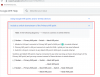
Here is exactly what Google said about including downstream switch for Google wifi system.


Untitled.png

My last reply.
 
Last edited:
It looks like I will be getting rid of the Edgerouter. I will hook a switch to the Google Primary wifi point and let Google do all the routing. I did not know that I could use wired devices with the Google system. I guess I should have studied a little more.
 
Probably a good idea overall. Sometimes jumping in is the best way to learn, and at least you asked the forum before spending too much time (hopefully) pulling your hair out.
 
Back
Top