• We’re currently investigating an issue related to the forum theme and styling that is impacting page layout and visual formatting. The problem has been identified, and we are actively working on a resolution. There is no impact to user data or functionality, this is strictly a front-end display issue. We’ll post an update once the fix has been deployed. Thanks for your patience while we get this sorted.

Build Complete New build not starting up

Stu99

Junior Member
I just put together a new build and it's not starting. I've built six other computers over the past 15 years but I'm no expert at this stuff. This is the first time I've never had one boot up for me. Not a good feeling.
I plug it in, turn on the power, nothing happens. I put the power button on my case and the RAM RGB lights up. That is the only thing that happens. No case fan, cpu cooler fan or video card fan fires up

I've double checked some of my cables, etc. Please advise! I need help.

Here are my components:
Motherboard: Gigatye Z790 Aorus Elite AX LGA 1700 with DDR5
Video: Gforce RTX 3070
Phanteks Enthoo Pro Case
Cooling: Corsair CW-9060060-WW ICUE H150I CPU cooler
Ram: G.Skill Trident Z5 Series DDR5 6400
Power: CORSAIR RMx Series (2021) RM1000x CP-9020201-NA 1000 W ATX12V / EPS12V SLI Ready CrossFire Ready 80 PLUS GOLD Certified ...
CPU: Iintle Core i9-14900K
M.2 Samsung 990 Pro 4TB
 
Unplug everything from the motherboard except the 24 pin and the 8 pin EPS. No USB, no front panel connectors, no audio. Also leave the PCI power cables for the GPU. Does it power on now? You will need to short the power switch with a screwdriver.
 
It sounds like the power supply to the motherboard possibly has a bad cable, isn't plugged into the right connector, or isn't maybe pushed on all the way? Your motherboard has the 24 pin and two 8 pin power connectors are all of those plugged in and working?
 
Unplug everything from the motherboard except the 24 pin and the 8 pin EPS. No USB, no front panel connectors, no audio. Also leave the PCI power cables for the GPU. Does it power on now? You will need to short the power switch with a screwdriver.
I did what you suggested. Only the MB is plugged into the PS. I still get the ram to light up but also get a yellow light on the MB and the on switch on the case lights up. Nothing else.
 
It sounds like the power supply to the motherboard possibly has a bad cable, isn't plugged into the right connector, or isn't maybe pushed on all the way? Your motherboard has the 24 pin and two 8 pin power connectors are all of those plugged in and working?
Yes, all three connections on the MB are plugged in. I have a volt meter but I'm not sure where to connect it to test for votage.
 
Can you take a picture of the yellow light on the motherboard? Also, if everything is unplugged there should be nothing lighting up the power button on the case.
 
Can you take a picture of the yellow light on the motherboard? Also, if everything is unplugged there should be nothing lighting up the power button on the case.
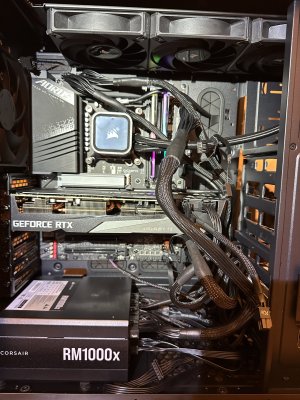
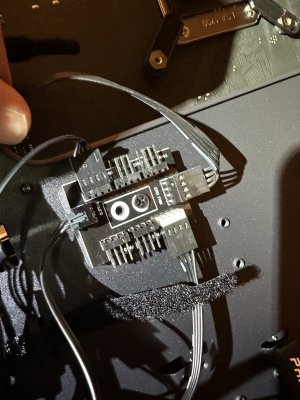
Unfortunately, the yellow light no longer comes on. I had unplugged all the power from the PS except the three MB power supplies. This case has a PWN fan header (new to me). The case fans were connected. I've connect it to power, etc.
 

Attachments

  • IMG_6938.jpg
    IMG_6938.jpg
    742.6 KB · Views: 17
  • IMG_6939.jpg
    IMG_6939.jpg
    495.9 KB · Views: 17
That worked! It started, all fans ran and took me to the bios. How to I troubleshoot the card?
Great! You could try a different cable from the PSU, or a different slot on the motherboard.

Edit double check the wiring on the GPU. Make sure it's a pcie cable. The one on the right in the picture above doesn't have a pigtail like I would expect it to.
 
I had the card in the top slot PCIEx16. I'll shut down and try to install it again. Any tips on troubleshooting the video card?
 
I now have questions about the water cooler. I'm worried because the rgb light is not on but the three fans are running. How can I tell if the pump is pumping?
 
You need to download the icue software from Corsair I believe to see the pump speed. You can also use your hand on the pump or tubing for a quick check.
 
I could not feel anything when I put my hand on the pump. Is it possible it is running but the light is out? I'm concerned that the CPU will overheat while installing windows if the pump is out.
You need to download the icue software from Corsair I believe to see the pump speed. You can also use your hand on the pump or tubing for a quick check.
i
 
I haven't installed a Corsair AIO, but I believe there is a SATA connector on the controller block for power. Do you have one connected?
 
I haven't installed a Corsair AIO, but I believe there is a SATA connector on the controller block for power. Do you have one connected?
Yes, the one sata connector powers both the pump and the three fans. I have it connected to the pump.
 
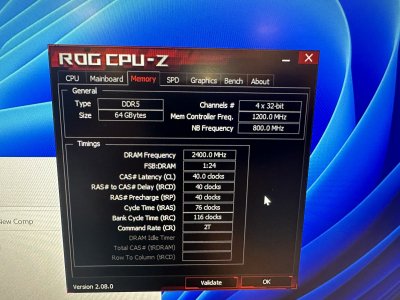
I finally got windows loaded. Ran CPUZ it does not say my RAM is set up as dual channel. I've got two 32 gig sticks, set up in the 2nd and 4th slot. Is this wrong for my mB?
 
I finally got windows loaded. Ran CPUZ it does not say my RAM is set up as dual channel. I've got two 32 gig sticks, set up in the 2nd and 4th slot. Is this wrong for my mB?
What does CPU-Z actually say on the memory tab? Recent versions don't always explicitly say "dual channel". For instance, mine says "2 x 64-bit"

2nd/4th slots (A2/B2) are correct per your motherboard manual.
 
See attached. This computer will be a workstation. I want to make sure I have all the best settings to get the most out of the CPU and memory without making it unstable or unreasonably hot with overclocking.
Any bios setting suggestions would be welcomed!
 

Attachments

  • IMG_6957.jpg
    IMG_6957.jpg
    830.1 KB · Views: 10
Back
Top