• We’re currently investigating an issue related to the forum theme and styling that is impacting page layout and visual formatting. The problem has been identified, and we are actively working on a resolution. There is no impact to user data or functionality, this is strictly a front-end display issue. We’ll post an update once the fix has been deployed. Thanks for your patience while we get this sorted.

ncix.com and Linux

Red Squirrel

No Lifer
For some reason, since I upgraded to Linux (Xubuntu) I cannot go to http://www.ncix.com/. It just sits there doing nothing. Has anyone ever noticed this with this or other sites? Is there some kind of scripting or what not the site could be using that I need a plug-in for? Just seems odd. It's the only site so far that I've found which does this. I can't see why an OS would have an effect on a site's ability to be rendered, it should be all done by the browser anyway.
 
Hmm, odd. Something with my machine specifically it does not seem to like then.

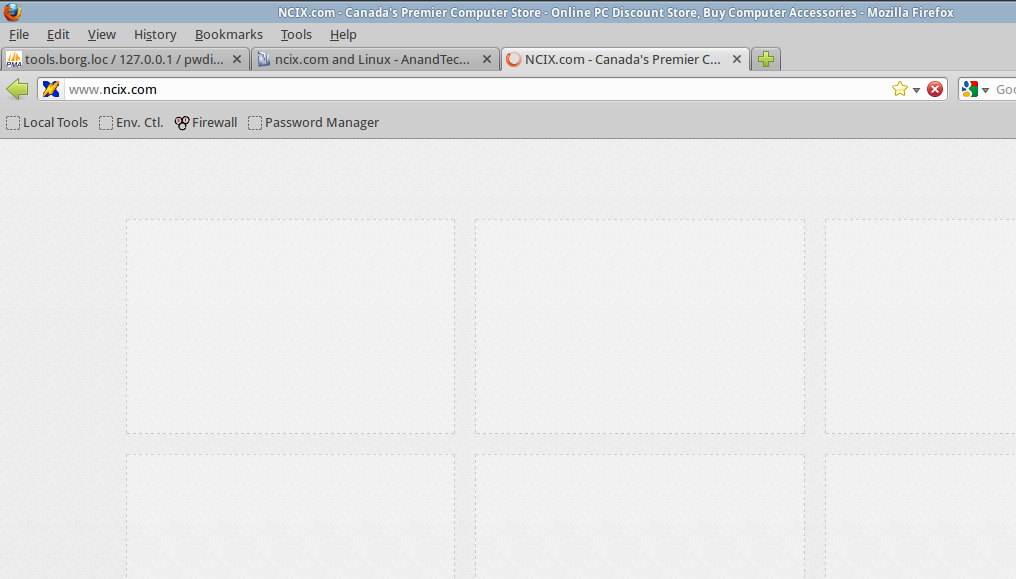
For me this is all I get:


It will just sit there forever and never load.

I tried in an XP VM and it loads fine. Trying in 7 but OMG that OS is soooooo slowwwww inside a VM. So it's kinda a bad test. I'll find out tomorrow. Still waiting for IE to load. I wont even attempt trying to install Firefox. Will be tedious just browsing to the network share to get to the installer.

I'm thinking I might have some kind of javascript thing turned off for safety that the NCIX site is coughing up on or something.
 
Have you tried different browsers? I gave up on Firefox, long ago.

Here's what I'm seeing in Chromium 21...


vindsl-desktop-11-jul-2012-1.png
 
It started working now, I have no idea why it was not working before. Maybe it was corrupted cache or something.
I run alpha/beta/testing apps, rc kernels, and dev releases exclusively.

When it comes to browsers, I set the prefs to auto delete everything (at close) except the history, and saved passwords.

You wouldn't believe how many problems that solves... 😉
 
Can also get to [us.]ncix.com just fine using Firefox 13.0.1 and Chromium 18.0.1025.151. Like VinDSL eluded too, it is probably a profile issue with Firefox. Try with a new profile:

Code:
 $ firefox -P, -ProfileManager
 
I'm starting to think FF under Linux just sucks. It's starting to act weird with Facebook too now, images no longer show up. Probably going to slowly start doing it to other sites too. Cleared cash and all that, still no go. Going to look into another browser. i don't like chrome's idea of wanting to store all my stuff in "the cloud" I like to do my own backups. What other browsers are worth looking into under Linux?
 
You've got some kind of issue, and I don't think it's Firefox. I've been using it under GNU/Linux since 2008, and aside from a couple squirrelly Nightly builds, I haven't had a bit of trouble. I can get to ncix fine with Iceweasel 13.0.1-2, and it works with my heavily restricted Tor browser, which is 10.0.5. I don't currently have any other versions installed, but I'd be confident enough to put down $100 saying any compatible version would work just as well.
 
What is the proper way to update FF in Linux? I don't see the option within FF itself, guessing I have to do it in the package manager but I don't see an update option. I may as well try that to make sure I'm on the right version. For NCIX, disabling adblock works. For facebook, that did not work. It's odd since Facebook worked fine yesterday when I uploaded some pics, now those pics as well as everyone else's don't show up.

Does this image work for you? https://fbcdn-sphotos-a.akamaihd.ne...480/541498_10150910321806583_1840155636_n.jpg

I get an apache error. It's like if some url writing script on facebook is not working and putting in wrong urls or something and it's only doing it for me. It's also doing the same thing in an XP VM, so I think the Facebook issue I'm having is not related. So maybe I DID solve the NCIX one by disabling adblock for it. I'm not realy that concerned about the FB one but still messed that it's not working for me. I know snort on my pfsense firewall used to cause me lot of grief by randomly blocking stuff but I disabled it a long time ago.

Edit: After clearing the cache a bunch of times, restarting the browser, clearing it again etc the problem seems to have gone away. Not sure for how long though.
 
Last edited:
What is the proper way to update FF in Linux? I don't see the option within FF itself, guessing I have to do it in the package manager but I don't see an update option.
Yea, that should be done in the package manager. I use Synaptic. Hit Reload, then Mark all upgrades, and if anything is available, it'll update. You can also compile from source, or download a binary package if you want to try a different version. If you use the binary, you can run it from the folder as-is, and it'll be semi portable. It'll use your existing profile, but with the updated binaries. That may cause erratic results, so I don't necessarily recommend it, but it's worked for me in the past. Finally, if you're on a *buntu, you can use a ppa from Mozilla to download more recent versions. That's how I ran nighlies on Ubuntu. I added their ppa to my sources list, and got the Nightly updates through the package manager.

No. I get this...

The requested URL "/hphotos-ak-ash3/s480x480/541498_10150910321806583_1840155636_n.jpg", is invalid.

Reference #9.57080f17.1342246929.15977f63

You may want to play around with the adblock lists. Maybe you're using one that's a little too aggressive. I don't recall having Adblock errors on sites. I may have, and just don't remember it. It's possible, but rare to non-existent for me. I'm using the EasyList filter.
 
I think I know what my issue may be. I have tendancy of just shutting down my PC with everything still open. I think this may cause corruption in some programs like Firefox. It always opens in "recovery mode" as if it had crashed. So think I need to close it before I shut down.

I also notice this weird issue that shows up once in a while where text randomly goes bold but if I highlight it it goes away.

I just tried NCIX again, and now it's doing the same, but if I hit enter several times in the address bar it eventually loads.
 
I think I know what my issue may be. I have tendancy of just shutting down my PC with everything still open. I think this may cause corruption in some programs like Firefox. It always opens in "recovery mode" as if it had crashed. So think I need to close it before I shut down.

I also notice this weird issue that shows up once in a while where text randomly goes bold but if I highlight it it goes away.

I just tried NCIX again, and now it's doing the same, but if I hit enter several times in the address bar it eventually loads.

So this whole time you've been effectively killing the app before it has a chance to properly flush anything it has in memory to disk? And you really expect things to work well like that?
 
I did it all the time in windows and I never had these issues. Guess the way apps in Linux close is just different. Is it even a problem to do that? I'm just grasping at straws here trying to figure out why my install is so messed up.
 
What is the proper way to update FF in Linux? I don't see the option within FF itself, guessing I have to do it in the package manager but I don't see an update option. I may as well try that to make sure I'm on the right version.

If using FF but not a derivative, like Iceweasel. FF updates are in Help=> About Firefox. A new window should show you what release you are using and if you need to update. You can have it automatically install updates if you want in: Preferences=> Advanced=> Update.

I think I know what my issue may be. I have tendancy of just shutting down my PC with everything still open. I think this may cause corruption in some programs like Firefox. It always opens in "recovery mode" as if it had crashed. So think I need to close it before I shut down.

I also notice this weird issue that shows up once in a while where text randomly goes bold but if I highlight it it goes away.

I just tried NCIX again, and now it's doing the same, but if I hit enter several times in the address bar it eventually loads.

Hitting enter several times to get NCIX to load is because you have not shutdown FF properly. This has happened to me when I need to shutdown X for whatever reason[mainly when testing stuff]. After entering X again, starting FF get that recovery screen and depending on the state FF was on when it was shutdown by X. Need to select the address bar and hit enter a few times, for some pages to load.

I did it all the time in windows and I never had these issues. Guess the way apps in Linux close is just different. Is it even a problem to do that? I'm just grasping at straws here trying to figure out why my install is so messed up.

You can get away with not shutting down things properly a few times. But if you do that all the time, expect things not to behave well.
 
I did it all the time in windows and I never had these issues. Guess the way apps in Linux close is just different. Is it even a problem to do that? I'm just grasping at straws here trying to figure out why my install is so messed up.

Windows apps have the same problem, it's just plain luck or ignorance if you haven't run into any issues from it. Outlook is a great example, whenever it crashes it normally will scan any PST or OST files it had open for errors much like a chkdsk.
 
Back
Top