• We’re currently investigating an issue related to the forum theme and styling that is impacting page layout and visual formatting. The problem has been identified, and we are actively working on a resolution. There is no impact to user data or functionality, this is strictly a front-end display issue. We’ll post an update once the fix has been deployed. Thanks for your patience while we get this sorted.

My laptop's wifi keeps dropping

swchoi89

Senior member
Hi everyone,

I bought my laptop almost exactly 5 years ago (specs in my signature). Recently I noticed that my wifi keeps dropping (randomly, sometimes it's good for 4 hours, sometimes only good for 10 minutes). Before it drops, I notice some SEVERE lag (my mouse doesn't move) for about 30 seconds, until all availble wifi networks disappear. Only way to fix it is either turn off wi-fi and reenable it or restart.

When I restart my computer, sometimes it also runs into blue screen of death.

Any one know how to fix this or is it time to buy another computer 🙁
 
If you are using it at home it could be your home router. I bought a Synology a year ago and our lives have changed. No more dropped wifi and I can watch movies.
 
Open up your laptop and clean it. You can also replace the nic.
This. It sounds like it's overheating, and thus needs a good dusting and clean-out, and probably re-pasting (possibly). Also, extended periods of high heat, can cause wifi adapters to shut down / disable / drop off the bus, and eventually, actually damage them. Consider replacing the wifi adapter, if possible, with something newer, better, faster, etc. Only issue is if your laptop is the type with a BIOS whitelist for wifi adapters, you might have issues replacing it then, unless you also want to delve into the murky world of "BIOS modding".
 
If you are using it at home it could be your home router. I bought a Synology a year ago and our lives have changed. No more dropped wifi and I can watch movies.
Could be, but that wouldn't explain his laptop blue-screening. Also, if the wifi network "disappears" from the list of networks, that's one thing, and probably the router's fault (or its power brick) as much as anything. But if ALL of the wifi networks disappear, or you get a "Red X" over the wifi icon, or the wifi disappears from Device Manager altogether, then that's probably the laptop (overheating) or the NIC (failing, overheating).
 
Could be, but that wouldn't explain his laptop blue-screening. Also, if the wifi network "disappears" from the list of networks, that's one thing, and probably the router's fault (or its power brick) as much as anything. But if ALL of the wifi networks disappear, or you get a "Red X" over the wifi icon, or the wifi disappears from Device Manager altogether, then that's probably the laptop (overheating) or the NIC (failing, overheating).
My thoughts also. I have other laptops connected to the router and they are all fine (just got new router from my ISP recently so yea)
 
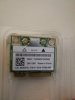
Too scared to open it but I guess I'll give it a go. What's a "nic"?
Network Interface Card. On laptops they look like this
IMG_20201012_113507.jpg


Remove your battery first and wait a few min if it is removable.

Search on youtube for how to open your laptop if the screws are not clearly visible on the back.
 
Back
Top