Monitor Setup: Multiple 1080p, or one big'o 4/5k?

Page 2 - Seeking answers? Join the AnandTech community: where nearly half-a-million members share solutions and discuss the latest tech.

What say you?

  • Multiple 1080p

    Votes: 5 19.2%
  • Single big arse 4/5k

    Votes: 13 50.0%
  • Neural link, you silly noob.

    Votes: 3 11.5%
  • One Ultra-wide

    Votes: 3 11.5%
  • Other (comment)

    Votes: 2 7.7%

  • Total voters
    26

SaltyNuts

Platinum Member
May 1, 2001
2,398
277
126
Thanks Viper GTS! I read somewhere they are not ideal for gaming - input lag and what not.
 

WhiteNoise

Golden Member
Jun 22, 2016
1,084
193
106
They are truly monitors. Multi client monitors with the ability to simultaneously display input from one to four sources in a variety of borderless layouts.

http://www.pcmag.com/review/346074/dell-43-ultra-hd-4k-multi-client-monitor-p4317q

I know first hand they can be had for low $9xx if you have enough buying power with Dell.

Viper GTS

The company i work for actually uses those in our mission control center. We do so much business with Dell that they brought in a film crew to film us in action. This was about 6 years or so ago. They used it in their marketing and even had us in a commercial of theirs to promote the DELL brand.
 

Red Squirrel

No Lifer
May 24, 2003
70,959
13,935
126
www.anyf.ca
Wait so that dell requires 4 inputs and basically acts like 4 monitors? Doesn't that kinda defeat the purpose though? I guess you don't get the bezel, but if you're going to use 4 outputs may as well go the extra mile and have 4 separate 4k monitors. :p

I still want to try to find a better OS/configuration that treats multi monitor better though, I hate how stuff opens where the hell it wants. Does this in Windows and in Linux. It's not so bad on a 2 monitor setup if the 2nd monitor is to the right as chances are stuff will open on the proper monitor, but in a triple monitor setup where the 2nd is primary I find some apps always want to open on the left one. Even with separate X sessions I've had stuff actually end up in the wrong X session! Crazy that OS devs have yet to figure out how to make this more intuitive. It's one of the things driving me to ditch multi monitor completely and do a single 4k. I don't have the money now though but with all the deals going on right now it's tempting to buy one anyway.
 

Viper GTS

Lifer
Oct 13, 1999
38,107
433
136
It doesn't require it, you can allocate the space in remarkably flexible ways (eg devote the top 3840x1080 to one input, and have two 1920x1080 on the bottom; make left or right 1920x2160 and have top/bottom 1920x1080, etc). Or you can simply drive the whole thing off one input as a single 4K.

They also have software that lets you control monitor modes via a system tray app you can switch modes without having to use the monitor GUI and jump from full 3840x2160 to a split mode without reconfiguring.

Very, very useful if you have multiple video sources you need to keep track of.

Viper GTS
 

Fenixgoon

Lifer
Jun 30, 2003
33,465
13,107
136
single 4k. you get much more in terms of area

1920*1080*3 (what i run) = 6.22MP
3840x2160 (4k) = 8.29MP

not quite 30% more area.
 

NoTine42

Golden Member
Sep 30, 2013
1,387
78
91
Wait so that dell requires 4 inputs and basically acts like 4 monitors? Doesn't that kinda defeat the purpose though? I guess you don't get the bezel, but if you're going to use 4 outputs may as well go the extra mile and have 4 separate 4k monitors. :p

I still want to try to find a better OS/configuration that treats multi monitor better though, I hate how stuff opens where the hell it wants. Does this in Windows and in Linux. It's not so bad on a 2 monitor setup if the 2nd monitor is to the right as chances are stuff will open on the proper monitor, but in a triple monitor setup where the 2nd is primary I find some apps always want to open on the left one. Even with separate X sessions I've had stuff actually end up in the wrong X session! Crazy that OS devs have yet to figure out how to make this more intuitive. It's one of the things driving me to ditch multi monitor completely and do a single 4k. I don't have the money now though but with all the deals going on right now it's tempting to buy one anyway.
You aren't running one of these?
:D
14-133-623-12.jpg
 

Red Squirrel

No Lifer
May 24, 2003
70,959
13,935
126
www.anyf.ca
You aren't running one of these?
:D
14-133-623-12.jpg

The video card is not the issue, it's the fact that OS environments are designed shitty when it comes to multi monitors. It's something most people just live with but it kinda gets on my nerves how stuff opens wherever it wants. Not so bad for environments like NOCs where once you open it it does not move though for the type of stuff I do at work I've been leaning towards single 4k to get rid of the annoyance of how OSes handle multi monitor. (Windows and Linux are equally bad)

Though I could use a couple of those and the monitors to go with it at work if they made slim versions that fit in a low profile business class machine. :p Not that they'd ever buy us that, they won't even buy us stationary lol.
 

SketchMaster

Diamond Member
Feb 23, 2005
3,100
149
116
I'm really liking the idea of a 4k TV as a new monitor. Anyone have any good recommendations/experiences? Ideally, I'd like to keep the total cost under $1000 with ~$500 being "smash buy button". As far as size, 40"-45" is what I'm leaning towards and don't want to go any larger than 55".

Usage:
  • 25% Gaming - Shooters like BF1, though I'm non-competitive and just play for the lulz
  • 25% Content creation - Adobe creative cloud for video editing and photo editing (both hobbies)
  • 50% Productivity - School work, remoting into the office (sys admin), research, and fiddling with VMs
System:
  • i7 5820K, 32GB RAM, GTX 1070
The LG OLED TVs are really tempting, but the input lag issues are worrying. There are warm fuzzies that LG is working on a patch, but no word on how much it'll help.
 

Carson Dyle

Diamond Member
Jul 2, 2012
8,173
524
126
If it's not for gaming or your primary means of watching TV and movies - that is, if it's actually for the purpose of doing work - I prefer three monitors that can be wrapped around.
 

jlee

Lifer
Sep 12, 2001
48,518
223
106
I'm really liking the idea of a 4k TV as a new monitor. Anyone have any good recommendations/experiences? Ideally, I'd like to keep the total cost under $1000 with ~$500 being "smash buy button". As far as size, 40"-45" is what I'm leaning towards and don't want to go any larger than 55".

Usage:
  • 25% Gaming - Shooters like BF1, though I'm non-competitive and just play for the lulz
  • 25% Content creation - Adobe creative cloud for video editing and photo editing (both hobbies)
  • 50% Productivity - School work, remoting into the office (sys admin), research, and fiddling with VMs
System:
  • i7 5820K, 32GB RAM, GTX 1070
The LG OLED TVs are really tempting, but the input lag issues are worrying. There are warm fuzzies that LG is working on a patch, but no word on how much it'll help.

Whatever you get, make sure it supports 4:4:4 full chroma at 4k/60hz.
 
  • Like
Reactions: SketchMaster

SketchMaster

Diamond Member
Feb 23, 2005
3,100
149
116
Picked up a Sony X850D 55" from Bestbuy to test drive.

After playing with it for an evening, it'll likely be going back to the store tomorrow.

I used a trail of Displayfusion to split the display into six virtual screens. At first, I was enjoying having the screen sectioned off into working areas. However, I soon started to miss the physical separation of multiple monitors as it felt like my screen was becoming cluttered with things all vying for my attention. I can totally see how some people love the seamless borders and freedom that a large 4k screen offers, but it may not be for me.

I can also say that 55" is just too large for me, maybe I'd like a 45"-50" curved screen so it doesn't have me feeling so dwarfed by my desktop. It's like I'm misplacing things on my screen because there's so much area in front of me.

Gaming was another disappointment. I knew that 4K would be a bit too much to ask from a GTX 1070, so I set up a custom resolution for 1920x1080@100Hz (120 had strange artifacts). the 100Hz was great, but the image was blurred in Battlefield 1 and the desktop. Turning gfx scaling up to 200% in BF1 helped to clean things up, but not enough to make me happy. I'm unsure if there is a setting in my TV that I need to turn on/off, but so far I haven't found anything that helped.

To sum up, I'm just not enjoying a 4k TV as a monitor. Maybe a decent 30"-35" 4k computer display with a 1080p/1440 on either side to hold extras/game on.

The hunt continues....
 
Last edited:

Kaido

Elite Member & Kitchen Overlord
Feb 14, 2004
51,966
7,413
136
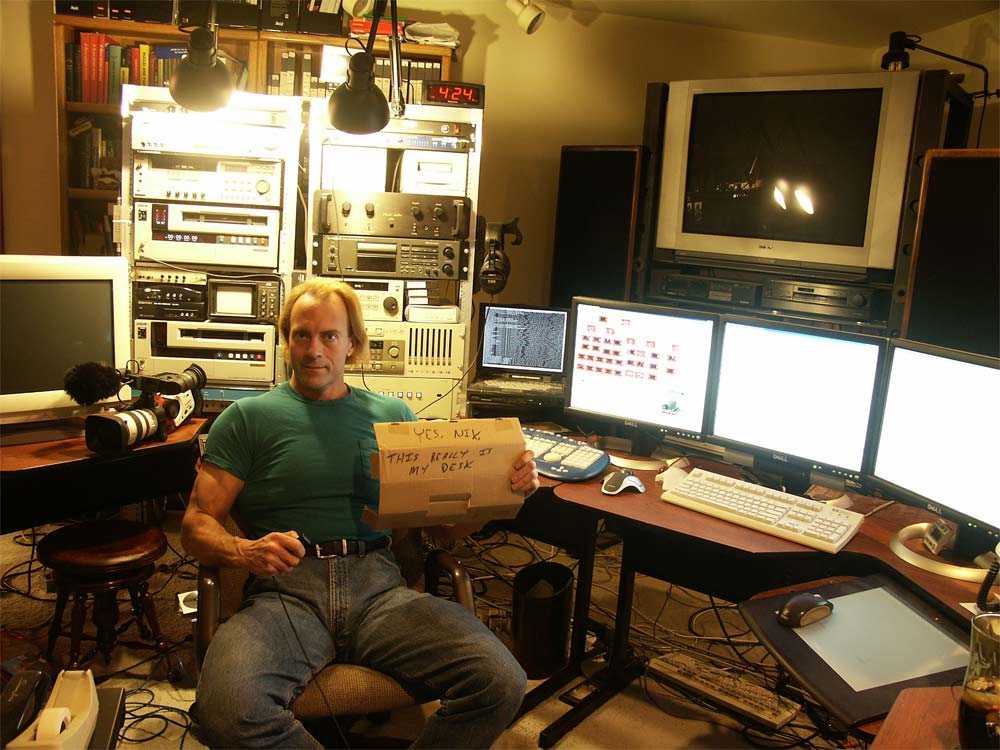
Still a classic. I was sooooo jelly of his Canon XL1.

That was a beast back in the day!

It's amazing what you can do these days though...they had a shootout between an iPhone 7 Plus & a $50k RED camera and in 90% of the shots, nobody could tell a difference:

http://www.ubergizmo.com/2016/12/iphone-7-plus-vs-red-weapon/

My video projects have changed vastly over the past few years...I started out with MiniDV (thank goodness those days are over) & currently do most of my shooting on my iPhone SE with an amamorphic lens adapter. I have "better" camera equipment, but this setup is so portable and looks just as good in most cases that I don't bother using it, haha.
 
  • Like
Reactions: SketchMaster

Red Squirrel

No Lifer
May 24, 2003
70,959
13,935
126
www.anyf.ca
Speaking of sectioning off, in Linux there are Window managers called "tiling window managers" and they work in that instead of windows you have sections. You can open/close them at will and resize as you open programs. I tried it, but not sure if I could get used to that, but it's an interesting approach. What I'd like is to have the centre monitor be standard, but the side ones be tiling, but not sure if that's doable.
 

Carson Dyle

Diamond Member
Jul 2, 2012
8,173
524
126
I can also say that 55" is just too large for me, maybe I'd like a 45"-50" curved screen so it doesn't have me feeling so dwarfed by my desktop. It's like I'm misplacing things on my screen because there's so much area in front of me.

You actually placed a 55" monitor on your desk? That's like sitting in the front row of the movie theater. You do that once when you're 11 years old and you learn your lesson.
 

SketchMaster

Diamond Member
Feb 23, 2005
3,100
149
116
TBH, I can see the draw of a 50-55" 4k screen. With Displayfusion it's like having six monitors glued together. I'm sure there are many people out there who find that setup very attractive. Also, the TV I got is flat. A curved screen would likely be much more easy to seat near and work on.
 

Chapbass

Diamond Member
May 31, 2004
3,147
96
91
I'm using a 34" ultrawide 3440x1440 with a 24" 1080p on either side. Love it. At some point I'd want to upgrade the sides to 27" 1440p to match up the height, but honestly it isn't bothering me as much as I thought it would.