EgonKowalski
Junior Member
After starting Windows 10 Pro 22H2 64-bit, I noticed that the Windows Defender icon was missing from the system tray, although the Windows Defender service itself was running normally. The following workaround helped:
[quote[Hi All,
Since I couldn't get a fix for my Windows Security icon not showing in the system tray problem resolved from Microsoft Accessibility or anywhere else, I made a work around, again, not a fix, but a work around for this problem if any one encounters the same crap.
Use the file path below to go to this file and create a desktop shortcut.
C:\Windows\System32\SecurityHealthSystray.exe
Now with the shortcut on your desktop, copy it and paste the copy in your Startup folder following the file path below.
C:\Users\YourName\Start Menu\Programs\Startup"
Now the System Tray file will run when you start / reboot your computer and show in the system tray.
Take care. Mike. Sent from my iBarstool. Go Dodgers![/quote]
This solution was found on Google
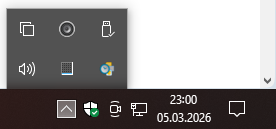
However, I want the Windows Defender icon in the system tray to appear higher up with the other tray icons, as it normally does in Windows. Currently, the Windows Defender icon appears at the very bottom of the system tray in the Start menu, instead of being hidden behind the “^” (show hidden icons) arrow.
[quote[Hi All,
Since I couldn't get a fix for my Windows Security icon not showing in the system tray problem resolved from Microsoft Accessibility or anywhere else, I made a work around, again, not a fix, but a work around for this problem if any one encounters the same crap.
Use the file path below to go to this file and create a desktop shortcut.
C:\Windows\System32\SecurityHealthSystray.exe
Now with the shortcut on your desktop, copy it and paste the copy in your Startup folder following the file path below.
C:\Users\YourName\Start Menu\Programs\Startup"
Now the System Tray file will run when you start / reboot your computer and show in the system tray.
Take care. Mike. Sent from my iBarstool. Go Dodgers![/quote]
This solution was found on Google
However, I want the Windows Defender icon in the system tray to appear higher up with the other tray icons, as it normally does in Windows. Currently, the Windows Defender icon appears at the very bottom of the system tray in the Start menu, instead of being hidden behind the “^” (show hidden icons) arrow.