• We’re currently investigating an issue related to the forum theme and styling that is impacting page layout and visual formatting. The problem has been identified, and we are actively working on a resolution. There is no impact to user data or functionality, this is strictly a front-end display issue. We’ll post an update once the fix has been deployed. Thanks for your patience while we get this sorted.

Mirror's Edge Catalyst Benchmarks Megathread

Bacon1

Diamond Member
Since the other thread for Mirrors Edge is purely about Hyper settings as stated by OP, lets list all the benchmarks in here instead.

c513CMX.jpg


2016-06-091mdsov.jpg


BK7vWO2.jpg


xfiubvw.jpg


http://www.computerbase.de/2016-06/mirrors-edge-catalyst-benchmark/

08111440390l.jpg


08111457675l.jpg


08111512830l.jpg


08111547219l.jpg


http://www.overclock3d.net/reviews/gpu_displays/mirror_s_edge_catalyst_pc_performance_review/1
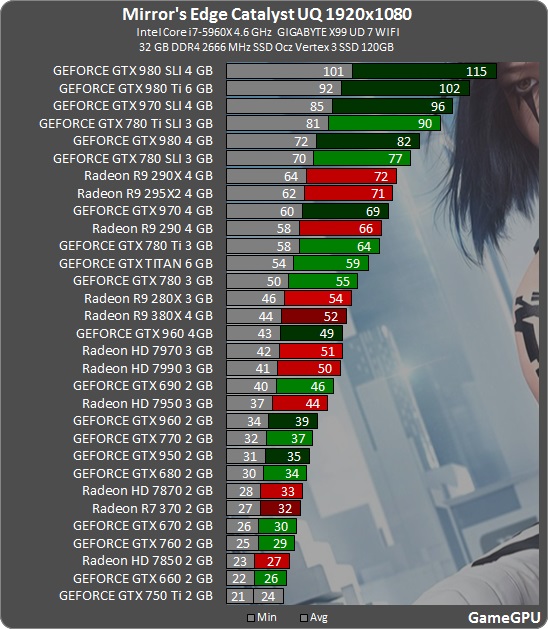
MirrorsEdgeCatalyst_1920.jpg


MirrorsEdgeCatalyst_2560.jpg


http://gamegpu.com/action-/-fps-/-tps/mirror-s-edge-catalyst-test-gpu

GamersNexus numbers look to be completely wrong

http://www.gamersnexus.net/game-ben...st-graphics-card-benchmark-gtx-1080-1070-390x


Digital Foundry Video Review:


https://www.youtube.com/watch?v=Bm5ZCJah-FY

970 Hyper gets under 20fps @ 1080p

390 Hyper @ 1080p - ~40-60fps depending on area

Video Settings / PC vs Xbox One vs PS4:

https://www.youtube.com/watch?v=LBqtw4gKEJs

PcGamingWiki Review:

http://community.pcgamingwiki.com/p...-reports/pc-report-mirrors-edge-catalyst-r195
 
Last edited:
08111528138l.jpg


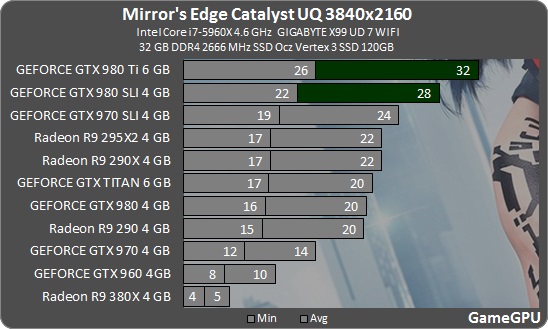
MirrorsEdgeCatalyst_3840.jpg


ComputerBase / Oveclock3D about Ultra settings (not Hyper):

Who uses Ultra, on the other hand comes with four gigabytes in 1,920 × 1,080 (two gigabytes is not enough), the same applies to 2,560 × 1,440. But for Ultra HD, it must also be more, otherwise show up from time to time unpleasant stuttering. By default, a protective function in the option menu is active, shut down the only details automatically when memory shortage. The function is switched off for all tests.

You could see in our 4K testing that the R9 Fury X had significant performance dips at Ultra or Higher settings and you can see why when looking at this table here. With our GTX 980Ti we see the game using well over 4GB of VRAM, explaining why AMD's R9 Fury X stuggles here. To play at 4K it is clear that future high-end GPUs will need a lot more VRAM, as AMD's current flagship is limited by it's 4GB framebuffer.
 
Last edited:
Yes nothing says fun like 30 fps max while rolling and jumping off buildings. No one will be playing 4k w/Ultra.
 
Thanks. I'm tempted to pick this one up for irrational reasons (didn't finish the first). If overclock3d benchmarks hold true for the game as a whole it looks like smooth 60fps+ at Ultra 1440P. Shadows are something I often turn down for higher framerates anyway, and that's what I notice the most improved in Hyper.
 
08111528138l.jpg


MirrorsEdgeCatalyst_3840.jpg


ComputerBase about Ultra settings (not Hyper):

So basically the conclusion would be that Hyper settings are only an issue on 4GB if you also run it at 4K resolution, seeing as Fury X does just fine at 1440P (even beating the 980 Ti by 10%:

08111512830l.jpg


Combine this with the fact that none of the 4GB cards have the horsepower to drive 4K plus hyper settings in the first place, and it's effectively a non issue. This also goes for the generation of GPUs coming out right now (i.e. RX 480 and potentially GP106), since none of those will have more horsepower than a Fury X.

Maybe when we get to 10nm, there will be 4GB GPUs with enough horsepower that 4GB is an issue.
 
So basically the conclusion would be that Hyper settings are only an issue on 4GB if you also run it at 4K resolution, seeing as Fury X does just fine at 1440P (even beating the 980 Ti by 10%:

Actually both Gamers Nexus and ComputerBase managed to run the game at Hyper @ 1080P/1440P with 4GB VGAs, the latter even got better average FPS than an 8GB Radeon R9 390. The problem according to them is instability and not running smoothly, despite what the framerate suggests.

The Fury X and GTX 970 refused to run with any stability – we think that's a VRAM limitation – and so the chart only shows the 390X, 1080, 980 Ti, and 1070. All of these cards have 8GB of VRAM, except the 980 Ti and its 6GB.

The Radeon R9 390 easy to lose 25 percent higher and the Radeon R9 Fury X 27 percent. The latter has the problem that the four gigabyte memory is no longer sufficient. The FPS-loss thereby is indeed low, but the game not running smoothly.

GameGPU goes one step further, claiming even Geforce GTX 980 Ti has problems:

Maximum setting Hyper in the test have not been used, since their activation RAM and memory consumption increases many times that even in failure for the GTX 980 Ti with its 6 gigabytes

Hyper discussion belongs to the other thread, otherwise this thread should be locked.
 
Last edited:
CB.de.Why is 980TI so slow?Nv already gimping maxell in drivers or what?
1080 is 40% faster than 980TI.
2016-06-091mdsov.jpg
 
Last edited:
not missing anything between ultra and hyper except fps I guess. Nothing else significant. Soon nvidia will complete their master plan of convincing people just losing FPS is worth getting high end cards for.

Get a 1080 to unnecessarily lose fps in mirrors edge with the all new hyper setting.
 
Why does the 1070 fall off so much at 4K? Or is Fury X just better as the rez goes up.

Fury X just gets better as the resolution increases. The 1070 doesn't really fall off much at all if you actually break down the numbers.

The 1070 is:

80.21% of 1080 at 1080
79.95% of 1080 at 1440
77.44% of 1080 at 4K

Fury X has always done comparatively better at higher resolutions, so it's not a surprise to see it make up ground here either.
 
Fury X just gets better as the resolution increases. The 1070 doesn't really fall off much at all if you actually break down the numbers.

The 1070 is:

80.21% of 1080 at 1080
79.95% of 1080 at 1440
77.44% of 1080 at 4K

Fury X has always done comparatively better at higher resolutions, so it's not a surprise to see it make up ground here either.

Yep

Fury X compared to 1080:
65% @ 1080p
76% @ 1440p
80% @ 4k

Fury X being 80% of a 1080 @ 4k in DX11 is pretty damn good I'd say.
 
This is a really lazy "Hyper", they could have added better textures for every asset instead and the game would be obviously better IQ. Here, they just increased the LOD distance for shadowmap and reflections, but it's so far away you can barely discern the details.
 
Can't see much difference in the screens between Hyper and the other higher levels. More of a marketing gimmick than anything. Still nothing able to hold 60fps at 4k either. I would expect (hope) that the coming big chips from AMD / Nvidia can do it and we can realistically start looking at single card setups for full 4k gaming.

p.s. when are gamegpu going to get something better than a 290X?
 
I had thought about that, but it's completely missing from the bottom.

Real question is though, why have we gone from hard shadows -> soft shadows and now back to hard shadows as being premium?


Ha! I thought the same thing
They look far less realistic to me in this comparison at least


http://www.pcgameshardware.de/commoncfm/comparison/indexb2.cfm?id=132736


If i had to guess, I'd say this hyper setting is designed to specifically target the glass jaws of every 28nm product on the market.
I suspected as much when I saw that greatly increased shadow draw distance was part of the package.

http://www.pcgameshardware.de/commoncfm/comparison/indexb2.cfm?id=132733

http://www.pcgameshardware.de/commoncfm/comparison/indexb2.cfm?id=132734

In my recent experience with tweaking settings on games to achieve a solid 1440p 60 FPS on my 390X I've found shadow draw distance to be one of the usual suspects when it comes to managing sudden framerate dips.

In Fallout 4 going from medium to high shadow draw distance is literally the difference between 1080p 60fps and 1440p 60fps with all other settings unchanged(Godrays off everything else maxed), I'm not even kidding you.

All these Hyper settings seem like things that require a ton more drawcalls and extra framebuffer for very little IQ improvement.
It's hard not to speculate that they are just added to create an arbitrary higher level of settings that make current cards seem like that cant keep up anymore.
 
Last edited:
CB.de.Why is 980TI so slow?Nv already gimping maxell in drivers or what?
1080 is 40% faster than 980TI.
2016-06-091mdsov.jpg

Is this game DX12? That's the biggest gap between 980 TI and 1080 I've seen yet. Seems the 1440P bench from computerbase was not done at Hyper but Ultra so VRAM issues should not have come into play here either.
 
Actually both Gamers Nexus and ComputerBase managed to run the game at Hyper @ 1080P/1440P with 4GB VGAs, the latter even got better average FPS than an 8GB Radeon R9 390. The problem according to them is instability and not running smoothly, despite what the framerate suggests.

Gamers Nexus results can pretty much be ignored since they are apparently the only ones who can't manage to get the game to run on those GPUs.

Computerbase's comments are certainly a bit worrisome, but it doesn't seem to line up with what a lot of people are actually experiencing (plenty of people with 4GB reports the game as running just fine).

It would be really nice if we could actually get some FCAT benches for the game.
 
Back
Top