
-
We’re currently investigating an issue related to the forum theme and styling that is impacting page layout and visual formatting. The problem has been identified, and we are actively working on a resolution. There is no impact to user data or functionality, this is strictly a front-end display issue. We’ll post an update once the fix has been deployed. Thanks for your patience while we get this sorted.
You are using an out of date browser. It may not display this or other websites correctly.
You should upgrade or use an alternative browser.
You should upgrade or use an alternative browser.
Question M.2 cards
- Thread starter Kledgie
- Start date
Tech Junky
Diamond Member
They should last at least 5 years if you buy decent ones. Using CDI though you can view the wear stats. The use on mine would last about 20 years.
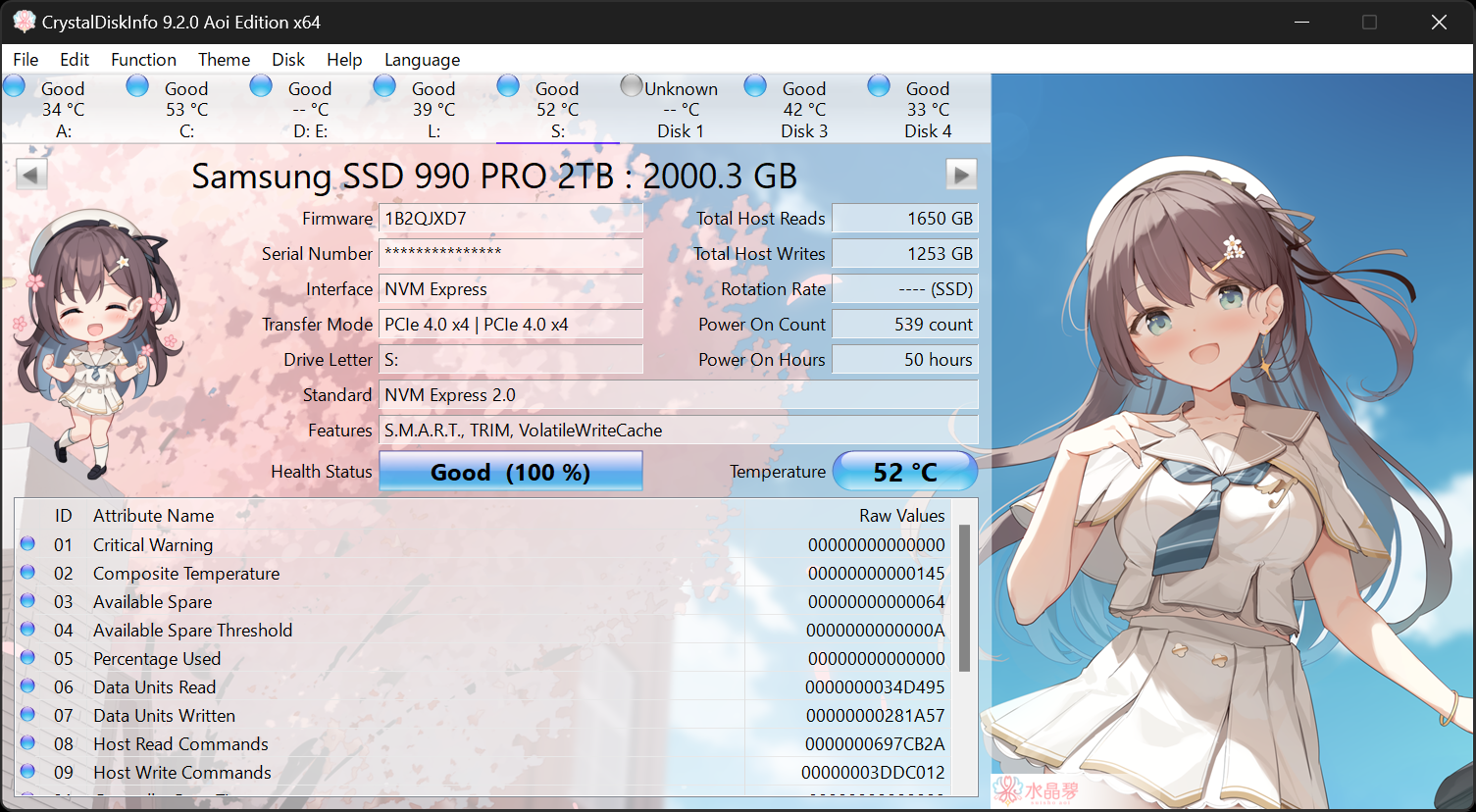
CrystalDiskInfo
About CrystalDiskInfo A HDD/SSD utility software which supports a part of USB, Intel RAID and NVMe. Aoi Edition Standard Edition Shizuku Edition Kurei Kei Edition Download System Requirements OS Windows XP/Vista/7/8/8.1/10/11Windows Server 2003/2008/2012/2016/2019/2022/2025 Architecture...
crystalmark.info
Thx so much for the reply! Not bad.They should last at least 5 years if you buy decent ones. Using CDI though you can view the wear stats. The use on mine would last about 20 years.
CrystalDiskInfo
About CrystalDiskInfo A HDD/SSD utility software which supports a part of USB, Intel RAID and NVMe. Aoi Edition Standard Edition Shizuku Edition Kurei Kei Edition Download System Requirements OS Windows XP/Vista/7/8/8.1/10/11Windows Server 2003/2008/2012/2016/2019/2022/2025 Architecture...crystalmark.info
Tech Junky
Diamond Member
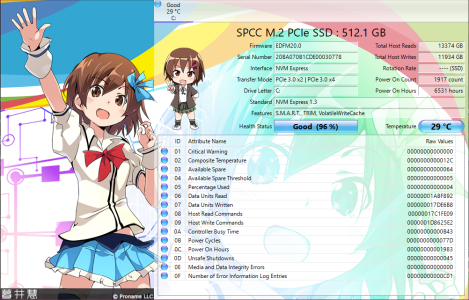
The one note is this must be a 1st gen 3 drive as it's only using 2 lanes. Upgrading would net you more speed. But that also depends on your system and needs. Considering 1TB drives are cheap ~$50 it would be worthwhile to swap.
Ah! Yep, must be 1st gen. What do you recommend. Any links appreciated!The one note is this must be a 1st gen 3 drive as it's only using 2 lanes. Upgrading would net you more speed. But that also depends on your system and needs. Considering 1TB drives are cheap ~$50 it would be worthwhile to swap.
Tech Junky
Diamond Member
I use WD right now the sn850 or sn770 are both good options... PCPartPicker.com will give you tons of options and compared prices easily.
Insert_Nickname
Diamond Member
The new SN580 too. If it nets you a larger capacity, I'd choose it over a lower capacity performance drive.I use WD right now the sn850 or sn770 are both good options...
Tech Junky
Diamond Member
Mainly the X4 portion. If there's not much difference in price then going Gen 4 means you can reuse it with a new system that has Gen 4.Copy that. Thx guys. So what I want is
Gen4 x4?

BFG10K
Lifer
Safe from what? NVMe drives aren't sausages that rot on a shelf.Would you buy a new one to be safe or should I just reformat and ride?
As long as you have regular backups (which you should have regardless of how new the drive is), just keep using it until it dies or you notice obvious problems.

bba-tcg
Golden Member
Under transfer mode, the first parameter is current mode, the second is what it's capable of, so there's some other reason for it to be x2 - probably slot or motherboard.The one note is this must be a 1st gen 3 drive as it's only using 2 lanes. Upgrading would net you more speed. But that also depends on your system and needs. Considering 1TB drives are cheap ~$50 it would be worthwhile to swap.
Tech Junky
Diamond Member
Good print. I was figuring current / slot capabilities.Under transfer mode, the first parameter is current mode, the second is what it's capable of, so there's some other reason for it to be x2 - probably slot or motherboard.
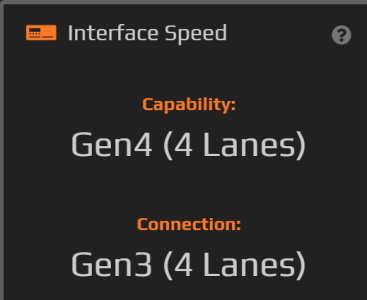
Running my sn770 in a Gen 3 slot shows the drive is Gen 4 I the WD dashboard. There are some drives though that are gimped from the early releases that only run at 1500 instead of 3000. I would say maybe some model info would help as well as system model would be helpful @Kledgie
bba-tcg
Golden Member
I have a gen 3 drive in a gen 5 slot and CrystalDiskInfo shows gen3 x 4 for both parameters. Nothing about the gen5 x 4 capabilities of the slot. The model info is in the screenshot.Good print. I was figuring current / slot capabilities.
Running my sn770 in a Gen 3 slot shows the drive is Gen 4 I the WD dashboard. There are some drives though that are gimped from the early releases that only run at 1500 instead of 3000. I would say maybe some model info would help as well as system model would be helpful @Kledgie
Good point. and lol @ the sausage guyGood print. I was figuring current / slot capabilities.
View attachment 83751
Running my sn770 in a Gen 3 slot shows the drive is Gen 4 I the WD dashboard. There are some drives though that are gimped from the early releases that only run at 1500 instead of 3000. I would say maybe some model info would help as well as system model would be helpful @Kledgie

These are the SSD and mobo in my build:
Thx for pointing that out.Under transfer mode, the first parameter is current mode, the second is what it's capable of, so there's some other reason for it to be x2 - probably slot or motherboard.
bba-tcg
Golden Member
Odd to add to a post after quoted.... but a completely different program, obviously with different parameters.Good print. I was figuring current / slot capabilities.
View attachment 83751
Running my sn770 in a Gen 3 slot shows the drive is Gen 4 I the WD dashboard. There are some drives though that are gimped from the early releases that only run at 1500 instead of 3000. I would say maybe some model info would help as well as system model would be helpful @Kledgie
Tech Junky
Diamond Member
Ok, so your mobo only does x2. You would need a new mobo to get more speed. So, no need for a new drive.
Copy that! I'll keep chugging along then. Thx guys.Ok, so your mobo only does x2. You would need a new mobo to get more speed. So, no need for a new drive.
TRENDING THREADS
-
 Discussion Zen 5 Speculation (EPYC Turin and Strix Point/Granite Ridge - Ryzen 9000)
- Started by DisEnchantment
- Replies: 25K
-
Discussion Intel Meteor, Arrow, Lunar & Panther Lakes + WCL Discussion Threads
- Started by Tigerick
- Replies: 25K
-
 Discussion Intel current and future Lakes & Rapids thread
- Started by TheF34RChannel
- Replies: 24K
-

-
