• We’re currently investigating an issue related to the forum theme and styling that is impacting page layout and visual formatting. The problem has been identified, and we are actively working on a resolution. There is no impact to user data or functionality, this is strictly a front-end display issue. We’ll post an update once the fix has been deployed. Thanks for your patience while we get this sorted.

Latest MacOs on VM or XCode on 2008 iMac

YuliApp

Senior member
Hi,

1) does anybody have an experience on installing latest MacOs on VM? I found many guides on the net but none really been working with most recent VMWare Player.

2) I have a 2008 iMac with El Captain and need to run xcode 9. Is there any way beyond "not possible".?

Thank You in advance
Y
 
Thank you...

i think i tried that one too, just was saying some virtualization part is missing (some kind of ID or so) and was working only on old VMWare...
It was on Windows 8.1 Pro
 
Thank you...

i think i tried that one too, just was saying some virtualization part is missing (some kind of ID or so) and was working only on old VMWare...
It was on Windows 8.1 Pro

On a computer of that age it's most likely missing VT-d support. That generation of processor isn't supported by the latest version of any of VMWare's products, you would have to go at least one major revision back.
 
i think it was that yes, i forgot to take a screenshot. It is I3 4030U, but i can manage other laptop if that is the only issue.
What means major revision back?
I just need to code on iOS9 Apps so whatever works...
Thanks, Yuli
 
i think it was that yes, i forgot to take a screenshot. It is I3 4030U, but i can manage other laptop if that is the only issue.
What means major revision back?
I just need to code on iOS9 Apps so whatever works...
Thanks, Yuli

That processor support VT-x, it might need to be enabled in the BIOS. Would need the specific error to determine what exactly is wrong.
 
2) I have a 2008 iMac with El Captain and need to run xcode 9. Is there any way beyond "not possible".?
Is that iMac8,1? If so, it will run macOS 10.13 via a patched OS installer.

http://dosdude1.com/highsierra/

The only issue is that macOS 10.13 High Sierra is not compatible with some of the WiFi modules of that era. If you don't need WiFi, then that's not a problem for you, but if you do need WiFi, you have to check which module you have to see if it's compatible. It's in the System Profiler under the WiFi section. These WiFi modules are not compatible with High Sierra:

- (0x14E4, 0x8C)
- (0x14E4, 0x9D)
- (0x14E4, 0x87)
- (0x14E4, 0x88)
- (0x14E4, 0x8B)
- (0x14E4, 0x89)
- (0x14E4, 0x90)

If you do have one of the offending WiFi modules, your options are just to use Ethernet, or else buy a compatible module off eBay and install it yourself. Or else you can just use a USB WiFi adapter. There are a few out there that have Mac drivers.
 
I have an ethernet, do not use WiFi, but it seems to be 8.0. Not sure how to check it reliably.
There is no such thing as iMac 8.0. It's iMac8,1 or something like that.

Check in the System Profiler.

20131116_2006imacupgrade_8.png


Here are the specs for iMac8,1:

https://everymac.com/ultimate-mac-lookup/?search_keywords=iMac8,1

If you have iMac8,1, you can install 10.12 using this:

http://dosdude1.com/sierrapatch.html

Or else 10.13 using this:

http://dosdude1.com/highsierra/
 
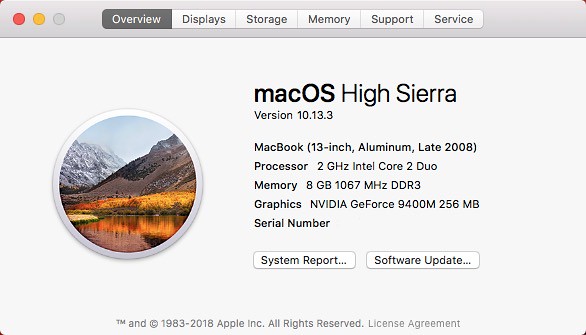
This is my 2008 MacBook5,1 running 10.13 High Sierra:

39034881355_b040ff1bf9_z.jpg


Like your iMac8,1, it is only officially supported up to 10.11 El Capitan.
 
Back
Top