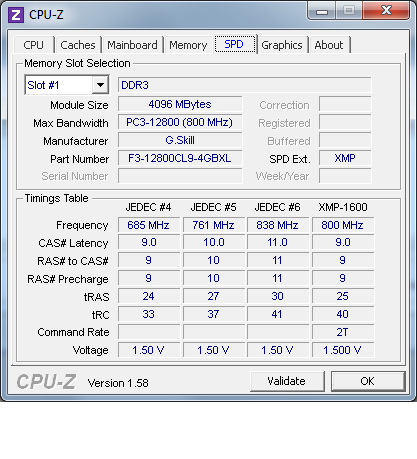
Is there something wrong with my ram?

hunkeelin

Senior member
Feb 14, 2012
275
1
0
well as my rig stated, my ram is

g skill z series 1600 (12800) 32gb kit quad 9-9-9-24'

however for some reason when i open up my cpuz and check my ram.

i get these

dram frequency: 800mHz
latancy 11-11-11-28

isn't my frequency should be 1600mHz and my latency should be 9-9-9-24? am i missing something here?
 

Idontcare

Elite Member
Oct 10, 1999
21,110
64
91
The frequency is right, your ram does not operate at 1600MHz, it operates at 800MHz but uses clock signal tricks to maximize the data that can be transfered in each clock cycle.

The timings are loose though, the 11-11-11-28 is what your BIOS has implemented, you could go into your BIOS and tighten the timings to 9-9-9-24 if you wanted.

The BIOS won't always implement the specs for the ram. Often times it is up to the end user to do that.
 

toyota

Lifer
Apr 15, 2001
12,957
1
0
cant he just select the XMP profile in the BIOS? that should make it run at the advertised settings.


EDIT: speaking of which, I have a question about that. in CPU-Z under the memory tab it shows my ram as 9-9-9-24 like it should be but under the SPD tab it says my XMP profile is 9-9-9-25. :confused:


Last edited:

Charlie98

Diamond Member
Nov 6, 2011
6,298
64
91
well as my rig stated, my ram is

g skill z series 1600 (12800) 32gb kit quad 9-9-9-24'

however for some reason when i open up my cpuz and check my ram.

i get these

dram frequency: 800mHz
latancy 11-11-11-28

isn't my frequency should be 1600mHz and my latency should be 9-9-9-24? am i missing something here?


That's funny, my G.Skill is showing that, too.... Off to the BIOS we go...

EDIT: XMP did indeed fix it!
 
Last edited:

Idontcare

Elite Member
Oct 10, 1999
21,110
64
91
cant he just select the XMP profile in the BIOS? that should make it run at the advertised settings.


EDIT: speaking of which, I have a question about that. in CPU-Z under the memory tab it shows my ram as 9-9-9-24 like it should be but under the SPD tab it says my XMP profile is 9-9-9-25. :confused:


Just be careful when enabling XMP in the BIOS because not all mobo makers adhere to implementing the SPD settings verbatim.

For example, my ASUS MIVE-Z, if I enable XMP in the BIOS then it will change the Vdram from 1.5V to 1.65V automatically.

The thing is, 1.65V is not in the SPD for my ram, my ram isn't even spec'ed for 1.65V operation (its 1.5V spec'ed at all SPD and XMP settings), and of course my Sandy Bridge is also spec'ed as not being ok with 1.65V.

Yet my MIVE-Z bios will just go and set it like that if I don't watch it.
 

hunkeelin

Senior member
Feb 14, 2012
275
1
0
So can anyone teach me how to tweak my bios so my ram is on the level i aspected without causing any trouble? ('im really new) i know i have something call the dram memory control where i can just change the latancy manually, but as Idontcare stated it can be dangerous so what's the safe way?
 
Last edited:

nusyo

Member
Feb 27, 2011
106
0
0
For some reason, sometimes BIOS won't set the RAM at correct speed & timings & voltage, it happened to me on a LGA775 system, where the RAM (DDR2) was suppose to run at 2.2V, but the BIOS would set it at 1.8V (everything auto) and cause all type of system instability.
 

d4a2n0k

Senior member
May 6, 2002
375
0
76
Go to the "A.I. Tweak" tab in the advanced BIOS and simply change "A.I. Overclock Tuner" to X.M.P. That *should* automatically load your RAM settings but as mentioned above, it sometimes does not work.