Is 67c under load @ 1.35vcore ok for PhenomII X6 1100T?

poohbear

Platinum Member
Mar 11, 2003
2,284
5
81
hey all, im trying to overclock my new PhenomII X6 1100t, and i installed it with a Big Typhon (much better than stock heatsink) and some Arctic silver 5, but under load in Prime95 with just 1.35vcore its hitting 67c (on the core)!!!! It goes from 40c @ idle, then to 50s, 60c, & then to 67c, & back down to 62c under load in Prime95. Granted its summer here, room temp is 28c, but the X3 720 it replaced NEVER reached those temps (maxed at 53-54c but NOT prime95, just playing FPS games) . I read the Thurbons run hotter but this is insane. Only Prime95 using all 6 cores pushes it up to 60+, no other programs push it that hard. I'm scared its because the Thermal paste didnt settle, or maybe i mounted the heatsink wrong, although if it were the latter im pretty sure i'd be getting BSOD every few minutes, no? or is it just Prime95 pushing it to its limits?

I googled it and AMD states 62c is the maximum safe temp on the core, and 72c+ is the danger zone (so whats everything between 62c-72c???? lol the grey area?) . Thing is im not sure if the read out is indeed the core, its speedfan that im using, and it says "core" is 62-63c, but 2 other temps at top are 44 & 59 ("temp 1" & "temp 2"). with my X3 720 that was accurate, so i have no reason to assume its not with the X6.

Mind you in FPS games it never passes 50c, Prime95 just makes it skyrocket though (im guessing this is because the FPS games (Crysis, C.O.D.: Modern Warfare 2) only use 2 cores max, whereas P95 uses all 6. EDIT: just encoded a movie from AVI to MP4 and it used all 6 cores, and yes the temp went up to 62c, so yes it does happen in the real world.:p


What do you guys think?
 
Last edited:

-Slacker-

Golden Member
Feb 24, 2010
1,563
0
76
You should be fine, prime95 is murderous on the cpu [/talking out of my ass, sort of]
 

RyanGreener

Senior member
Nov 9, 2009
550
0
76
Temperature should never hit above 62C. Most abide by the "never go above 55C" rule....it's up to you though. Then again, what are you using to measure temperature?
 

poohbear

Platinum Member
Mar 11, 2003
2,284
5
81
i use speed fan. i know the bios is the most accurate, but by the time i get into bios the cpu is idle, so i'll never see it under load.

most people dont go above 55c for hecta core? when all 6 of those work toghether it gets ridiculously hot, if its only 2-4 of em then, yes, i dont go above 50, even in a hot room. But all 6 at same time its like a little vortex of heat! (Big typhoon is not exactly a small heatsink!)

whats the area between 62c-72c then? AMD says 62 is max safe temp, and 72+ is danger zone. so 63-69 is .... the twilight zone?
 

Black96ws6

Member
Mar 16, 2011
140
0
0
That does seem a bit high, especially if you're stock! (Are you OC'ing it?) - Either the temp readings are off or something's not right. Are you sure everything's seated properly?

Download AMD Overdrive, select all the items under Stability Test, start the test, then monitor the board status and tell us what the Core and CPU temps say there....
 

richierich1212

Platinum Member
Jul 5, 2002
2,741
360
126
Your temps seem a bit high. Like previously mentioned your heatsink doesn't seem like its getting the correct contact.
 

deimos3428

Senior member
Mar 6, 2009
697
0
0
"Temp 1" is your IHS temperature. That's the one that AMD uses for it's "maximum safe temperature", and it should never exceed 62C for your chip. So you're hot, but ok as yours is at 59C during Prime95. The individual cores can get a bit hotter than that.

(73C is the max safe temp for the same IHS sensor on certain Phenom II chips with lower TDP ratings; eg. most dual/tri cores.)
 

Idontcare

Elite Member
Oct 10, 1999
21,110
64
91
I googled it and AMD states 62c is the maximum safe temp on the core, and 72c+ is the danger zone (so whats everything between 62c-72c???? lol the grey area?) .

Its not that it is a "gray area"...there is a physics-based fundamental phenomenon at play in terms of thermally activated degredation mechanisms.

There is no such thing as a "safe" temperature. There is just "more safe" and "less safe"...and by "safe" we mean "expected operational lifetime of the IC".

62C means AMD has characterized thousands of chips on internal testbeds, applied the result to their Weibull-based lifetime reliability models, and concluded that the CPU's have an acceptable failure rate (whatever number that may be) over a given period of time (usually the warranty period) provided the maximum operating temperatures do not exceed 62C.

It does not mean your chip will not die, it does not mean your chip is safe. It means the chances of it dieing and becoming a financial liability to AMD's warranty replacement program is viewed to be "acceptable" to them and their accountants.

What we also know from chemistry, physics, and industry experience making these things is that you are increasing the failure rate by increasing temperature.

The failure rate at 52C is less than the failure rate at 62C, which in turn is less than the failure rate at 72C. The propensity to fail, the inverse of the expected operational lifetime of your CPU, doubles for every 10C increase in operating temps.

A chip which is expected to last 10yrs if kept at 52C can be expected to only last 5yrs if kept at 62C (10C rise in temps cuts the lifetime in half). Raise those temps to 72C and now the lifetime is cut in half again is a mere 2.5yrs, go to 82C and the lifetime is now expected to be a scant 1.25yrs. Etc.

Operating temperature is a trade-off for both the stable clockspeed attainable at that temperature as well as the expected lifetime of the CPU.

This is why AMD spec's such low max temps versus Intel. By lowering the max-allowed temp, AMD can spec a higher operating clockspeed and spend less R&D on engineering the device's lifetime reliability metrics versus the efforts that Intel puts itself through.

Given how long CPU's last versus their expected usable lifespan, the argument is easily made that Intel over-engineers their CPU's way way too much...but they do this because in the end it results in better margins for themselves because their yields are higher and they can package their retail chips with cheaper HSF's.

For example Intel publicly stated that when they went with the Q6600 G0 stepping they intentionally designed the chip to survive higher temps so they could save $2/cpu by bundling it with a cheaper HSF. In comparison, AMD bundles their chips with direct-contact heatpipe HSF's as stock coolers to keep the temps down.

In the end its all accounting-motivated, but understand there is a very real, physics-driven, reason why max temps are specified by CPU manufacturers and there are specific/understood ramifications to come from operating your chip at or above that temperature.

Armed with this information you can then decide for yourself whether you care to baby your CPU so it lives 10yrs or if you take it into harms way with the understanding that it'll be toast in a couple years.
 

poohbear

Platinum Member
Mar 11, 2003
2,284
5
81
Idontcare, thank you so much for that explanation! Really explains things well and yes i dont think i'll be keeping it for 2 years and since it hardly ever hits 62-65 (only when all 6 cores are running and only in this summer heat), i think its acceptable. Where did you get those figures of 10 years @ 52c, 5 years @ 62c, 2.5yrs @ 72c from? If true then i have no prob running this thing up to 72c!^^ thanks again for clarifying!

I'm gonna recheck the heatsink to be safe, i always remove the mobo when i install it and make sure i push it down by the base of the heatsink so the Arctic silver 5 gets spread out, but since i bought a cavernous Corsair 600T case i had enough room to just take out the heatsink, put in the cpu and replace the heatsink without removing the mobo or anything! however, i pressed on the top of the heatsink to spread the Arctic silver 5, not the base wherein i would've been able to apply more pressure and thus spread the AS5 more evenly (w/ the mobo in the case i cant reach in to do this). There's no mention of having to apply pressure on the AS5 site, it says just put the drop of AS5 on center & wiggle the heatsink around a bit, which is what i did.:p I've never had a problem installing AS5 & heatsinks, but i always did it w/ mobo removed.


That does seem a bit high, especially if you're stock! (Are you OC'ing it?) - Either the temp readings are off or something's not right. Are you sure everything's seated properly?

Download AMD Overdrive, select all the items under Stability Test, start the test, then monitor the board status and tell us what the Core and CPU temps say there....

yes im overclocking, but only @ 1.35vcore which is hardly much of a bump. @ stock vcore (which in BIOS shows as 1.30 and also in speedfan and CPU-z, not the AMD specs of 1.325) it runs at 59c max under load, which is still insane i think.

"Temp 1" is your IHS temperature. That's the one that AMD uses for it's "maximum safe temperature", and it should never exceed 62C for your chip. So you're hot, but ok as yours is at 59C during Prime95. The individual cores can get a bit hotter than that.

(73C is the max safe temp for the same IHS sensor on certain Phenom II chips with lower TDP ratings; eg. most dual/tri cores.)

are u sure that's correct w/ the X6 1100T and Speedfan 4.43? for me Temp1 never exceeds 48c underload @ 1.350, Temp2 hits 61c, & "core" hits 65-67. Those are the only 3 temps that are cpu related i imagine, but temp1 can't be CPU at only 48c max under load.

again thanks all for the responses, very informative!!
 
Last edited:

nyker96

Diamond Member
Apr 19, 2005
5,630
2
81
I see you got all that great gears in there, why not pay $25 and get a hyper 212+ cpu cooler will do a great deal for your temperatures. and a peace of mind.
 

deimos3428

Senior member
Mar 6, 2009
697
0
0
are u sure that's correct w/ the X6 1100T and Speedfan 4.43? for me Temp1 never exceeds 48c underload @ 1.350, Temp2 hits 61c, & "core" hits 65-67. Those are the only 3 temps that are cpu related i imagine, but temp1 can't be CPU at only 48c max under load.

again thanks all for the responses, very informative!!
Apologies. It's the higher of the two reported temps from the motherboard when under full load. The other is typically the NB.

In your case as reported by Speedfan it is "temp 2"; the one at 59C. I mistyped when I stated "temp 1".
 

poohbear

Platinum Member
Mar 11, 2003
2,284
5
81
ah ok thanks deimos3428! so "Core" is what exactly? temp2 hardly ever exceeds 62 (maxed out at 63 when doing 1.35vcore and @ 3800mhz), so thats reassuring.^^

I see you got all that great gears in there, why not pay $25 and get a hyper 212+ cpu cooler will do a great deal for your temperatures. and a peace of mind.

is that heatsink better than a Big Typhoon? the BT is a very powerful heatsink in its own right & costs $50, so can't imagine a Hyper 212+ would be better?

The thing is something must be wrong with the way i mounted it cause it reached 72c on the core when i had the CPU-NB @ 1.325 and vcore at a mere 1.35!! (was overclocking cpu-nb @ 2800mhz & CPU @ 3700mhz) That's definitely not normal for a Thurbon 6 core right? yes room temp is 28c, but i've never seen a cpu hit that high a temp @ a measly 1.35vcore?? (even with CPU-NB @ 1.325). Somethings off right? Temp1 (Northbridge) stays @ 45c even under P95, so its not the case, its the cpu area.:p
again, my old X3 720 @ 1.45vcore maxed out at 55c @ 3500mhz under P95......
 
Last edited:

(sic)Klown12

Senior member
Nov 27, 2010
572
0
76
The Big Typhoon hasn't aged well. It was a great cooler for older dual-cores, but something like the Hyper 212+ will cool a lot better with newer quad/hexa core CPUs. I have my old BT running my old Phenom II X4 940 at 3.8Ghz/1.4v and it gets pretty warm.
 
Last edited:

jvroig

Platinum Member
Nov 4, 2009
2,394
1
81
Where did you get those figures of 10 years @ 52c, 5 years @ 62c, 2.5yrs @ 72c from? If true then i have no prob running this thing up to 72c!^^ thanks again for clarifying!
I think you misunderstood what he meant.

The failure rate doubles every 10C, and he just cited "10 years" as a figure to base his illustrations on - if 10 years at 52C, going up by 10C means 10 years will be halved, and so on.

Nobody really knows how long they last. But they last so long that, barring 24/7 extreme vcore and high temps and fully loading them, they will almost always most certainly outlive their useful life to you. Long before they die, other components would have died first that would probably have motivated you to buy a whole new system (especially motherboards, I'm thinking of them in particular).
 
Last edited:

poohbear

Platinum Member
Mar 11, 2003
2,284
5
81
hmmmm hard to believe about the cooler, the BT is massive! klown12 ure saying some heatsinks are designed better for quad/hecta cores? Is that because alot more heat accumulates in the center & so they have a bigger base or something? hey if the hyper 212 is $25 then sure. I've had the BT since forever (5 years now probably), so definitely got my moneys worth out of it! Any other good heatsinks for ~$50? can't imagine the performance of the hyper212 is that good for $25?

Thanks for clarifying jvroig. I wont be keeping this cpu for more than a year, so that settles that.

Strange thing is it idles at a lowly 35c @ 1.35, then skyrockets to 70c when under P95 for 20min. what gives?? i looked inside my mobo and checked the mounting, it seems to be on fine, albeit i can't say for sure cause that requires unscrewing the mobo and removing it.:p but that does seem symptomatic of an improperly mounted heatsink no?
 

jvroig

Platinum Member
Nov 4, 2009
2,394
1
81
Strange thing is it idles at a lowly 35c @ 1.35, then skyrockets to 70c when under P95 for 20min. what gives?? i looked inside my mobo and checked the mounting, it seems to be on fine, albeit i can't say for sure cause that requires unscrewing the mobo and removing it.:p but that does seem symptomatic of an improperly mounted heatsink no?

Yes, I would say that the least you can do is try to remount it, and this time be extra focused on the task just to be sure nothing could have possibly gone wrong with the mounting and application of thermal paste.

I also have a Thuban. With a Hyper 212+ it does not get as hot as yours, despite idling slightly higher. We cannot compare notes directly because we have different cases, coolers, ambient temps, and overclock settings, but more or less I am of the opinion that you should investigate if the cooler is properly mounted, or if too much paste was used, etc.

What are your overclock settings, by the way? On my board, there are actually 2 ways to interpret vcore settings. It depends on whether TurboCORE is on or off. If TurboCORE is off, the vcore setting means traditional vcore. But when TurboCORE is off, it means the vcore when Turbo is enabled, therefore the "normal" vcore is about 0.075V lower (it would have been more convenient if they just had a separate setting for TurboCORE vcore, and less confusing; as it is, it is rather strange to find that your vcore is almost .1V lower than what you set it, and I ended up running my Thuban accidentally at 1.6V for a short time of normal usage)
 

poohbear

Platinum Member
Mar 11, 2003
2,284
5
81
hhhmmmm, yes on the arctic silver 5 site it said to use a blob the size of a grain of rice, but unfortunetly i put on 3x that amount. I didnt think much of it cause i've always used a little more anyways (been making my own systems for 14 years now), so just plopped the heatsink on & wiggled it about, albeit i didnt take out the mobo cause my Corsair 600T is huge and had enough room to do it while mobo was still installed (i mean really that's why i paid so much for such a nice case, to be able to do things like that). I'll take out the mobo this time but it just takes so long....:p

My overclock is very modest, only 3700 @ 1.35, and CPU-NB is 2800 @ 1.325. hardly much of a overclock but due to the load temps i have'nt gone much further (keep stopping whenever it reaches 68-70c). lemme reinstall the heatsink and see.
 

rbk123

Senior member
Aug 22, 2006
748
351
136
hhhmmmm, yes on the arctic silver 5 site it said to use a blob the size of a grain of rice, but unfortunetly i put on 3x that amount.

This is the worst thing you can do as you are now insulating the heatsink from the CPU. For paste, less is more. You'll find if you actually use less than a grain of rice (say 3/4 or 1/2) it will work even better. Do your own tests and see.
 

Stuka87

Diamond Member
Dec 10, 2010
6,240
2,559
136
That temp just seems high, nd is over AMD's rated temp. I have a Xigmatek Gaia on my 965BE running at 3.9GHz and it hits 54C running Prime95. The extra cores are going to add more heat, but that seems like a bit much.

It does seem like you are having heat transfer issues. Or, that heatsink is an older design, and its possible it just doesn't have enough material to pull the heat away from a 125W CPU. It has a big fan, but it has a lot to do with how much surface area there is to pull the heat away from the heat pipes, and how well the heat pipes pull heat from the CPU.
 
Last edited:

poohbear

Platinum Member
Mar 11, 2003
2,284
5
81
This is the worst thing you can do as you are now insulating the heatsink from the CPU. For paste, less is more. You'll find if you actually use less than a grain of rice (say 3/4 or 1/2) it will work even better. Do your own tests and see.

ok i'll reinstall it over the weekend. taking everything out, putting everything back in, & then cabling to make it neat is a chore but better do it right. lol guess regardless of how sophisticated or big a case is whenever we install a cpu we just have to get old school.:p


That temp just seems high, nd is over AMD's rated temp. I have a Xigmatek Gaia on my 965BE running at 3.9GHz and it hits 54C running Prime95. The extra cores are going to add more heat, but that seems like a bit much.

It does seem like you are having heat transfer issues. Or, that heatsink is an older design, and its possible it just doesn't have enough material to pull the heat away from a 125W CPU. It has a big fan, but it has a lot to do with how much surface area there is to pull the heat away from the heat pipes, and how well the heat pipes pull heat from the CPU.

ah i see. interesting stuff. A pic of the big typhoon can be found here (scroll down):

http://ixbtlabs.com/articles2/cpu/eclipse-typhoon.html

Its pretty massive and powerful, but according to your description yes there might not be enough surface area to pull the heat away (but ontop of the area that touches the IHS there's ALOT of area).
 
Last edited:

Idontcare

Elite Member
Oct 10, 1999
21,110
64
91
I think you misunderstood what he meant.

The failure rate doubles every 10C, and he just cited "10 years" as a figure to base his illustrations on - if 10 years at 52C, going up by 10C means 10 years will be halved, and so on.

Nobody really knows how long they last. But they last so long that, barring 24/7 extreme vcore and high temps and fully loading them, they will almost always most certainly outlive their useful life to you. Long before they die, other components would have died first that would probably have motivated you to buy a whole new system (especially motherboards, I'm thinking of them in particular).

This. The 10yrs @52C was merely an example starting point to give me/you some numbers to speak to.

Generally the industry norm for process development engineers is to engineer into the process tech an intrinsic device reliability of 10yrs at the max spec'ed operating load conditions (temperature, voltage, and duty-cycle therein).

But it is not a hard-fast rule and the 10yrs is the engineered intrinsic level, actual reliability of the devices from any given wafer will vary significantly owing to fluctuations in background contaminants present during the fabbing of the chips on the wafer and so.

So the 10yr metric is done to build in enough overhead that a wafer which may have inadvertently been exposed to some iron containing dust (gears worn on a drive shaft somewhere, but not catastrophic failure at the time) and the lifetime of those CPU's are immediately taken down to 3yrs from the initial 10yrs owing to charge trap issues in the gate-ox or some such. (there is literally no shortage of real-world examples of how things turn out to be less than ideal in a production environment)

As enthusiast/end-customers though we tend to focus our attention on the things we have some control over. We know the max spec temp, we know, roughly, the intended lifespan of the CPU as engineered if operated at those temps, and we can control the temps and voltages and clockspeeds of our CPU in a way that we can be assured will either increase or decrease the expected lifetime of the CPU.

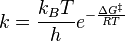
Both temperature and voltage have exponential impacts on device reliability owing to the fact they both enable flux (kinetics) mechanisms that are dependent on Arrhenius mechanics.

38b55998db6511df7e1d2dc342807949.png


(Temperature provides thermal energy necessary for overcoming the activation barrier of a given kinetic mechanism, voltage lowers the activation barrier thus lowering the temperature requirements for activating said mechanism)

The quickest way to degrade a CMOS IC is to raise both its temps and its voltage.

Unfortunately as many of us OC'ers know, if you raise temps without raising voltage then your OC becomes less stable. This is why superior HSF's are such a necessity for OC'ing.

It keeps your temps low, which reduces the required voltage to maintain stable overclock at any given temp, which combined results in enabling you to OC your chip while not materially degrading its expected operational lifetime. It is truly the veritable "win-win" situation.
 

BD231

Lifer
Feb 26, 2001
10,568
138
106
I'd check to see if your CPU is throttling the voltage, 1.35v is way to high a setting for my 1055t as it'd end up over 1.5v at load. Some people forget the voltage adjustments are made within the CPU itself so you need to be aware of whether or not your voltage is jumping around.

Not sure if it works the same way with the 1100 T but that temp is really high for such a big cooler, I'd imagine your chip is simply getting to much juice.
 

poohbear

Platinum Member
Mar 11, 2003
2,284
5
81
well folks, i reinstalled the heatsink with less arctic silver 5 (grain of rice size), and made sure its making correct contact with CPU and everything, and even managed to push the heatpipes 2cm more away from the nearest ram stick. So i figured this will surely lead to lower temps yea? Well no, it didnt. Still @ 65-64, which is less than 67-68, but still too hot @ only 1.35vcore.(no throttling, all those options are disabled in bios)

I guess its true, my Big Typhoon heatsink was designed 4-5 years ago before the advent of 125w cpus with 6 cores. So im looking at getting a new heatsink. Its been with me for 4 years so i can't complain.:)


Im looking at the newer Thermaltake Frio, apparently a great heatsink & very future proof. It makes frostytech's top 3 heatsinks for AMD, and its readily available where i live (currently Seoul, S. Korea).

http://www.frostytech.com/top5heatsinks.cfm

What do you guys think? im looking at the $50-$60 price range & a fan that runs at 1200-1400 rpm (dont want it louder than that). The noctua's are ridiculously overpriced here ($100 for a heatsink!), so the TT Frio looks best.

Thanks again for any feedback!
 
Last edited:

jvroig

Platinum Member
Nov 4, 2009
2,394
1
81
I think that's a good idea. I myself was tempted several times to get a Thermaltake Frio, for pretty much the same reasons you stated - favorable reviews and readily available in brick-and-mortar stores.

If it weren't for my Hyper 212+ already performing adequately, I would certainly have bought the Frio. Or, if during the time I bought my Hyper 212+ the Frio was already available, I would have bought the Frio instead.