pcslookout
Lifer
Is the keyboard or pen worth it?

Keyboard yes, pen no unless you already have a planned use for it.
What use does the keyboard have when the iPad is on your lap or stomach when laying down ?
The same Pencil would work. And to answer OP, I’d argue that the Pencil is a better thing to get than the keyboard. You can use it to manipulate the screen, not just draw, and that’s just a nice thing to do. Plus if you ever do want to draw (even simple stuff like in notes, or marking up an image/pdf), then now you have an amazing stylus for the job.Thinking of selling my ipad pro 9.7 128gb and put towards new 10.5 one. Does the OG pen work with the new one or do I have to buy a new pen?

Yeah, I've tried various kbs for ipads and it just reminds more that it's a tablet and not a laptop.The same Pencil would work. And to answer OP, I’d argue that the Pencil is a better thing to get than the keyboard. You can use it to manipulate the screen, not just draw, and that’s just a nice thing to do. Plus if you ever do want to draw (even simple stuff like in notes, or marking up an image/pdf), then now you have an amazing stylus for the job.
The Pencil is better than any other stylus for the iPad Pro. The same cannot be said of the Smart Keyboard.

The same Pencil would work. And to answer OP, I’d argue that the Pencil is a better thing to get than the keyboard. You can use it to manipulate the screen, not just draw, and that’s just a nice thing to do. Plus if you ever do want to draw (even simple stuff like in notes, or marking up an image/pdf), then now you have an amazing stylus for the job.
The Pencil is better than any other stylus for the iPad Pro. The same cannot be said of the Smart Keyboard.


Is the keyboard or pen worth it?


If Apple would release a version of it's Xcode IDE for the iPad Pro, this powerful little machine could be the replacement for the low end Macbook Pro.
I can say that this new iPad Pro is expensive, but well worth the money.
And a tablet os. Useless as a dev laptop.But why? what are you gaining by trying to do dev work on an ipad. You save 1lb of weight maybe? You get a worse keyboard, no touchpad, no expandability. Just seems like a dumb proposition.
It’s... high? The 9.7” ipad is 2048x1536, and the 10.5” is higher that that... do you think the 9.7 or 12.9 are fuzzy? I think they’re all roughly the same dpi.What is the resolution of the screen on this iPad? For some reason in anything other than Safari fonts are fuzzy and appear low-resolution.


Hmm.. so if I am understanding correctly, things on 9.7" iPad (2048x1536) are stretched to fill 10.5" iPad (2224x1668)? That would explain the blurriness that I observe.Some apps were not built in a way that they are properly scalable. They'd probably be even "fuzzier" on the 12.9" iPad Pro. The app is being upscaled from the 9.7" resolution to the 10.5" resolution. This can be resolved and will be over time. All of Apple's native apps should support the native resolution properly for comparison purposes.
This comment on MacRumors visualizes it perfectly: https://forums.macrumors.com/thread...new-ipad-pro-10-5-12-9.2051713/#post-24705551 as the status bar adopts the scaling level of the app. A similar effect can also be seen on apps that were never optimized for iPhone 6/6+ and are scaled up versions of the 4" screen size or choosing to run each of those larger phones in their scaled up mode that emulates the size smaller.
fraz76@Macrumors said:Otherwise apps will work, but with NoUpdadedApp running on ipad 10.5, resolution will be downscaled from native 2224x1668px to 2048x1536px. (You can verify it from iOS status bar clock that begin bigger when is on app running in downscale resolution) As a result the ppi value decreases from the native 264ppi to small and blurry 244ppi
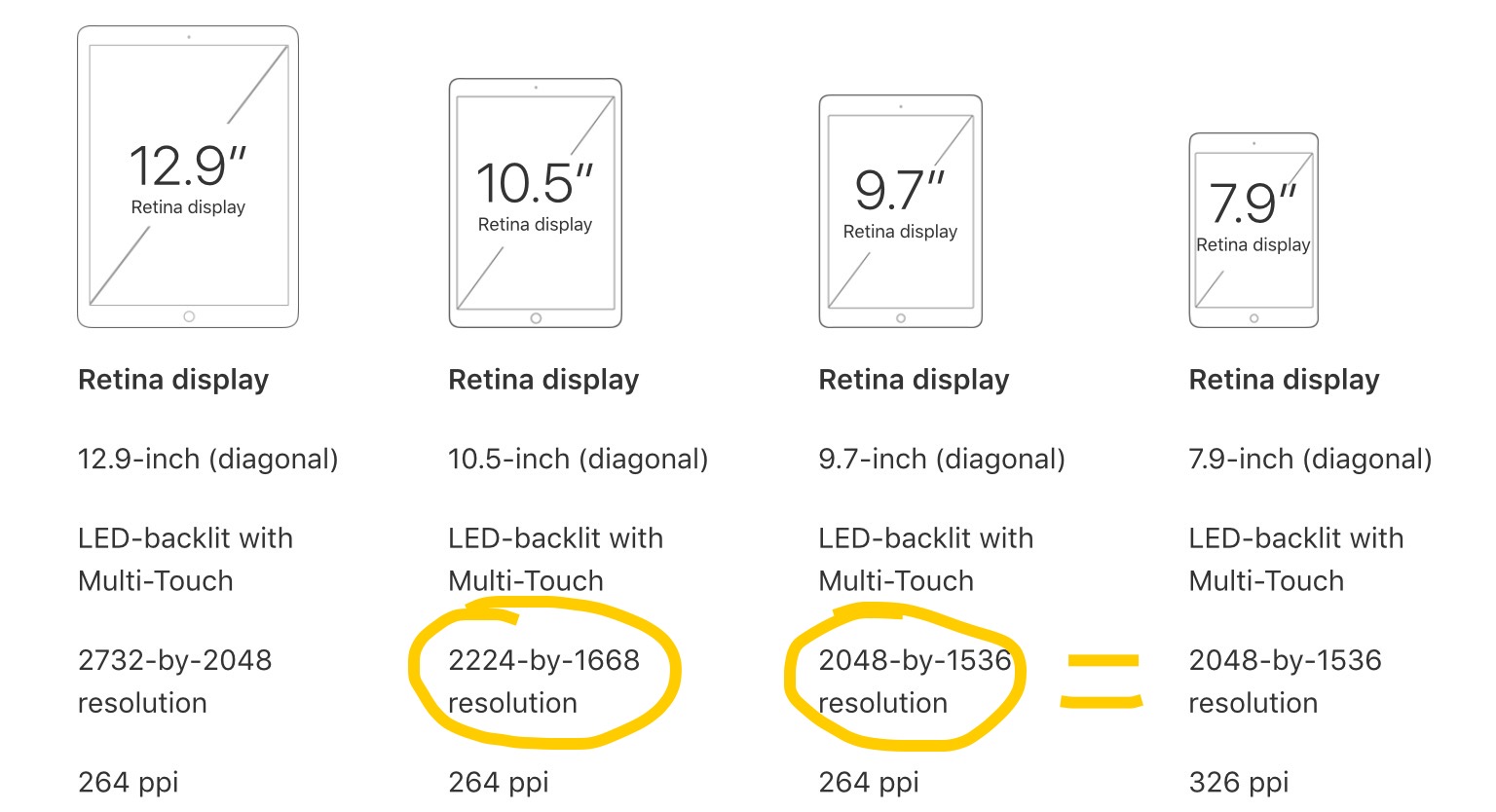
It's not about your vision and I am sure most folks do not notice the difference between 264 PPI and 244 PPI. But I happened to notice a difference and wanted to know if there is a technical explanation for it. It seems like my question has been answered by Tegeril's post above and the Macrumors link.The fonts seem fine to me or my visions are bad but it doesn't bother me anyway.

Hmm.. so if I am understanding correctly, things on 9.7" iPad (2048x1536) are stretched to fill 10.5" iPad (2224x1668)? That would explain the blurriness that I observe.
[Crowdsourcing] Non-Optimized Content on the new iPad Pro (10.5" + 12.9")
It's not about your vision and I am sure most folks do not notice the difference between 264 PPI and 244 PPI. But I happened to notice a difference and wanted to know if there is a technical explanation for it. It seems like my question has been answered by Tegeril's post above and the Macrumors link.


