• We’re currently investigating an issue related to the forum theme and styling that is impacting page layout and visual formatting. The problem has been identified, and we are actively working on a resolution. There is no impact to user data or functionality, this is strictly a front-end display issue. We’ll post an update once the fix has been deployed. Thanks for your patience while we get this sorted.

Question Improving case airflow

Goi

Diamond Member
Hi guys,
I have a Fractal Design Define Mini C Tempered Glass with the default case fans (1 front, 1 back, both ~52CFM). I realise that my GPU (2060) and SSDs run really hot. The SSD is right under the GPU so probably it's just being heated up by the GPU. I suspect it's the case airflow that's sub-par since I've already re-applied thermal paste on the GPU. So, I'm thinking of adding another intake in front. Would this help or would it be too much positive pressure, since the PSU at the bottom is also drawing air in? If so, I could switch the rear exhaust to the front and get a much more powerful rear exhaust to balance it.
 
When you say the SSD is under the GPU I assume you mean it's an M.2 SSD connected directly to the motherboard and the graphics card overshadows it?

Is it possible to move the M.2 drive to another M.2 slot? My personal experience is that a poorly located M.2 drive (in terms of airflow) doesn't tend to get airflow from the front or rear fan, so if I was desperate to do something about it then I would consider positioning a fan that points as directly and as close to the drive as possible.

However, it would be useful to know what your M.2 temps are because they might not be particularly scary relative to M.2 normal temps.
 
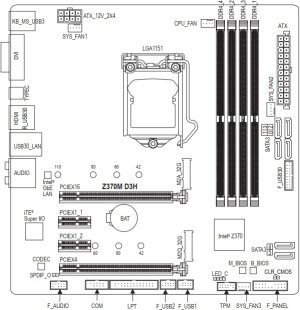
Thanks. Yes that's what I mean about my SSD. As you can see, it's right at the PCIE so my 2060 covers it when installed. I have the option to move it to the other M.2 slot I guess. Right now they can go as hot as 80+C.

32cc9ff0-96dc-4944-af61-520cc7b8b6c9.jpg
 
What's the SSD idle temp like? I have a Samsung 980 PRO SSD in the same position as yours and is overshadowed mainly by the NH-D15S CPU HSF, its idle temps in say a 20C ambient can be anywhere between 35-50C, and NVMe SSDs are well-known to hit 80C under load.
 
What SSD is it? It doesn't look like your motherboard has a built-in heat sink for the m.2 slot. If your SSD doesn't have a heatsink then I'd look into getting one. My 980 Pros rarely get to 50C with the motherboard heatsink.

 
My 980 Pros rarely get to 50C with the motherboard heatsink.

Is that even under load? My 980 PRO's built-in heatsink keeps it under 50C while not under load, but frankly all Samsung M.2s I've used without a heatsink manage that incredible feat 🙂
 
Last edited:
What's the SSD idle temp like? I have a Samsung 980 PRO SSD in the same position as yours and is overshadowed mainly by the NH-D15S CPU HSF, its idle temps in say a 20C ambient can be anywhere between 35-50C, and NVMe SSDs are well-known to hit 80C under load.
40-50C. Ambient room temp is about 30C
 
I always heat-sinked my NVME drives. After using Samsung initially, I bought SK Hynix P31 units -- which require less current and run cooler no matter what. But I sinked 'em anyway.

Otherwise, my formula for fan deployment in a midtower case: two 140mm front intake fans in a pressurized case and a ducted exhaust fan with an air-cooler. Same formula may work OK with a water-cooled rig.
 
So I upgraded my case airflow with a few larger fans (originally 1 120mm intake, 1 120mm exhaust, now 2 140mm intake, 1 120mm + 2 140mm exhaust) and temps are much better. GPU hot spot temps have fallen by about 10C.
 
So I upgraded my case airflow with a few larger fans (originally 1 120mm intake, 1 120mm exhaust, now 2 140mm intake, 1 120mm + 2 140mm exhaust) and temps are much better. GPU hot spot temps have fallen by about 10C.

I assume that means you've got three exhaust fans.

What about the SSD temp?

Interesting though. I've got 2x140 intake front and nothing at the back (though a vent at the back and top), I'm semi-curious now to see what adding a 1x120mm at the back might do to my setup.
 
I have a Be Quiet! Dark Base Pro 900 Rev.2 case…yes, it’s a behemoth…I have 3 140mm fans for front intake, 1 140mm rear exhaust, and 2 140 mm fans on my top- mounted AIO set as exhaust.
 
Back
Top