• We’re currently investigating an issue related to the forum theme and styling that is impacting page layout and visual formatting. The problem has been identified, and we are actively working on a resolution. There is no impact to user data or functionality, this is strictly a front-end display issue. We’ll post an update once the fix has been deployed. Thanks for your patience while we get this sorted.

I need help getting faster wireless speeds

Hi guys,

Yesterday I bought a Linksys e4200v2 router, however I'm not getting the wireless speed out of it that I thought I would. Even with my devices about 10 feet away from the router, I only get about 5MB/sec with my laptop, 4MB/sec with my Nexus 7 2013, and 3MB/sec with my Moto G phone. Those speeds are copying files over the LAN.

At one point my laptop was getting 9MB/sec but it was very brief.

Do any of you know of some settings I should tweak or anything? Everything is left at stock and I have the encryption set to WPA2-personal.
 
If you have a computer with Good DualBand card and the Router is set to provide it!

Real Transfer of 9MB is about as Good as it gets.

The following is a typical result that I get across all my Networks with similar hardware level.

Hardware.

i7 high range Giga capable computer with Samsung fast SSD.

Wired to a Giga capable Dual Band Asus RT-N66U

Wireless i7 high range fast SSD Laptop with Dual Band Wireless Card Laptop.

Placed 12' away from the Wireless Router.

Wireless card Status.

300Mbs.jpg


Yeah as you can see, it states nice and clear 300Mb/sec. However, be aware that this number is Not a result of any real Bandwidth Measure.

-------------
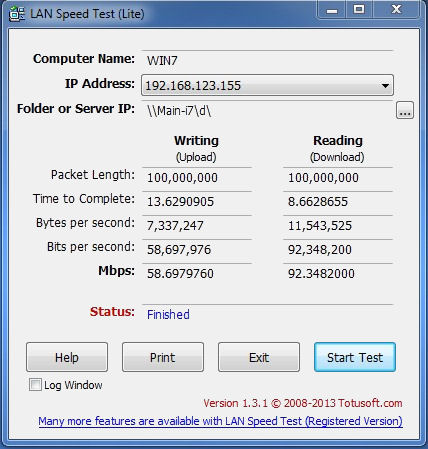
OK, what LAN Speed says when measuring from the Laptop to a clean second partition on the wired desktop.


LAN%20Speed.jpg


See any 300Mb/sec reading above? 😳

--------------
Cross check with Real 101MB file transfer.


101MB%20file.jpg


11.3 MB x 8 = 90.4 Mb/sec. (B=Byte, b=bit).

Which validates the LAN Speed measure.

--------------------------
As a frame of reference.

Same Hardware same Network.

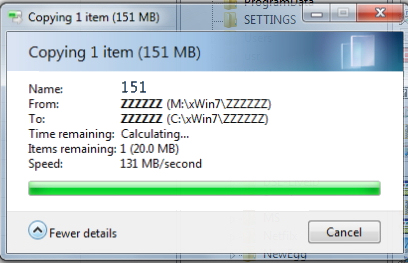
Transferring File to second Giga capable computer. Both computer are hooked to the same Asus Router as above.

151MB_Transfer.jpg


131 x 8 = 1048Mb/sec. Real Giga.
 
Run inSSIDer and see what kind of networks are around you.

Check to see if 40MHz mode is enabled or not on the router and on the client devices (where possible). 5MB/sec is nothing near what you should be able to get.

On my T100 with 1:1 Wifi adapter in it (IE 65/150Mbps max speeds for 20MHz/40MHz) I get around 8.5MB/sec average up/down. With my laptop which has an Intel 7260 802.11ac card on it connected to my 2.4GHz ONLY 802.11n router at 300Mbps rate, I get 21MB/secs up and down.

I'll grant with the later, on Windows 7SP1, it was only 13MB/sec up and 15MB/sec down, so whatever Windows 8/8.1 did with the netstack and wifi stuff significantly improved the situation. This was ALSO the case with the Intel 2230 Wifi adapter that used to be in the machine (same Windows 7 speeds, give or take a hair. Under 8.1, the 7260 produces about 1MB/sec faster up/down speeds than the 2230 did. I got the 7260 for future compatibility as I am getting 802.11ac routers in the next couple of months).

If there are a lot of Wifi networks nearby, generally pick the channel that has the fewest and/or lowest signal strength networks on it.

Ensure 20/40 coexistance is enables on your clients, supposing your router is setup in 40MHz mode. If you have a lot of competing networks, disable 40MHz mode, this will likely speed things up for you. If few/no competing networks, enable 40MHz mode if it is currently disabled.

For your phone, that is not abnormal. Not as nice a Wifi stack in it, but my iPhone 5 maxes out around 4MB/sec for CIFS. My old iPad 2 maxed at a hair under 3MB/sec downhill with a tailwind. Supposedly the iPhone 5/5s is a bit better on 5Ghz, with the ability to actually do 150Mbps mode, so I'd expect a speed of at least 25-50% on 5GHz...but still talking 5-6MB/sec.

In general, without testing the latest generation of phones and android/iOS tablets, the adapters and/or netstacks in them are badly limited. Most 2.4/5GHz are actually connecting at 65Mbps and not 150Mbps. I wouldn't be suprised if current 2:2 11n adapters in tablets that have been rolling them recently only connect at 144Mbps (that's 2:2 20MHz) or something similarly stupid.
 
I upgraded to an Intel 5300 adapter and now I get 14MB/sec but that is with only 2 antennas installed. Once the third one arrives I'm sure I will hit over 20MB/sec.
 
Back
Top