• We’re currently investigating an issue related to the forum theme and styling that is impacting page layout and visual formatting. The problem has been identified, and we are actively working on a resolution. There is no impact to user data or functionality, this is strictly a front-end display issue. We’ll post an update once the fix has been deployed. Thanks for your patience while we get this sorted.

I know some people don't like the look of Firefox 29+

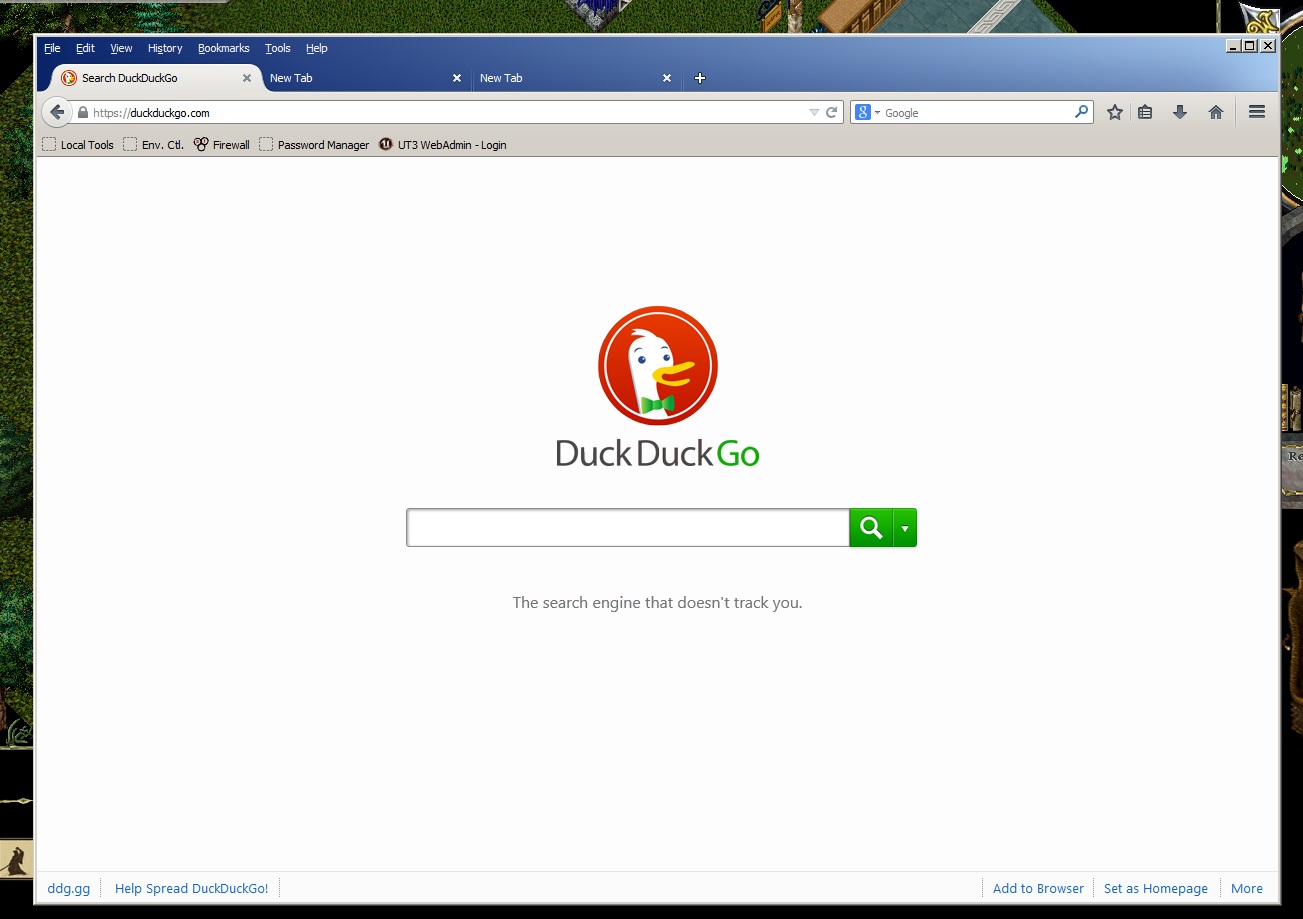
I hate the new look, but I was finally able to make it just the way I like it...

http://i.imgur.com/ZgxOdsa.jpg

ZgxOdsa.jpg


Classic Theme Restorer:
https://addons.mozilla.org/en-US/firefox/addon/classicthemerestorer/

Classic Toolbar Buttons:
https://addons.mozilla.org/en-US/firefox/addon/cstbb/

Classic Bookmarks Button
https://addons.mozilla.org/en-US/firefox/addon/classicbookmarksbutton/?src=cb-dl-toprated

Omnibar:
https://addons.mozilla.org/en-US/firefox/addon/omnibar/

userChrome.css:
Code:
#urlbar-container { max-width: 350px !important; }
#urlbar-container { min-width: 350px !important; }
#urlbar { height: 30px !important; }

#TabsToolbar { height: 30px !important; }

#main-window:not([customizing]):not([customize-entered]):not([inFullscreen]):not([onclose*="exitPrintPreview"])
  #tab-view-deck { margin-top: -3px !important; }

#identity-icon-labels { display: none !important; }

The rest is just moving all the buttons and url/"omnibar" up to the title bar.

[These are the preferences I have in Classic Theme Restorer. I think you can just put them into a text file and import them from within the addon]
Code:
CTR_Preferences__DO_NOT_EDIT__'='->booleans__':'->strings__'~'->integers
tabs:tabs_squared
tabsontop:false2
ctabwidth~140
ctabmwidth~140
closetab:closetab_forced
appbutton:appbutton_off
appbuttonc:appbuttonc_orange
alttbappb=false
appbutmhi=false
appbutbdl=false
nbiconsize:small
smallnavbut=false
hidenavbar=true
backforward=true
wincontrols=true
starinurl=false
statusbar=true
hideurelstop=true
combrelstop=true
panelmenucol=false
verifiedcolors=false
findbar:findbar_default
nav_txt_ico:icons
ctab1:#EBEBEB
ctab2:#EBEBEB
ctabhov1:#EBEBEB
ctabhov2:#79A6CE
ctabact1:#79A6CE
ctabact2:#79A6CE
ctabpen1:#00FF00
ctabpen2:#007700
ctabunr1:#00FF00
ctabunr2:#007700
cntab1:#EBEBEB
cntab2:#EBEBEB
cntabhov1:#EBEBEB
cntabhov2:#79A6CE
ctabt:#000000
ctabhovt:#000000
ctabactt:#339999
ctabpent:#000000
ctabunrt:#000000
ctabtsh:#FFFFFF
ctabhovtsh:#FFFFFF
ctabacttsh:#FFFFFF
ctabpentsh:#FFFFFF
ctabunrtsh:#FFFFFF
tabcolor_def=false
tabtextc_def=false
tabtextsh_def=false
tabcolor_act=false
tabtextc_act=false
tabtextsh_act=false
tabcolor_hov=false
tabtextc_hov=false
tabtextsh_hov=false
tabcolor_pen=false
tabtextc_pen=false
tabtextsh_pen=false
tabcolor_unr=false
tabtextc_unr=false
tabtextsh_unr=false
ntabcolor_def=false
ntabcolor_hov=false
tabfbold_def=false
tabfbold_act=false
tabfbold_pen=false
tabfbold_unr=false
tabfbold_hov=false
tabfita_def=false
tabfita_act=false
tabfita_pen=false
tabfita_unr=false
tabfita_hov=false
highaddonsbar=false
hightabpososx=false
altmenubar=false
altmenubarpos=false
altmenubarpos2=false
menubarnofog=false
noaddonbarbg=false
notabfog=false
notabbg=false
nobookbarbg=false
nonavbarbg=true
nonavborder=false
nonavtbborder=true
alttabstb=false
cpanelmenus=false
bfurlbarfix=true
emptyfavicon=true
emptyfavicon2=false
hidezoomres=false
pmhidelabels=false
menupopupscr=false
hideprivmask=false
invicomenubar=false
invicotabsbar=false
inviconavbar=false
invicoextrabar=false
invicobookbar=false
invicoaddonbar=false
tabmokcolor=false
tabmokcolor2=false
tabmokcolor3=false
dblclnewtab=false
hidetbwot=false
faviconurl=false
padlock:padlock_default
dblclclosefx=false
hide_bf_popup=false
throbberalt=false
bmanimation=true
pananimation=true
closeabarbut=false
toolsitem=true
appmenuitem=true
contextitem=false
cuibuttons=true
padlockex=true
closetabhfl=false
noemptypticon=false
feedinurl=false
noconicons=false
 
Last edited:
How did you modify it that way?

Classic Theme Restorer:
https://addons.mozilla.org/en-US/firefox/addon/classicthemerestorer/

Classic Toolbar Buttons:
https://addons.mozilla.org/en-US/firefox/addon/cstbb/

Classic Bookmarks Button
https://addons.mozilla.org/en-US/firefox/addon/classicbookmarksbutton/?src=cb-dl-toprated

Omnibar:
https://addons.mozilla.org/en-US/firefox/addon/omnibar/

userChrome.css:
Code:
#urlbar-container { max-width: 350px !important; }
#urlbar-container { min-width: 350px !important; }
#urlbar { height: 30px !important; }

#TabsToolbar { height: 30px !important; }

#main-window:not([customizing]):not([customize-entered]):not([inFullscreen]):not([onclose*="exitPrintPreview"])
  #tab-view-deck { margin-top: -3px !important; }

#identity-icon-labels { display: none !important; }

The rest is just moving all the buttons and url/"omnibar" up to the title bar.

[These are the preferences I have in Classic Theme Restorer. I think you can just put them into a text file and import them from within the addon]
Code:
CTR_Preferences__DO_NOT_EDIT__'='->booleans__':'->strings__'~'->integers
tabs:tabs_squared
tabsontop:false2
ctabwidth~140
ctabmwidth~140
closetab:closetab_forced
appbutton:appbutton_off
appbuttonc:appbuttonc_orange
alttbappb=false
appbutmhi=false
appbutbdl=false
nbiconsize:small
smallnavbut=false
hidenavbar=true
backforward=true
wincontrols=true
starinurl=false
statusbar=true
hideurelstop=true
combrelstop=true
panelmenucol=false
verifiedcolors=false
findbar:findbar_default
nav_txt_ico:icons
ctab1:#EBEBEB
ctab2:#EBEBEB
ctabhov1:#EBEBEB
ctabhov2:#79A6CE
ctabact1:#79A6CE
ctabact2:#79A6CE
ctabpen1:#00FF00
ctabpen2:#007700
ctabunr1:#00FF00
ctabunr2:#007700
cntab1:#EBEBEB
cntab2:#EBEBEB
cntabhov1:#EBEBEB
cntabhov2:#79A6CE
ctabt:#000000
ctabhovt:#000000
ctabactt:#339999
ctabpent:#000000
ctabunrt:#000000
ctabtsh:#FFFFFF
ctabhovtsh:#FFFFFF
ctabacttsh:#FFFFFF
ctabpentsh:#FFFFFF
ctabunrtsh:#FFFFFF
tabcolor_def=false
tabtextc_def=false
tabtextsh_def=false
tabcolor_act=false
tabtextc_act=false
tabtextsh_act=false
tabcolor_hov=false
tabtextc_hov=false
tabtextsh_hov=false
tabcolor_pen=false
tabtextc_pen=false
tabtextsh_pen=false
tabcolor_unr=false
tabtextc_unr=false
tabtextsh_unr=false
ntabcolor_def=false
ntabcolor_hov=false
tabfbold_def=false
tabfbold_act=false
tabfbold_pen=false
tabfbold_unr=false
tabfbold_hov=false
tabfita_def=false
tabfita_act=false
tabfita_pen=false
tabfita_unr=false
tabfita_hov=false
highaddonsbar=false
hightabpososx=false
altmenubar=false
altmenubarpos=false
altmenubarpos2=false
menubarnofog=false
noaddonbarbg=false
notabfog=false
notabbg=false
nobookbarbg=false
nonavbarbg=true
nonavborder=false
nonavtbborder=true
alttabstb=false
cpanelmenus=false
bfurlbarfix=true
emptyfavicon=true
emptyfavicon2=false
hidezoomres=false
pmhidelabels=false
menupopupscr=false
hideprivmask=false
invicomenubar=false
invicotabsbar=false
inviconavbar=false
invicoextrabar=false
invicobookbar=false
invicoaddonbar=false
tabmokcolor=false
tabmokcolor2=false
tabmokcolor3=false
dblclnewtab=false
hidetbwot=false
faviconurl=false
padlock:padlock_default
dblclclosefx=false
hide_bf_popup=false
throbberalt=false
bmanimation=true
pananimation=true
closeabarbut=false
toolsitem=true
appmenuitem=true
contextitem=false
cuibuttons=true
padlockex=true
closetabhfl=false
noemptypticon=false
feedinurl=false
noconicons=false
 
What's with that weird max/min/restore button? Is that a different OS, or is that Firefox itself? Reminds me of those scammy type fake antivirus programs. 😛

I cannot stand the look of FF 29. The title bar should be used as only the title bar, and they screwed up general convention. The menu should not be embeded inside the title bar nor should it be made thicker. It looks a bit better in yours though compared to what it looks like on other windows systems I've seen it on, but I still prefer classic look. I avoided updating because of the look, I just hate it.

Though, on one of my Linux systems I just noticed it's running 31 and it does not look too bad. Maybe this screw up does not affect Linux or they fixed it after 29.
 
Though, on one of my Linux systems I just noticed it's running 31 and it does not look too bad. Maybe this screw up does not affect Linux or they fixed it after 29.

They should all be the same. Maybe you already had addons that fixed some of it before you upgraded. I'm running 33, and it pretty much looks like the old Firefox...

XLpiHjT.png
 
You know what I dont get about browsers... the forward/backward and refresh buttons not being together. Its the reason I dont use IE and firefox by default does this same BS.

OP's got them all clustered together which is good but by default firefox dosent do that 🙁 The only browser that seems to do this by default is chrome.

To illustrate:
tnXkUYl.png
 
I managed to make 29+ look identical to the previous versions within 5 minutes of installing it. I don't understand what the issue is.
 
They should all be the same. Maybe you already had addons that fixed some of it before you upgraded. I'm running 33, and it pretty much looks like the old Firefox...

XLpiHjT.png

Yeah mine looks similar but buttons not in same spot. (I can probably change that, just never did)

But on windows systems this is how 29 looks, and it's horrible:


Not sure who's bright idea it was to put the menus right into the title bar and extend the title bar over the tabs and put the tabs in it too. Just terrible design all round. I managed to roll back my windows system to 28 though and disabled auto updates until they fix their shit.

My parents' xp computer updated too and it looks the same. I want to puke every time I look at that interface. I really don't know what they were thinking.

Just glad it does not look like that in Linux.
 
I'm running 33

Where did you get 33? The newest Waterfox is 31.0, and the newest Firefox judging by the filename on the stub installer is also 31.

Btw, is there anywhere to download the "full" Firefox installer? I hate those stupid stub installers.
 
Where did you get 33? The newest Waterfox is 31.0, and the newest Firefox judging by the filename on the stub installer is also 31.

Btw, is there anywhere to download the "full" Firefox installer? I hate those stupid stub installers.

I'm using Iceweasel on Debian, but it isn't much different than vanilla Firefox. I set it up in the repos, and the magic happens. I'm not sure where they get it from. I did a quick search on my phone last night, and Mozilla does a good job of scattering, and hiding the non-standard downloads.
 
I'm using Iceweasel on Debian, but it isn't much different than vanilla Firefox. I set it up in the repos, and the magic happens. I'm not sure where they get it from. I did a quick search on my phone last night, and Mozilla does a good job of scattering, and hiding the non-standard downloads.

Depends on what branch it was built off of.

Trunk: version n
Aurora: version n-1
Beta: version: n-2
Release: version n-3

So Nightly (trunk) users were on version 33 when mainstream users were on version 30.

New features are allowed only on the trunk (and only after they've been baked and tested on development branches, so the trunk is actually pretty stable). Aurora, Beta, and Release are bugfix-only branches.
 
Last edited:
Back
Top