Info I had a bit of spare time on a customer's Intel N100 PC, so I ran a quick benchmark

mikeymikec

Lifer
May 19, 2011
21,529
16,751
136
Screenshot 2026-01-27 113745.png

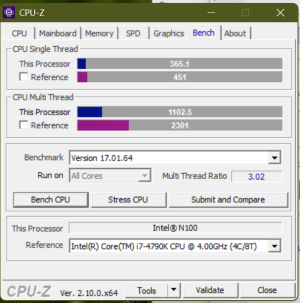
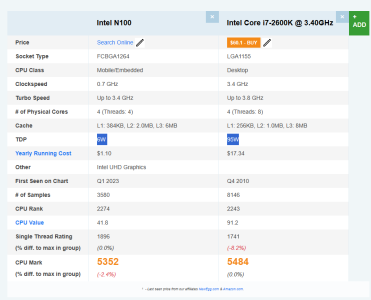
Pegging it against a i7-2600K, the N100's single core performance was slightly better.

Insert usual disclaimer here: A single benchmark is not representative of all of a CPU's strengths.

Still, I would have thought that the bottom of the barrel today ought to be able to wipe the floor with mainstream CPUs from more than ten years ago, however the impression I've had from installing Win11 on unsupported PCs was that the older PCs (e.g. Ivy Lodge era) are faster, which seems to be borne out here.

One thing I find interesting about this benchmark is that based on the presumption that the multi-core benchmark is basically the same benchmark as the single-core one but with as many simultaneous threads as the CPU has cores or threads, the N100's multi core benchmark figure is less than x4 the single core reading, and the i7's benchmark figure is more than x4 its single core reading.
 
Last edited:
  • Like
Reactions: igor_kavinski

Jan Olšan

Senior member
Jan 12, 2017
624
1,258
136
One thing I find interesting about this benchmark is that based on the presumption that the multi-core benchmark is basically the same benchmark as the single-core one but with as many simultaneous threads as the CPU has cores or threads, the N100's multi core benchmark figure is less than x4 the single core reading, and the i7's benchmark figure is more than x4 its single core reading.

That's normal, scaling is not 100% and clock may be lower during the multi-thread test. N100 has 4 threads/cores, so MT score should be less than 400% of 1 thread score.

The reason the score is over 4x on the Core i7-2600K or i7-4790K is those CPUs use SMT (HT) so each core provides two threads. That increases mulithread performance. Imagine something like each thread running at 60 % of 1core/1thread performance, so together you get 120 % or so. Then multiply that by 4x = 480 % (minus scaling imperfections, perhaps). Anyway, expected behaviour.
 

gdansk

Diamond Member
Feb 8, 2011
4,764
8,060
136
As mentioned no SMT, but N100 also has a large shared L2 while Haswell has a 256KB L2 per core. So in ST a single thread on N100 can use more of the cache but in MT it's being shared aggressively between 4 cores
 

Sgraffite

Senior member
Jul 4, 2001
207
145
116
View attachment 137485

Pegging it against a i7-2600K, the N100's single core performance was slightly better.

Insert usual disclaimer here: A single benchmark is not representative of all of a CPU's strengths.

Still, I would have thought that the bottom of the barrel today ought to be able to wipe the floor with mainstream CPUs from more than ten years ago, however the impression I've had from installing Win11 on unsupported PCs was that the older PCs (e.g. Ivy Lodge era) are faster, which seems to be borne out here.

One thing I find interesting about this benchmark is that based on the presumption that the multi-core benchmark is basically the same benchmark as the single-core one but with as many simultaneous threads as the CPU has cores or threads, the N100's multi core benchmark figure is less than x4 the single core reading, and the i7's benchmark figure is more than x4 its single core reading.
One could argue the bottom of the barrel CPUs are wiping the floor if you look at the power envelope
1769619107999.png
 

Abwx

Lifer
Apr 2, 2011
12,009
4,973
136
One could argue the bottom of the barrel CPUs are wiping the floor if you look at the power envelope
View attachment 137502
That s not the actual power, it pulls at least 15W to score 479 pts in CB R15, comparatively a 4770K does 770 pts and a 2600K 614 pts.

At same perf than a N100 a 4770K would use 3x less power than its 84W rated TDP, so about 28W, not that much more given how old it is, but quite better that the 2600K wich would require about 45W to do so.
 
Last edited:
  • Like
Reactions: Tlh97 and Sgraffite

LightningZ71

Platinum Member
Mar 10, 2017
2,690
3,390
136
That's one of the best bins from Intel 22nmrunning deep in it's frequency sweet spot vs. a bargain tier part on an Intel 10nm iteration that is designed for cheapness above all else being run at it's maximum possible sustained clocks. That seems... Expected.
 

mikeymikec

Lifer
May 19, 2011
21,529
16,751
136
That's one of the best bins from Intel 22nmrunning deep in it's frequency sweet spot vs. a bargain tier part on an Intel 10nm iteration that is designed for cheapness above all else being run at it's maximum possible sustained clocks. That seems... Expected.

I'd like to know what the logic is that helps you reach that conclusion, because if I were to compare two CPUs used in desktops: the worst of 2014 and the best of 2002, which to my mind is probably something like an AMD A4-4000 vs say an Athlon XP 2800+, I'd expect the A4 to wipe the floor with the Athlon. Especially considering that the A4 is shown beating the likes of the Athlon 64 FX / X2 here:

I suspect that my expectation is correct.

At the end of the day I expect that we're approaching this from two different perspectives, mine is that crap like the N100 is being sold in *desktop PCs*, in my customer's case an AIO PC, in my view it's part of an objective from the big-name PC builders who are pining for the era of 1998 when PCs were being replaced three years later, and that they're selling utter rubbish but posing as a desktop PC, so therefore it should be able to compete as a perfectly respectable desktop CPU in this era.

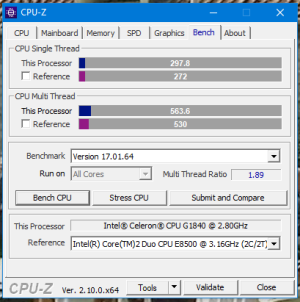
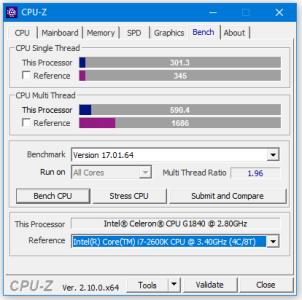
Here's another counterpoint - I've got a customer's cheap-ass Celeron G1840 (Haswell era) PC on my workbench, and here's the same benchmark but it's narrowly beating a desktop Core 2 Duo from 2007:
g1840.png

Can anyone imagine a TV advert saying, "buy an N100 today, core-for-core it's slightly better than crap we were making 12 years ago!"?
 

Attachments

  • g1840.png
    g1840.png
    21.3 KB · Views: 3
Last edited:

LightningZ71

Platinum Member
Mar 10, 2017
2,690
3,390
136
You're in the bargain bin. What do you really expect? The N100 can run completely fan less, the other can't and retain performance. The N100 is single channel ram, the others are dual, so there's no ram speed improvement. It's a limited capability low cost unit that still runs Windows well enough for web browsing in something as small as a couple packs of playing cards or an oversized HDMI stick computer. You aren't doing that on anything from the SB era or even the 4000 era with anywhere near as good performance.
 

mikeymikec

Lifer
May 19, 2011
21,529
16,751
136
You're in the bargain bin. What do you really expect?

Pretty much like I said, it should be better all-round than the bargain bin from 12 years ago at the very least. IMO today's desktop CPU bargain bin should at least outpace the mainstream flagship from ten years ago, or give it a very good run for its money, especially given that a 12-year-old bargain bin CPU seems to give a decent CPU *7* years its senior a run for its money.

The N100 can run completely fan less, the other can't and retain performance.

Which would be a fine argument if we were talking about using it in a setting where that matters, like say an ATM. Also, there is a fan in that customer's AIO PC.

You aren't doing that on anything from the SB era or even the 4000 era with anywhere near as good performance.

I even wrote from personal experience to the contrary in the OP, take from that what you will. When I was helping this customer migrate from their old PC to this one, this one was CPU saturated probably for 60-75% of the time I was there (just over 2 hours). I've frankly never seen anything like it. I can CPU-saturate a lot of Win11 PCs by making them do (on a clean install) a store apps update and a Windows Update run at the same time, but the saturation is typically relatively short-lived (several minutes).
 

LightningZ71

Platinum Member
Mar 10, 2017
2,690
3,390
136
That could be a driver issue. I've used several N100 systems and none of them were a bad experience in their targeted use case.
 

DAPUNISHER

Super Moderator CPU Forum Mod and Elite Member
Super Moderator
Aug 22, 2001
32,412
33,386
146
I was planning on the N100-150 for my mom-in-law's Xmas gift. Ended up going with R5 3550H 4c/8t miniPC because it included 2x8GB and 512GB NVME for $180. Barely buy the ram and SSD for that at the moment. Was not paying the same money for 4 e-cores with single channel DDR4. 4 Alder P-cores would smoke the doors off of Devil's Canyon, and would have been the easy choice at that price.
 
  • Like
Reactions: igor_kavinski

DAPUNISHER

Super Moderator CPU Forum Mod and Elite Member
Super Moderator
Aug 22, 2001
32,412
33,386
146
That could be a driver issue.
Probably not driver related. While the 3550H had no trouble with it due to 8 threads,, win 11 updates on day one is a resource hog. It came with 11pro which was a nice perk for the money.

I would expect every time there is a major update like 25H2 it is going to 100% all 4 of those Celeron e-cores and be no fun to use.
I've used several N100 systems and none of them were a bad experience in their targeted use case.
Definitely. When windows isn't hijacking the system for its own purposes, it can even do some gaming.


mikeymikec

Lifer
May 19, 2011
21,529
16,751
136
I've also used more than one N100 PC. In my experience they are extremely easily overwhelmed with background activity, which is a given on Windows. They're probably a solid choice to run Linux at the low end. The other thing I wonder is whether the systems I encountered would fare better with a decent SSD rather than the likely DRAM-less bargain basement rubbish found at the low end.

I wonder if the N100 would do better if Windows was running 24/7, active hours enabled, etc.
 

Sgraffite

Senior member
Jul 4, 2001
207
145
116
I'd like to know what the logic is that helps you reach that conclusion, because if I were to compare two CPUs used in desktops: the worst of 2014 and the best of 2002, which to my mind is probably something like an AMD A4-4000 vs say an Athlon XP 2800+, I'd expect the A4 to wipe the floor with the Athlon. Especially considering that the A4 is shown beating the likes of the Athlon 64 FX / X2 here:

I suspect that my expectation is correct.

At the end of the day I expect that we're approaching this from two different perspectives, mine is that crap like the N100 is being sold in *desktop PCs*, in my customer's case an AIO PC, in my view it's part of an objective from the big-name PC builders who are pining for the era of 1998 when PCs were being replaced three years later, and that they're selling utter rubbish but posing as a desktop PC, so therefore it should be able to compete as a perfectly respectable desktop CPU in this era.

Here's another counterpoint - I've got a customer's cheap-ass Celeron G1840 (Haswell era) PC on my workbench, and here's the same benchmark but it's narrowly beating a desktop Core 2 Duo from 2007:
View attachment 137683

Can anyone imagine a TV advert saying, "buy an N100 today, core-for-core it's slightly better than crap we were making 12 years ago!"?
In this worst of 2014 and the best of 2002 you picked regular desktop CPUs from the respective year for comparison. You didn't pick a CPU specialized for low power usage from 2014 like how you are using the N100 in the original comparison. I don't really know what the equivalent to that would be in that era though.

Alternatively you could use a regular desktop low end CPU to compare against the 2600K as that would be more of an apples to apples comparison.

The rolling 12 year window is of course going to lessen the performance gap as time goes on. Remember when the Pentium came out and the worst Pentium was better than the best 486 in a lot of things, but it came out less than two years after the 486.
 

hemedans

Senior member
Jan 31, 2015
308
178
116
In this worst of 2014 and the best of 2002 you picked regular desktop CPUs from the respective year for comparison. You didn't pick a CPU specialized for low power usage from 2014 like how you are using the N100 in the original comparison. I don't really know what the equivalent to that would be in that era though.

Alternatively you could use a regular desktop low end CPU to compare against the 2600K as that would be more of an apples to apples comparison.

The rolling 12 year window is of course going to lessen the performance gap as time goes on. Remember when the Pentium came out and the worst Pentium was better than the best 486 in a lot of things, but it came out less than two years after the 486.
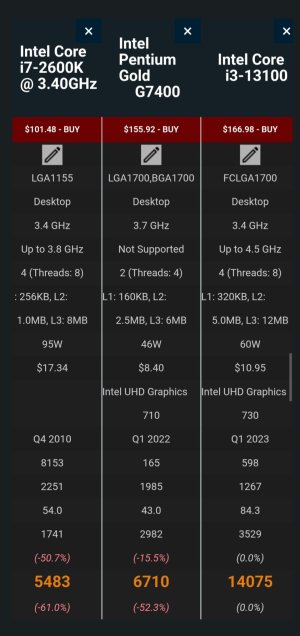
Modern pentium gold or i3 would be much faster than 2600K,

N100 is from Atom lineup, fair comparison should be something like N2100 from same era as 2600K and N100 will be more than 20 times faster.
 

StinkyPinky

Diamond Member
Jul 6, 2002
6,992
1,284
126
You can buy an entire N100 system for like 200 bucks, or you could before the ram crisis. I had one for a year and it was fine. Good enough for basic work.
 

mikeymikec

Lifer
May 19, 2011
21,529
16,751
136
In this worst of 2014 and the best of 2002 you picked regular desktop CPUs from the respective year for comparison. You didn't pick a CPU specialized for low power usage from 2014 like how you are using the N100 in the original comparison. I don't really know what the equivalent to that would be in that era though.

I've said at least once in this thread already: Because it's being sold in desktop PCs.
 

Abwx

Lifer
Apr 2, 2011
12,009
4,973
136
Modern pentium gold or i3 would be much faster than 2600K,
2600K is 50% faster than a year 2020 Pentium gold 7505, the latter is even slower by
almost 20% than a N100, CB R15 scores are respectively 614, 400 and 479, comparatively my 7 years old 2500U laptop does 640 pts.

Problem of all these CPUs is that they are not fit for W11 but work decently with W10 or better W8/8.1, i know someone who had a 2014 Kabini 4C/4T with once W8.1 but she made the mistake to benefit from a free upgrade to W10, at wich point the PC became sluggish.
 

hemedans

Senior member
Jan 31, 2015
308
178
116
2600K is 50% faster than a year 2020 Pentium gold 7505, the latter is even slower by
almost 20% than a N100, CB R15 scores are respectively 614, 400 and 479, comparatively my 7 years old 2500U laptop does 640 pts.

Problem of all these CPUs is that they are not fit for W11 but work decently with W10 or better W8/8.1, i know someone who had a 2014 Kabini 4C/4T with once W8.1 but she made the mistake to benefit from a free upgrade to W10, at wich point the PC became sluggish.
Why would you choose laptop Tiger Lake Pentium to compare with desktop overclocked CPU?

G7400 or it's successor should be fair comparison as it's from alderlake family and it's desktop CPU.

IMG_20260203_011309.jpg
 

Abwx

Lifer
Apr 2, 2011
12,009
4,973
136
Why would you choose laptop Tiger Lake Pentium to compare with desktop overclocked CPU?

G7400 or it's successor should be fair comparison as it's from alderlake family and it's desktop CPU.

View attachment 137805
Dunno what is this bench but not only G7400 is from 2022 but it does only 543 pts in CB R15, that s still less than the 2600K s 614 pts despite being 11 years apart, pentium 7505 was announced in late 2020, so that s about 10 years difference and it wouldnt beat the 2600K even if its TDP is doubled.

Beside i3 is irrelevant since the OP talked of comparing the recent bottom of the barrel to old first rate CPUs, when this i3 was released it wasnt the lower offering and it still not the case currently.
 

hemedans

Senior member
Jan 31, 2015
308
178
116
Dunno what is this bench but not only G7400 is from 2022 but it does only 543 pts in CB R15, that s still less than the 2600K s 614 pts despite being 11 years apart, pentium 7505 was announced in late 2020, so that s about 10 years difference and it wouldnt beat the 2600K even if its TDP is doubled.

Beside i3 is irrelevant since the OP talked of comparing the recent bottom of the barrel to old first rate CPUs, when this i3 was released it wasnt the lower offering and it still not the case currently.
That's passmark, also Geekbench 6 show 7400 being better cpu,