• We’re currently investigating an issue related to the forum theme and styling that is impacting page layout and visual formatting. The problem has been identified, and we are actively working on a resolution. There is no impact to user data or functionality, this is strictly a front-end display issue. We’ll post an update once the fix has been deployed. Thanks for your patience while we get this sorted.

I bought a HD5870 off ebay, how do I know it's not a HD5850?

nukem256

Junior Member
The sticker is sort of peeling on the card, that says it's a hd5870. So then I started wondering what if this guy switched stickers and gave me a 5850 instead. I was hoping when I installed the drivers it would tell me which model, but all it says is Radeon 5800 series. I just want to make sure I wasn't ripped off.

In the pictures I've seen, it looks like the 5870 is longer, but I have nothing to compare it too. The card barely fit into my mid-tower case. Is there any software that will tell me which model video card I have?
 
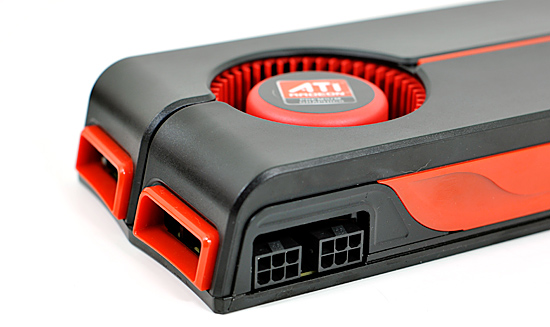
Are the PCI-E connectors on top of the card?

pciepower.jpg
 
GPUz. 1600 Shaders for HD5870 vs 1440 Shaders for HD5850.

They could flash the bios, is the reason hes asking to begin with. USE GPU-Z also google the GPU-Z of a good 5870 you will see numbers in there depicting if it is or not. You could also ask others to post up there's for you so you know what your looking at.
You may also look at Howbot for know 5870's That show the GPU-Z of the card. Here's a link to start you off.
http://www.techpowerup.com/downloads/SysInfo/GPU-Z/
 
Last edited:
The connectors are on the side near the back. So it's facing me when the card is installed. Just like in the picture posted above
 
Yeah if your power connectors are there, it's definitely a 5870. 5850 connectors are inside one of the two red box thingies.
 
Back
Top