_Avalanche_
Junior Member
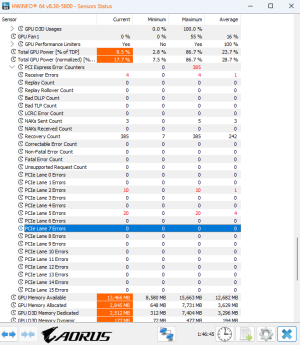
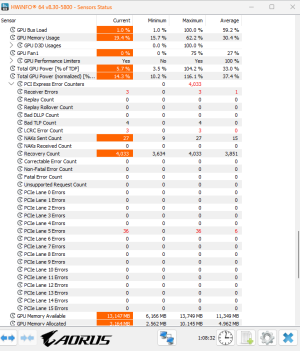
I am receiving these pcie lane errors with my new build. Are these normal? Or I shouldn't be concerned about them?
Thank you
Thank you

Thanks for the helpWhat CPU/platform?
after a few hourse of use, I see a few of them. Specillay those that happen on the line. those look so bad to me.Not normal if they’re steadily increasing. If they keep climbing, could point to GPU/board defect worth RMA.
Do they increase only under load, or even at idle?

 www.hwinfo.com

If they show up at idle even slowly, that usually means signal integrity issues rather than just load stress.after a few hourse of use, I see a few of them. Specillay those that happen on the line. those look so bad to me.

You fail to mention what GPU it is, but set the PCIe gen for that slot to the gen the GPU is specced for and see what happens.This is right now. after half an hour of playing. but the PC was on from the morning for a few hours, but only the recovery counts happened a lot, as it seems normal. Also a few of NAKs
It works fine as I said, but I don't know.
I will try on another PCIe express. That one is gen 3 I think, but no other way.
Can you guys please check HWinfo for a few hours on your system? to see what happens? specially when power saving options are ON.I would really appreciate it
Yeah you are right, but believe me everytime I want to send a new post, it stops me and calls it as spam, so I edit it heavily in every aspect. Probably it is because I am new.You fail to mention what GPU it is, but set the PCIe gen for that slot to the gen the GPU is specced for and see what happens.

CPU amd 7000 seires, the motherboard is AM5
Then try gen 4.I set it to PCIe 5, but no success.
When I disable the power saving function of GPU and pCIe, the number of Recovery errors go almost to zero. But the other error such as PCIe lane 5 error is there. Maybe even after few hours of use there is nothing, but suddenly 20 30 of them apper in a short period of time.
Thank you!Although I'm on AM4, maybe it'll help:
pcie errors appeared once AER/advanced error reporting was activated in BIOS.
Had to up the SoC voltage a bit and they went away.
But, as you said, there were no perf differences ..
I don't think the hardware's faulty.I disabled all the power management options, in bios and windows and nvidia control panel.
I am trying to see if the lane error appears again.
I am trying my best to not to return it back, because I am not sure if the hardware are really faulty or not. I have a few days. I will put the results here. Also, if anyone else has similar or more or less similar specs, please share the results
Thank you
So you mean it is normal? Happens to everyone?I don't think the hardware's faulty.
After all of these, happened again on PCIe lane 5. But just a few. 10I disabled all the power management options, in bios and windows and nvidia control panel.
I am trying to see if the lane error appears again.
I am trying my best to not to return it back, because I am not sure if the hardware are really faulty or not. I have a few days. I will put the results here. Also, if anyone else has similar or more or less similar specs, please share the results
Thank you
Probably. When I get a chance, I'll check a couple of my machines. There's many little things that can fly under the radar when it outwardly looks like things are good.So you mean it is normal? Happens to everyone?
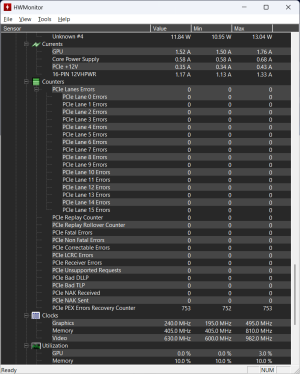
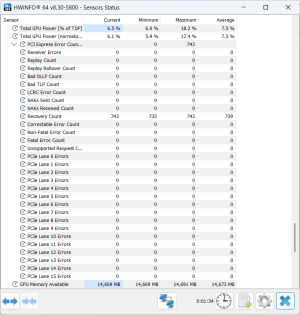
These are from my system with a 5070 Ti. I also checked one of my systems with a GTX-970. It had a few under recovery counter but neither had any under lane errors. My AMD GPU systems don't seem to have this information.So you mean it is normal? Happens to everyone?
These are all clearly under the GPU heading.The more I search, the more it appears it can be anything from graphics cards, to wifi cards, to nvme drives. The general consensus is that if it works fine, it's fine.