• We’re currently investigating an issue related to the forum theme and styling that is impacting page layout and visual formatting. The problem has been identified, and we are actively working on a resolution. There is no impact to user data or functionality, this is strictly a front-end display issue. We’ll post an update once the fix has been deployed. Thanks for your patience while we get this sorted.

Hybrid or Regular HDD?

olds

Elite Member
I have an older 500 GB drive that's almost full. I want to swap it out for a 2 TB drive. I use it for FPS games and storing/watching videos.
Requirements:
  1. Reliable
  2. Quiet (HTPC set up)
  3. Fast

An SSD for the drive is not in the budget at this time.

I'll need to transfer my old files over to it.

TIA
 
Last edited:
Do what I did if you have the cash. I bought two 1 TB Samsung 840 Evo drives for 490 USD each. I still have an empty mSATA slot which I will add another 1 TB mSATA 840 Evo to it so have a total of 3 TB SSD space. You get the speed, reliability for years, and best bang for the buck

If SSD is out of your budget, then it's better to consider a hybrid HDD such as the Western Digital Caviar (not sure about the name) but I wouldn't settle for a normal HDD at this day and age. just too slow for me
 
OP has slightly disparate requirements. He wants HTPC functionality; he wants to game.

HTPC doesn't require anything more than SATA-II (TWO!) HDD operating normally for a buffer and DVR captures. Any HD movie you store on such an HDD will play flawlessly.

Gaming? Might likely benefit from much greater speed.

Most of the gurus over in the HTPC forum would say "build a dedicated HTPC." I did the opposite. My sig-rig has two monitors: the HDTV running through my AVR, and a desktop monitor. I can also imagine just using the HDTV for all purposes, although I wouldn't be able to do those purposes simultaneously. But the number of monitors or their assigned usage isn't the issue.

The sig-rig has a (currently) 500GB SATA-III WD Black running off an auxiliary Marvell SATA III controller. [I will soon disable that controller and hook the drive up to the onboard intel controller's SATA-II port -- it won't matter.] My boot-system disk -- storing programs and games -- is currently a Sammy 840 Pro in "RAPID" mode [and obviously connected to an Intel SATA-III port]. Media Center is configured to make its temporary buffer files on the HDD and record programs to it.

I've got plenty of 1TB drives to choose from and replace the 500GB WD -- not a problem to clone. Nor should there be a problem moving from the Marvell to the Intel controller.

Maybe that will offer suggestions for a configuration with a 2TB HDD. What the OP wants would make the SSD+HDD combination optimal. But "optimal" is constrained by price/expense. If it were me, though, I wouldn't try and put all eggs in one basket, where the basket is a "hybrid" drive. Last time I looked, hybrid drives don't offer so much in performance gains. If "hybrid" also includes SSD-caching ISRT setups, the performance of the latter is closer to standalone SSD performance.

BUT! You don't want to push movie files through your ISRT configuration -- bad idea. So . . . much better to have a standalone SSD and an HDD for any intensive "HTPC" usage. Your games would run off the SSd.
 
The PC is basically a gaming rig that's hooked to my 60" Plasma so it doubles as a HTPC.
 
The PC is basically a gaming rig that's hooked to my 60" Plasma so it doubles as a HTPC.

Not much different than my own machine and its usage. Here, I was just offering suggestions based on my own practice. It actually evolved to its current state: I'd set up ISRT to cache a VelociRaptor; realized that I didn't want "home theater stuff" going through that cache. I finally dumped the ISRT configuration and replaced it with an 840 Pro SSD. It wasn't cheap, but it was timely. Using a second HDD for the HT function always proved to be the wisest choice.

But for the gobs of money spent on the 840 Pro, I'm now using only a single HDD in the system.

Just my opinion, but if the rig was initially focused on gaming, I would have thought you might have jumped on the SSD-standalone bandwagon earlier. I'll be the first to admit, though, that I was only "testing the water" with ISRT and an SSD that cost me only about $100+. SSDs are still an expensive proposition.

You might, of course, just install a pair of SATA-III HDDs (hybrid wouldn't offer any critical value here), set them up in RAID0 and make the compromise that way. I'm only guessing that your sequential read bench would come close to 300 MB/s -- even higher. with the right choice of drives, it would still be a fraction of the cost of a single SSD of equal capacity. And you wouldn't have to segregate "HT" files from system/programs. Wouldn't have to -- but you could: by cutting the RAID partition into two logical drives.

Then, you'd have to worry about backups. One drive going south would kill the whole enchilada.
 
Last edited:
I'm personally not a fan of hybrid HDDs. More components to go wrong, and when the mechanicals of the drive die, you're throwing away all that flash memory. And its not that hard to tie a SSD and a HDD together at the software/logical level, using the various onboard stuff from Intel, or even bcache on Linux. Or simply by being strategic as to how one plans out their installation (ie: OS on the SSD, media stuff on the HDD!).

But if a SSD truly isn't in the budget, then a straight up HDD I guess it has to be. Best deal/quality/reliability seems to be the Toshiba 3Tb's these days.
 
I like the multiple drive route.
Right now, I have 3.
C: SSD for OS
D : HDD for all other files/programs
E: HDD to back up C and D (almost full)
If C crashes, all I lose is the OS files. Games, Documents, Music, Movies, etc are still on D and E.

I do have a 1TB NAS that I bought used but I haven't been able to get it working.
 
Last edited:
hybrid drives aren't that much faster then a normal 7200rpm drive.

It has almost 0 effect on loadup, unless its something you constantly load up.

example:
If your playing Battlefield, and ur constantly loading up a map, it may help a tiny bit, but not as noticeable as a SSD. If your game session is long, and u dont load up the same map constantly, it will have almost no impact on the loadup.

If you turn off and on your PC, it may effect windows bootup, but not if your the type that puts the PC to sleep.

The Drive needs to learn what files are accessed frequently, and again, you dont see that consistent access on a game which ram itself wont cache.

If you want faster loadup, save up and get a SSD purely for gaming, and use the Magnetic for files / movies.

If you really cant afford a SSD, then just grab the fastest 7200rpm drive with 64mb of cache, and call it a day. Dont spend the extra for a hybrid feature as i dont see it being truely worth it.

I have had 3 hybrid drives believing the hype behind them only to be disappointed when they were replaced with real SSD's.
 
I like the multiple drive route.
Right now, I have 3.
C: SSD for OS
D : HDD for all other files/programs
E: HDD to back up C and D (almost full)
If C crashes, all I lose is the OS files. Games, Documents, Music, Movies, etc are still on D and E.

I do have a 1TB NAS that I bought used but I haven't been able to get it working.

I won't criticize your approach. SSD is premium-priced storage real-estate. But I draw the line between OS+Programs and data files. This of course means I need more SSD storage beyond the OS files. As much as I can tell, the OS files for Win 7 may take up less than 25GB. But with program installations, my 500TB 840-Pro has about 140GB in use by OS+programs.

This makes it easy for me to use the daily backup feature of my WHS server, but not by that much. I could also put program folders and data files on another disk, and just include them in the backup configuration. But separating the data files allows me to back them up separately or simply put them on the server and force their duplication. If I have to make a bare-metal restore of the OS, it will include the OS and all the programs.
 
I won't criticize your approach. SSD is premium-priced storage real-estate. But I draw the line between OS+Programs and data files. This of course means I need more SSD storage beyond the OS files. As much as I can tell, the OS files for Win 7 may take up less than 25GB. But with program installations, my 500TB 840-Pro has about 140GB in use by OS+programs.

This makes it easy for me to use the daily backup feature of my WHS server, but not by that much. I could also put program folders and data files on another disk, and just include them in the backup configuration. But separating the data files allows me to back them up separately or simply put them on the server and force their duplication. If I have to make a bare-metal restore of the OS, it will include the OS and all the programs.
When I built this rig, I bought everything all at once so it was a sizable
outlay. At the time (almost 2 years ago) SSDs were selling for a premium. Maybe when they come down a bit more, I'll upgrade D to a 1 TB SSD.
 
If SSD is out of your budget, then it's better to consider a hybrid HDD such as the Western Digital Caviar (not sure about the name) but I wouldn't settle for a normal HDD at this day and age. just too slow for me

Too slow? My 14Mbps (16GB) encode of Suzumiya Haruhi no Shoushitsu loads in under 2 seconds off my ST1000DM003. My Little Pony eps pop up in under 1s in either 1080p or the 720p interpolated 60fps versions.

A hybrid drive is going to do nothing for a media drive unless you're watching one thing over and over.

A 2TB drive is $80.
A 2TB hybrid with only 8GB flash is $120
2TB drive + 240GB SSD for 64GB SRT cache and a 176GB app drive is $180.
2TB in SSD is $1000

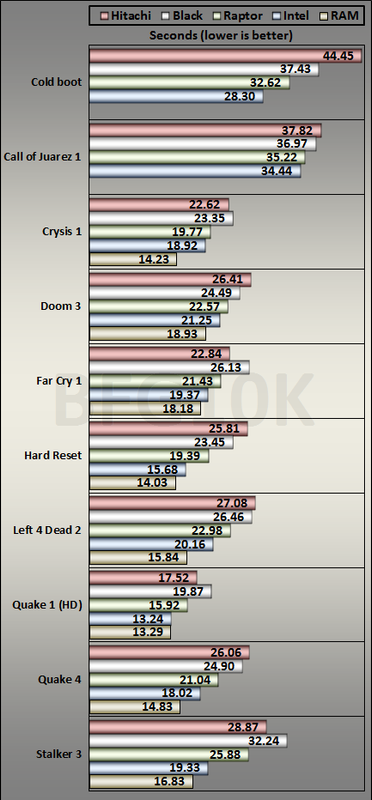
For games?
http://forums.anandtech.com/showthread.php?p=33588015
Graph.png


The "Intel" is an Intel 320 SSD. Certainly looks worth >$800 to me 🙄
 
When I built this rig, I bought everything all at once so it was a sizable
outlay. At the time (almost 2 years ago) SSDs were selling for a premium. Maybe when they come down a bit more, I'll upgrade D to a 1 TB SSD.

Maybe it had already been mentioned above, or maybe I even mentioned it. If you use a motherboard with an Intel processor and chipset Z68 or later, you could spend ~$80 on a 60GB SSD, throw in (even an SATA-II) 1TB or 500GB HDD, and do the ISRT "SSD-caching/HDD-acceleration" thing.

If so, I WOULD suggest that you update the system BIOS and get the IRST version update before proceeding.

Later, when you find yourself flush with enough cash to buy a bigger SSD, the 60GB SSD will still have many uses.

Another way to do this on an older motherboard but more recent PCI-E bus version: find an add-in Marvell controller (i.e., Startech PEXSAT34RH) and use the "HyperDuo" Marvell technology alternative to Intel ISRT.

I cannot vouch for how satisfactory HyperDuo might be, or its reliability, but you might look into it. You're still going to spend between $45 and $80 on the PCI-E controller, another $80+ on the 60GB SSD, and between $50 and $80 on an inexpensive but reliable HDD.

Either way -- this sort of thing doesn't require an SATA-III HDD. You'll get the same results from an SATA-II -- for instance, a 1TB Samsung F3 drive if you can find one.

 
As long as your OS is installed on a SSD, you wont see much improvement from having your games installed on an SSD or hybrid, vs a regular old HDD. Therefore I strongly recommend just a standard 7200RPM HDD.
 
Back
Top