
The HF audio sound from my PC is just getting too much and I really need to tackle this. After a few hours on my PC and I go into another room I still hear the high pitched noise and no I do not have tinnitus 🙂.
The fan noise is not great either but that is a secondary issue for me.
I have already raised the PC up on a styrofoam platter to remove any vibration going into the floor.
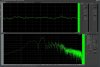
I have captured the sound using my desktop mic and a frequency analyser software app. My Desk (dining table) layout is also shown.
I can only think to make some form of thin metal enclosure to wrap around and cover the top of my PC. Maybe with some foam stuck on the inside of it. This I can make myself at fairly low cost and I know there would need to be spaces for airflow and cables.
Anyone have different suggestions?

The fan noise is not great either but that is a secondary issue for me.
I have already raised the PC up on a styrofoam platter to remove any vibration going into the floor.
I have captured the sound using my desktop mic and a frequency analyser software app. My Desk (dining table) layout is also shown.
I can only think to make some form of thin metal enclosure to wrap around and cover the top of my PC. Maybe with some foam stuck on the inside of it. This I can make myself at fairly low cost and I know there would need to be spaces for airflow and cables.
Anyone have different suggestions?


