• We’re currently investigating an issue related to the forum theme and styling that is impacting page layout and visual formatting. The problem has been identified, and we are actively working on a resolution. There is no impact to user data or functionality, this is strictly a front-end display issue. We’ll post an update once the fix has been deployed. Thanks for your patience while we get this sorted.

How to identify startup app named "Program" in Win 10?

pete6032

Diamond Member
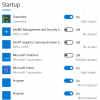
In Settings > Startup Apps I have two applications named "Program" that are set to start when Windows starts. How can I tell what those are if they are just named "Program"?

1642864714484.png
 
Task Manager also has a startup tab but not sure if it would show more info or not. You can right click the name of the program and get more info. Weird that it doesn't show open file location and properties for all entries though.
 
I have 30 Apps in the StratUpMenu of Win 10 Setting..

6 Of them are put by default during the installation of Win 10.

About 12 are put by default with the Drivers of Printers, Google Chrome, and Networking hardware.

The rest are programs that I Installed.

Each one has it recognizable name.

When some thing is just name program I suggest to really find what it is.

If the OP is not capable to use sophisticated program like Autoruns, he/she should disable them one at the time and see if there is a Functional result of any of them.

BTW, cCleaner (the freeware Cleaning Program ( https://m.majorgeeks.com/files/details/ccleaner_portable.html ) has under the Tools good StartUp Manager too.


😎

 
Looks sketchy on the surface. It'd be interesting to see what those are, haven't seen that before myself.
They are sketchy to me too but this is a work relatively new work machine and I'm the only one to work on it. Everything is up to date. I'm guessing it may be something installed by our IT Department.

If the OP is not capable to use sophisticated program like Autoruns, he/she should disable them one at the time and see if there is a Functional result of any of them.

BTW, cCleaner (the freeware Cleaning Program ( https://m.majorgeeks.com/files/details/ccleaner_portable.html ) has under the Tools good StartUp Manager too.

Thanks, I will spend some time on in when I get a chance.
 
I had this exact situation. Turned out to be a video editing program I downloaded and uninstalled. Looks like the uninstallation software didn't clean out everything in the registry, which isn't a surprise. Once I cleaned those entries out, the mystery "program" entries disappeared.
 
Back
Top