
• We’re currently investigating an issue related to the forum theme and styling that is impacting page layout and visual formatting. The problem has been identified, and we are actively working on a resolution. There is no impact to user data or functionality, this is strictly a front-end display issue. We’ll post an update once the fix has been deployed. Thanks for your patience while we get this sorted.

How to get regular windows search back?

Red Squirrel

No Lifer
I recently reinstalled my work computer (XP) and somewhere along the process I must have missed unchecking something and it snuck in this stupid windows search thing that does not actually work. It looks like this:
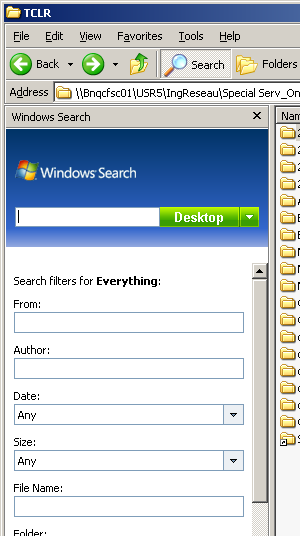


Did a full malwarebytes scan but did not find anything, this might actually be a MS thing and not spyware, either way, I want to get rid of it. I can't seem to find much online. Anyone seen this before and know how to get rid of it?
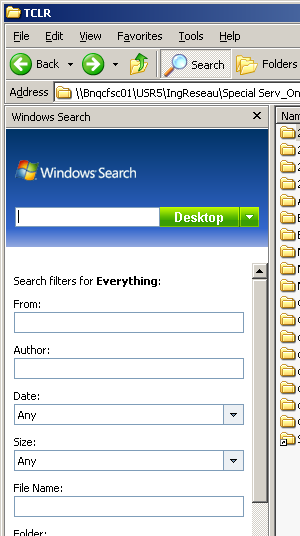
 
Weird. It looks like some odd "Windows Search 4.0" that got rolled out to Vista SP1 6 years ago:

microsoft-prepares-to-auto-deliver-windows-search-4-0-to-vista-users
http://betanews.com/2008/07/21/microsoft-prepares-to-auto-deliver-windows-search-4-0-to-vista-users/
 
Sounds like this:

"Windows Search 4.0 for Windows XP (KB940157)"

Which is in my Microsoft Updates under "Software/Optional" list right now.

Should be easy enough to remove In Add/Remove. Don't forget to tell it to "show updates."
 
Sounds like this:

"Windows Search 4.0 for Windows XP (KB940157)"

Which is in my Microsoft Updates under "Software/Optional" list right now.

Should be easy enough to remove In Add/Remove. Don't forget to tell it to "show updates."

Yep that is what it would be
 
Cool I'll try that when I get to work tomorrow. I'll have to retake an image of my PC after this. My PC is the first PC in a long time that is reinstalled from scratch so figured I'd make it the standard image that everyone can use if their PC ever crap out.

Typically that would be an IT thing but our department is so specialized we tend to just take care of our own PCs and only go through IT for parts or basic stuff.
 
I don't like that stuff either. It seems kind of update from "Windows Search". It is a piece to get you ready for the even bigger piece of search they have in both Vista and Win7.

You should uninstall it in Start>Control Panel>Add/Remove Programs.

Then go manually to Windows Update and prevent it from installing again.
 
If you want a better search try Everything.exe. I disable indexing anyway since I have a SSD.

http://www.voidtools.com/download/

That's a superb lightning fast tool that doesn't rely on Windows indexing. Only shortcoming is that it does not search file contents--only names or parts of names.

Should be preferable for most users to Windows built-in search unless you are the type of person that would put a pot roast recipe in a file called "cool stuff" instead of using a much more descriptive name.
 
Yeah, I would like to find something that searches file contents. But Everything has located many a driver and files for me.
 
I've been using FileLocator Pro for years and it has worked well for me. They have a free version called Agent Ransack.
 
One thing I discovered is since the "upgrade" to office 2010 or w/e the newer version is after 2003 not only did it screw up search but when I got rid of that annoying search thing, it broke searching in email. No more instant search, and actual searches don't find anything.

I don't get why MS does this crap. It worked fine before, why break it? I can either install that new search tool back and lose ability to search within files but be able to search in outlook, or not have it and only be able to search files. Can't have both working at same time.

Is there by chance a way to be able to search both effectively? I suppose I could reinstall that tool and just use a 3rd part desktop search app? Most apps wont do UNC paths or network drives though right?
 
Yeah....you need to look up the backend services that the searches use. M$ searching is based on an index service that's linked to NTFS. Versions vary, but you must have that installed and service running for searches to work.

You can likely find it by checking "services" and look for Microsoft search or indexing services....I think the names have changed. In Windows Server, it's part of the roles & features.
 
Only issue is index based file searches wont work, since most of our stuff is on the network, either drive mappings or UNC path. Is there a way to keep the current standard search, but also get instant search in email? Seems silly they tried to link the two, but then again it's Microsoft we're talking about here. 😛

I suppose I could write a file search app or use a 3rd party one if I can find one that does not use indexing, and use that instead. Then I could install that stupid search thing for the email search to work again. Indexed based searching is great for local but not so much for network. You're not going to index TB's worth of files, and most of these apps wont even let you search network anyway.
 
winXP; on desktop, press f3, it automatically brings up the 4.0 version of search (garbage sometimes), and then there is a link option that takes you back to the original search option with the animated character dog.
i'm pretty sure there is pre-indexing/caching available in the original search function if i'm not mistaken, but may not be as easily accessible for most common users.
 
Back
Top