• We’re currently investigating an issue related to the forum theme and styling that is impacting page layout and visual formatting. The problem has been identified, and we are actively working on a resolution. There is no impact to user data or functionality, this is strictly a front-end display issue. We’ll post an update once the fix has been deployed. Thanks for your patience while we get this sorted.

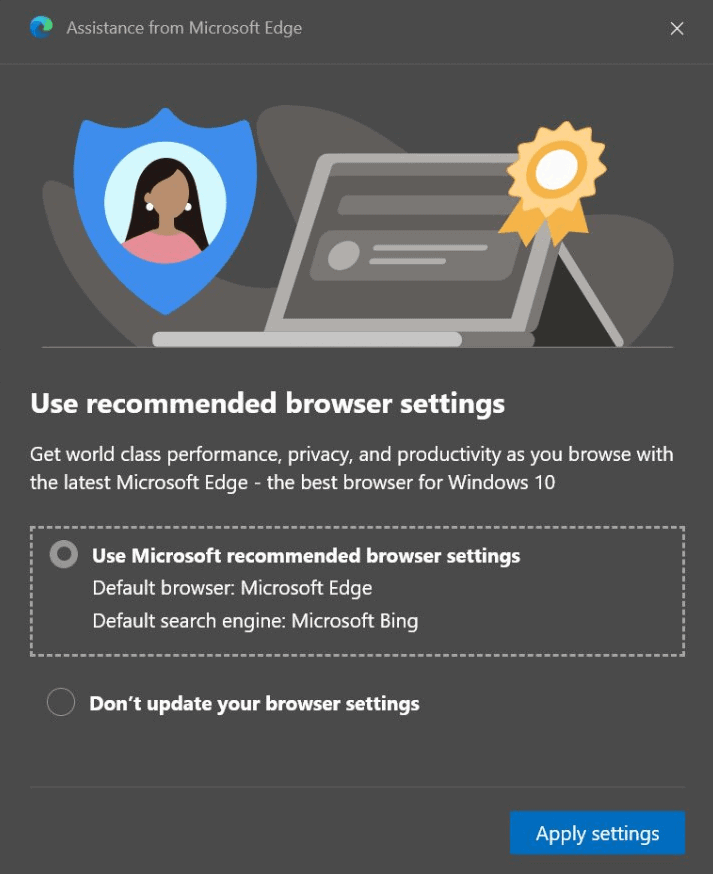
Info How to disable Edge's "use our recommended settings?" prompt

This feature in Edge really grinds my gears, the notion that MS notices that say you're not using Bing as your default search engine and sees fit to tell you that you're doing it wrong.

Anyhoo, fire up Edge, type in edge://flags in the address bar.

The first setting in the list ought to be labelled "show feature and workflow recommendations". Set it to 'disabled'.

Admittedly because MS has been resetting users' browser settings back to what MS wants them to be for possibly decades now, I'm not sure I trust MS to not reset this one as well at a convenient moment such as an Edge or Windows feature update, I don't think I'll be changing my recommendation to customers* about avoiding using Edge.

* - customers who are in a position to change/choose browsers (e.g. Internet Explorer users, newbies), as opposed to me telling happy Edge users that they're doing it wrong 🙂
 
You have to scroll down a bit to see the section on how to disable default browser check.

Or do you actually want to use Edge?

I'm not talking about the default browser setting, but this:
 
I wonder if you can use Ublock Origin's "block element" feature to make it go away. I'll give what you said a try though. Edge isn't my default browser and I see that darn pop-up all the time. I've been to lazy to disable sandboxie and start edge to get rid of the pop-up so it will save the option permanently.
 
Anyhoo, fire up Edge, type in edge://flags in the address bar.

The first setting in the list ought to be labelled "show feature and workflow recommendations". Set it to 'disabled'.

Thanks for this! I don't use edge often, but it will sure be nice to stop some of it's whining about default browser and bing.

I'm using edge 97, and "show feature and workflow recommendations" didn't show up at the top of the list, but I found it using the search function on the flags page.

I hope it worked; only time will tell 🙂
 
Thanks for this! I don't use edge often, but it will sure be nice to stop some of it's whining about default browser and bing.

I'm using edge 97, and "show feature and workflow recommendations" didn't show up at the top of the list, but I found it using the search function on the flags page.

I hope it worked; only time will tell 🙂

Yeah, my instructions were slightly wrong. There's a URL you can go to that puts that setting at the top of the list, but I can easily remember 'edge://flags' rather than 'edge://flags#insert_novel_here' 🙂
 
I've since found that there's not a great deal of point in this setting. If you disable it, you still get the regular message on Windows login asking you to repent your wrongthink. It just disables the specific scenario of starting the browser and getting that message.
 
I've since found that there's not a great deal of point in this setting. If you disable it, you still get the regular message on Windows login asking you to repent your wrongthink. It just disables the specific scenario of starting the browser and getting that message.

I've never got that upon signing into windows after booting up. All I've ever seen was an item in settings about it. Do you use a local account or microsft account to sign in?
 
I've never got that upon signing into windows after booting up. All I've ever seen was an item in settings about it. Do you use a local account or microsft account to sign in?

I've never actually used Win10 as my primary OS, but for my gaming OS I have a local account only. I tend to recommend local accounts to my customers though through my work I see a whole mix of settings (local account, local account with MS account linkage, MS account). In my travels I've seen the following nags at the login stage:

MS Edge browser setting
Please use OneDrive
MS account nag, your computer isn't fully set up without it!
Please use OneDrive backup feature
Not 100% sure about this: Please sign up to MS Office, you'll get 1TB OneDrive space
 
This feature in Edge really grinds my gears, the notion that MS notices that say you're not using Bing as your default search engine and sees fit to tell you that you're doing it wrong.

Anyhoo, fire up Edge, type in edge://flags in the address bar.

The first setting in the list ought to be labelled "show feature and workflow recommendations". Set it to 'disabled'.

Admittedly because MS has been resetting users' browser settings back to what MS wants them to be for possibly decades now, I'm not sure I trust MS to not reset this one as well at a convenient moment such as an Edge or Windows feature update, I don't think I'll be changing my recommendation to customers* about avoiding using Edge.

* - customers who are in a position to change/choose browsers (e.g. Internet Explorer users, newbies), as opposed to me telling happy Edge users that they're doing it wrong 🙂
Here is how I do it...

1) Run Edge, change my default search engine to it to Google, install ABP (optional, just in case if I ever use Edge)

2) Install Chrome or whatever web browser you want and set it as default.

3) Run that new browser once and close it.

4) Open Edge once or twice until you see the prompt and reply no to the stupid prompt

5) I then never see that prompt again.
 
Back
Top