• We’re currently investigating an issue related to the forum theme and styling that is impacting page layout and visual formatting. The problem has been identified, and we are actively working on a resolution. There is no impact to user data or functionality, this is strictly a front-end display issue. We’ll post an update once the fix has been deployed. Thanks for your patience while we get this sorted.

How to be a completely moronic IT admin (please share your stories)

So the latest "achievement" of my company's IT admin gorilla:

Picture this. You have five (at least 32 inch) TVs. Each of them has a VM running on it. Developers from the outsourced company request RDP to any of these VMs and everything happening on the VMs is recorded by security cameras pointed at the TV screens.

Apparently, he has yet to progress to a level where he learns that screen recording software is a thing.
 
I don't even want to ask anyone in the dept (other than the idiot himself because I'm no longer on speaking terms with him), if the five VMs are running on the same server OR if there are five different mini PCs connected to each TV. I'm almost afraid to ask for the possible trauma to my brain.

I mean, the way his mind works, he may go, oh the host OS is one layer of defense. The VM inside is another layer of defense. Definitely install a VM on the standalone PC that is only used as a jump server (it's entire purpose to exist)!
 
So the latest "achievement" of my company's IT admin gorilla:

Picture this. You have five (at least 32 inch) TVs. Each of them has a VM running on it. Developers from the outsourced company request RDP to any of these VMs and everything happening on the VMs is recorded by security cameras pointed at the TV screens.

Apparently, he has yet to progress to a level where he learns that screen recording software is a thing.

One could argue that since the screen recording is occurring on the same physical PC as the VM that a VM user could in theory escalate privs and take out the recording software and its recordings that an analog (ish?*) method is less hackable.

I'm kind of curious about what needs to be semi-security-sensitive that all *visible* UI activity needs to be recorded yet the machine is RDP'able from an outside source and company, presumably they secure-tunnel in before they RDP.

* - the cameras are likely digital and record onto a digital resource which is probably network connected...
 
One could argue that since the screen recording is occurring on the same physical PC as the VM that a VM user could in theory escalate privs and take out the recording software and its recordings that an analog (ish?*) method is less hackable.
That's a good point. It would make sense if those five security cameras were actively monitored. We don't have staff for that. It's most likely just to record activity to find the culprit "after the fact" in case of some rogue developer doing something malicious in our database.

I'm kind of curious about what needs to be semi-security-sensitive that all *visible* UI activity needs to be recorded yet the machine is RDP'able from an outside source and company, presumably they secure-tunnel in before they RDP.
Financial core system managed by an outsourced developer containing sensitive customer data of at least a million customers (not all of them active, though).
 
So the latest "achievement" of my company's IT admin gorilla:

Picture this. You have five (at least 32 inch) TVs. Each of them has a VM running on it. Developers from the outsourced company request RDP to any of these VMs and everything happening on the VMs is recorded by security cameras pointed at the TV screens.

Apparently, he has yet to progress to a level where he learns that screen recording software is a thing.
You got TVs that can run VMs? Also, RDP session recorder is a thing.
 
Last edited:
So the latest "achievement" of my company's IT admin gorilla:

Picture this. You have five (at least 32 inch) TVs. Each of them has a VM running on it. Developers from the outsourced company request RDP to any of these VMs and everything happening on the VMs is recorded by security cameras pointed at the TV screens.

Apparently, he has yet to progress to a level where he learns that screen recording software is a thing.
Uhh, you said several things wrong here that show what you're not familiar with.

VMs don't run on TVs. The TV might have some kind of screen sharing with the VM? If it's got custom software? Or it could be strapped to a thin client or something? but VMs run on a VM host, or on a PC that's got some kind of VM software on it.

RDP access to a system lets you remote desktop to it, that does not present in a console session, so cameras will only capture the console session being logged out, then a login screen for hours/until it's rebooted (assuming it's autologin).

The appropriate way to do this would be to RDP or use some kind of screen sharing software from their system to the VM, then let the vendor use some kind of helper software to take control of their session, so all actions can be observed and access can be cut off at any time.
 
Last edited:
RDP access to a system lets you remote desktop to it, that does not present in a console session, so cameras will only capture the console session being logged out, then a login screen for hours/until it's rebooted (assuming it's autologin).

😀 That is a very good point!
 
Uhh, you said several things wrong here that show what you're not familiar with.
Way to go throwing suspicion on my tech knowledge (sure, I don't claim to have knowledge about everything but I feel hurt by that sentence so thanks I guess?) 😀

Dude, I don't have to go into explicit detail to relate something. This is a tech forum. People here generally understand when someone is talking about tech related stuff.

VMs don't run on TVs. The TV might have some kind of screen sharing with the VM? If it's got custom software? Or it could be strapped to a thin client or something? but VMs run on a VM host, or on a PC that's got some kind of VM software on it.
OMG. You really expected me to believe or anyone else to believe that VMs run on TVs??? Obviously it's a server or a bunch of mini PCs. I cannot confirm without poking my nose into their setup which I don't care doing because I will most likely get a bad headache from seeing what choices they have made like spending too much on needless hardware when more could have been accomplished with less.

From what I know about this merry bunch of IT wizards (the gorilla is the one who likes to take charge and get things done. There are others who take a mostly backseat approach and just kept in the loop or the hardware vendor who manages the network, routers and desktop PCs at our branches), they are using Hyper-V VMs.

The appropriate way to do this would be to RDP or use some kind of screen sharing software from their system to the VM, then let the vendor use some kind of helper software to take control of their session, so all actions can be observed and access can be cut off at any time.
Yes, they are using Splashtop to remote to the PC and then RDP to the VM and whatever they are doing is visible on the TV.
 
By the way, just to get an idea of what kind of people I deal with (it's mostly the gorilla. The others are not bad because at least they don't respond rudely when I inform them of something they may have done wrong or overlooked):

There's a Windows XP PC running a cheque printing software. They (company (maybe they are unaware) or the gorilla, I'm not sure) do not want to pay the license to get that software on a new PC. Said PC once stopped booting Windows because the CMOS battery died. My memory is hazy (it was several years ago) but I'm pretty sure that I was the one who showed the gorilla that there's an AHCI option in the BIOS and that needed to be changed to legacy for Windows XP to boot.

They also had a very critical three PC setup (one was running Windows Server 2000, other two Windows 2000) on PCs of that era. Both PCs died obviously due to their age so they were left with only the Windows Server one and started using it directly to logon and use their critical piece of software. They mentioned to me that if this PC also died, they would be in serious trouble. I, being the STUPID helpful idiot that I am, immediately rose to the occasion to solve the problem for them since they couldn't (or wouldn't) pay to develop a newer version of that custom SQL Server 2000 based Visual Basic compiled software. I converted the PC's HDD into a VM image and transferred it to another Windows XP Core i3 3rd gen PC (because XP was the OS at that time) and they have been running that critical software through Virtual Box ever since. I've had to fix that VM a few times due to various reasons (Vbox absolutely sucks for mission critical stuff. Don't make the same mistake I did) and once had to stay up until 1:00 A.M. in the office for that reason. Obviously, zero appreciation thanks to the toxic place I work at.

So I can definitely help them by moving the cheque software to a newer PC but at this point, I'm just going to sit back and enjoy the gorilla's crap show. Especially since he publicly accused me of bringing viruses (he can't even say that word. He says BI-ruses) into the company network and promptly failed to give any concrete evidence with the CEO in the email chain and I basically had to school him with strong words and told him flat, with the CEO as witness, that he could kiss goodbye to any future tech advice or help for when he gets stuck.
 
Sounds like you could use a new place of employment. Hard to get work there?
I wish it was simple to change workplaces. LOOOOOONGGGG list of reasons.

Major is that I'm an expat and basically a subhuman who can't return to his own country because it's wayyyyy worse and I can't move to any other country because I'm not skilled enough to make it in another foreign land especially at my age (44).

The easiest thing is to just stay here and collect a paycheck and do the very best until some tipping point is reached or the company croaks (I swear they seem desperate for it to do that. Like some people stand to gain from the company dying).
 
Way to go throwing suspicion on my tech knowledge (sure, I don't claim to have knowledge about everything but I feel hurt by that sentence so thanks I guess?) 😀
You were the one claiming authority in this situation by making a post about how poor your IT support was.
OMG. You really expected me to believe or anyone else to believe that VMs run on TVs??? Obviously it's a server or a bunch of mini PCs. I cannot confirm without poking my nose into their setup which I don't care doing because I will most likely get a bad headache from seeing what choices they have made like spending too much on needless hardware when more could have been accomplished with less.
I've worked long enough in this career to not assume anything. I also wouldn't assume anything about the hardware itself, I've seen some really funky stuff in the A/V space.
From what I know about this merry bunch of IT wizards (the gorilla is the one who likes to take charge and get things done. There are others who take a mostly backseat approach and just kept in the loop or the hardware vendor who manages the network, routers and desktop PCs at our branches), they are using Hyper-V VMs.
Then the vendor having RDP access to the VM won't be 'secure' since nobody will know what they're doing without substantial monitoring software, which most won't deploy for one-off cases like this.
Yes, they are using Splashtop to remote to the PC and then RDP to the VM and whatever they are doing is visible on the TV.
Nope, you need a screen-share software on the target system (the 'VM' in this case) to make use of the console of the thing you're seeing on the screen. RDP to the VM won't provide console access, and will be invisible to whatever camera setup is going on.

Don't get me wrong, he may be a useless as a sack of doorknobs, just make sure that you're correct when you criticize him/appeal to authority 😛
 
Nope, you need a screen-share software on the target system (the 'VM' in this case) to make use of the console of the thing you're seeing on the screen. RDP to the VM won't provide console access, and will be invisible to whatever camera setup is going on.
There's no Linux being used. Only Windows. Not sure where the "console" part is coming from.

I've seen the TV screens in use. Vendor is given Splashtop access. Vendor then RDPs into some IP and then everything they do at that IP is visible on the screen. They just logon to the desktop of the IP they RDP into.
 
There's no Linux being used. Only Windows. Not sure where the "console" part is coming from.
Console has nothing to do with Linux.

When you're sitting in front of a computer, logged into it, you're logged into the console session:
1758811038468.png
If you're remoted into a system, you're in an RDP session:
1758811100628.png
RDP sessions do not present on a console screen (the tv/monitor/whatever you're looking at) since that only presents the console of the system.

In order for this to work, the thing that the TV is connected to needs to have the console session shared in some way, generally by software like splashtop. There's a few ways this could look like:
vendor -> RDP to endpoint -> RDP session, see nothing on TV, cannot reasonably break communication. (bad)
vendor -> 'helper software' to IT admin workstation -> RDP to endpoint -> RDP session, see nothing on TV, can break communication at any point. (better)
vendor -> 'helper software' to IT admin workstation -> splashtop-like software to endpoint -> console session, see stuff on TV, can break communication at any point (best)

last one, if the thing the TV is connected to is actually RDPing to a windows VM (since that part is unclear) you may need this:
vendor -> 'helper software' to IT admin workstation -> splashtop-like software to TV endpoint (rather than VM itself) -> console session, see stuff on TV, can break communication at any point (best)

If the above is the case, then any to the VM itself won't provide a console connection in any circumstance since what the TV is seeing is a workstation utilizing an RDP session into a VM.
 
OMG. Now you are either showing off your knowledge (because you clearly have more experience being an IT admin) or you simply misunderstood.

It is also very possible that I'm using terminology that means something different in your circles because this is the first time I've even seen someone put RDP and console together.

So yes, my apologies if I seem like a n00b to you and please also accept my indignation at the fact that you somehow think that the gorilla knows things that you understand better than I do.

To further clarify, when I say RDP, I mean the Run command mstsc.
 
OMG. Now you are either showing off your knowledge (because you clearly have more experience being an IT admin) or you simply misunderstood.

It is also very possible that I'm using terminology that means something different in your circles because this is the first time I've even seen someone put RDP and console together.

So yes, my apologies if I seem like a n00b to you and please also accept my indignation at the fact that you somehow think that the gorilla knows things that you understand better than I do.

To further clarify, when I say RDP, I mean the Run command mstsc.
Not showing off, this is rather basic stuff in IT admin world (or it is with competent admins.. most aren't). I don't particularly know/care what you or the gorilla knows, just squaring the info so you/others are aware.

And yeah RDP is mstsc/other doodads that use the remote desktop protocol (not many do).

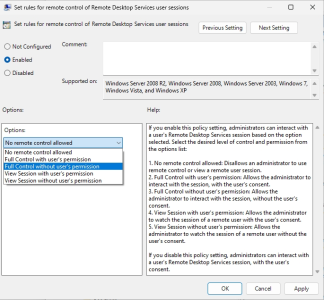
This describes the case most closely to what I am referring to.
That makes sense, the widget connected to the TV might have some kind of saved RDP session it auto-launches (not great since creds are stored in that format)... if it's better it has some kind of pre-authed (via certificates, shared secrets, whatever) screen share session to the VM. In that case you'd want the vendor to screen-share into the admin's workstation, then screen-share from there to the TV-widget. That'd alleviate need to have tcp/3389 open from the internet to anything inside, provide the gorilla the ability to kill the session immediately if he sees them installing a btc miner, and provide video evidence of everything taking place.
 
provide the gorilla the ability to kill the session immediately if he sees them installing a btc miner, and provide video evidence of everything taking place.
He spends most of his time writing useless daunting looking LONG emails using ChatGPT (English isn't his first language) and trying to show that he's accomplishing a lot.

I doubt he would be able to detect any unusual activity. He actually got me to help him login to SQL Server for a time attendance solution and a separate ticker board solution to "hack" them into doing what was required because (yes here it comes again), the company didn't want to renew the subscription fee for those custom software programs and most likely using them illegally. And oh, I also helped him to (again most likely illegally) to get the tickerboard software onto additional PCs from the one it was bought for by making an image of it and restoring it using dissimilar hardware restore option of Acronis whatever the product is called.

Which makes all of the VM and camera monitoring thing totally useless in practice but the basis for another email he gets to show the management to try to get another raise. His only IT credentials are a high school diploma certificate which I wouldn't have pointed out before he got all arrogant because I don't mind people going beyond their education to learn and achieve more.
 
On a sorta similar type of thing, when I worked at the hospital they bought a 70" TV, this was about 10 years ago so that was a pretty top shelf item compared to now, where you might be able to get one for fairly cheap. The idea was to replace a white board in the ER used for patient tracking with an electronic display. So rather than manually walk up to the board to write name of patient and doctor assigned it would be automated when they are inputted in the EHR. This project took about half a year of meetings and planing and for something that should not be that complicated ended up turning into a big ordeal.

During this entire time, the ER nurses and doctors were never even consulted on it, for input on how to improve it or to make sure it will work for them. On deployment day the white board is taken down and the TV is installed and it goes live. The first complaint was immediate, it was just way too bright for the nursing station, since it was essentially a 70" big bright white rectangle sitting right in front of them. It seemed like a legit concern honestly, since if you're sitting there all day I could see that get a bit irritating. It also did not work well with their workflow, because instead of walking up to it to change something you now had to walk to a computer and login to do it. Within about a week the project was cancelled and the white board was put back up and the TV put in storage. 6+ months of planing, for nothing. If only they had actually consulted the people that are going to use it!
 
Note, that allows admins to interact with a RDP session, not a console session. I think MS has incorporated some kind of console-assistance system at this point, beyond their own remote control mechanism for their own tech support junk. I've never had reason to use it though (most of my stuff is done remotely with servers or systems where users aren't otherwise involved).
 
Back
Top