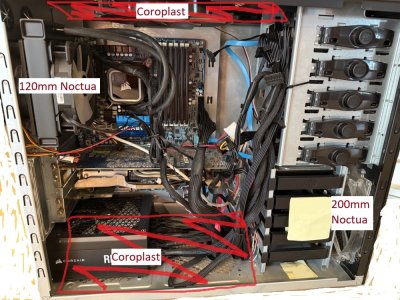
Depending on the RPM of your front and rear fans, you already have a problem in that you may be starving the upper 5.25" rack from air intake.
I see no point in putting a block on the bottom case wall, if you want to minimize dust then that's going to be an exhaust area anyway because your front wall fan is pushing more than rear wall plus PSU would exhaust otherwise.
It seems like one of those situations where you hit a limit that you know you have and just want to make life hard on yourself.
However, anywhere you have the space to put a HDD, there is a way! Yes you could put one between the HDD rack and the PSU, obviously needing better cable management to do that, and then I wouldn't block off the case bottom vent perforations because why?
For minimal dust ingress with positive pressurization, meaning your front intake fan is doing the work, you could even mount a HDD upside down onto the top panel of the case then just don't block off the exit path for air above that HDD.
You could instead pull out those 5.25" bays and fabricate something that will hold another HDD, but you still then have the case pressurization issue of whether enough air is pulled through that bay, but that can be overcome with pusher fans in front of a newly fabricated bay.
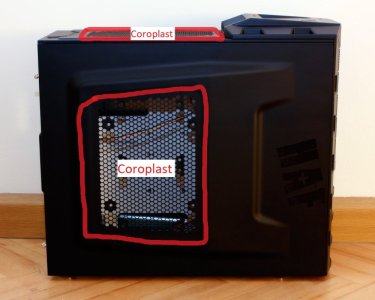
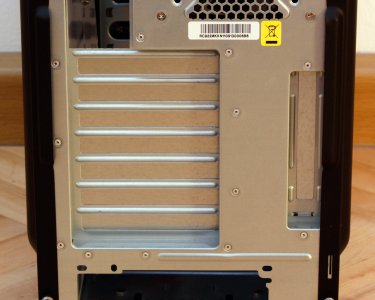
Beyond that, anywhere you want the HDD, that you can drill mount holes, will work then just fabricate a fan bracket to blow some air. Literally anywhere, you could even put it on the unused space where your picture has the text "120mm Noctua", mount the HDD using one side of the mounting frame and if you don't want to bother making a frame for a new fan mount, just cut a hole in the case side panel and put a fan in there,, which wouldn't need but a minimal amount of airflow.
The question is really more one of what fabrication abilities and materials, (and surplus fans available, trying to justify cost:benefit ratio here) you have.
If you were a really wild and crazy MOFO (lol!) you could even mount the 1 more HDD you want, to the top of the PSU intake where the fan is, just need some standoffs and screws and then the PSU fan pulls the air past it.
That HDD could also be mounted to the removable side panel, put some holes in the panel where it's mounted so with positive case pressurization the exhaust air there cools the HDD.
Worst comes to worst, just stick a PSU lead and SATA cable out the back to use the HDD with a *passive* enclosure. Again it really depends on what fab skills, tools, and materials you have available to justify price:effort ratio.
If it's going to be stuffed somewhere out of the way and out of eyesight, the drive doesn't even need to be "in" the case, could just mount it external on the top with some of that air passive left to let the front pusher fan put some air past it. Fugly option for sure, just throwing spitballs at this point.
Ultimately, you don't have the right case for the # of drives you want. You can make it work, but the effort and then serving of the system is going to be more of a burden too.
How about abandoning the idea of stuffing more HDDs into it and just finding the smallest enclosure that suits your needs to put right next to it if you need the same one PSU and mobo /card SATA connectors for that many drives? PSU leads (or with extensions) and SATA cable lengths seem plenty to connect to HDDs in an enclosure adjacent to it.
There are so many ways I could go with this reply. If you had the fab skills then you could just make a box that sits under the case, that houses the additional HDDs, more than just one or two more if you need room for more expansion, make the box tall enough to put an additional filtered intake fan in front of it. You could also make that box sit on top of the case instead, literally thinking outside of the box. 😉
You could even see if the PSU harness is long enough to put the PSU outside the case and mount a HDD or 3 where the PSU is currently mounted. I'd really need to be hands on and know every last variable of what you can do, your will/effort and modding skills and more, to give you the solution that I'd pick first.
The easiest answer is get a different full tower case. 🙂 What you have isn't ideal for your needs unless you have fabrication skills beyond what you've mentioned. If you aspire to gain fabrication skills then I highly recommend a recip saw, 0.06" aluminum sheeting, and a metal brake. Those three things (plus some sandpaper, drill, etc) are the primary things I've needed for very many case mods. Of course I have over-simplified that a bit, it's a journey...
How many ways can you skin a cat is the old saying... but I like cats.