
• We’re currently investigating an issue related to the forum theme and styling that is impacting page layout and visual formatting. The problem has been identified, and we are actively working on a resolution. There is no impact to user data or functionality, this is strictly a front-end display issue. We’ll post an update once the fix has been deployed. Thanks for your patience while we get this sorted.

Question How can I connect my switch?

Dayer

Junior Member
I have a monitor and a laptop, and I want to use them at the same time. So I buy a kinan 2-ports dual monitor switch. Badly, I find my monitor has a DP port, but my laptop has a HDMI port. And the switch has two DP ports. Is it possible to connect my two devices to this switch? If so, what can I do? By the way, the DP monitor can't show images, what happens to it? Is my connection wrong. I connect one by one according to the diagram. This is the diagram. Anyone can give me a solution? Thanks.
 

Attachments
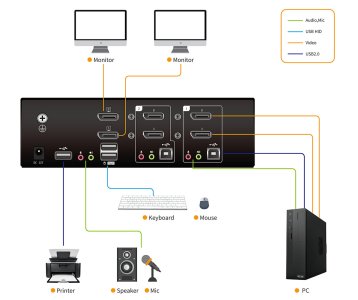
  • Kinan 2 port 4k USB2.0 dual monitor displayport kvm switch.jpg
    Kinan 2 port 4k USB2.0 dual monitor displayport kvm switch.jpg
    99.8 KB · Views: 6
Last edited:
You don't need that switch to hook the monitor up to your laptop. All you need is an active HDMI to DP adapter/cable like this. Notice that it requires USB power.

BENFEI HDMI to DisplayPort Cable, 6 Feet HDMI Source to DisplayPort Monitor Compatible with PC Graphics Card Laptop PS5 Xbox One(360) Supporting 4K@60Hz 2K@144Hz 1080P@165Hz(Not Bi-Directional) https://a.co/d/6Ts4E0b
 
You don't need that switch to hook the monitor up to your laptop. All you need is an active HDMI to DP adapter/cable like this. Notice that it requires USB power.

BENFEI HDMI to DisplayPort Cable, 6 Feet HDMI Source to DisplayPort Monitor Compatible with PC Graphics Card Laptop PS5 Xbox One(360) Supporting 4K@60Hz 2K@144Hz 1080P@165Hz(Not Bi-Directional) https://a.co/d/6Ts4E0b
I will try it! Thank you soooo much!
 
Back
Top