
HIS IceQ X2 7970 Testing

sze5003

Lifer
Aug 18, 2012
14,320
683
126
Ok so I got my case and card and I have it installed. Ran standard bench mark in Heaven and it says GPU is intel HD 300 although in BIOS it is set to PCIE Express.

Here are some pics:

https://www.dropbox.com/s/3nciq14osrmv5gn/IMAG0217.jpg

https://www.dropbox.com/s/hulcjplhvztyb57/IMAG0218.jpg

https://www.dropbox.com/s/iawe5zsxhd5l4hk/IMAG0219.jpg

https://www.dropbox.com/s/dw9l8xmr36rhy2y/IMAG0220.jpg

GPU Z
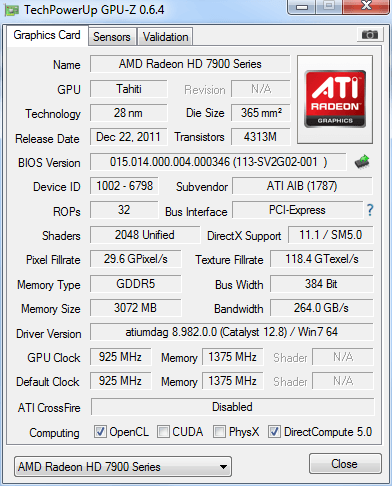
2sk.png


So far the card is really quiet. I have not overclocked it. Had to take out my hard drive trays to fit it. Even setting the fans up louder does not make it audible much.

I don't notice and coil whine either.

Here is the Benchmark for Unigen, not sure if it is correct:

https://www.dropbox.com/s/z2cvuhohk61s414/Unigen.JPG

Can anyone tell me if these are correct or maybe I have my settings wrong? Before I start installing some games and playing them I would like to know what settings to bench on.

So far the card is handling nicely, I like that the Temperature is at 31 degrees celsius, sometimes up to 35.

I still have yet to run 3DMark but once I can confirm things are correct, then I will continue to update here.

I am running 12.8 drivers and everything installed and configured correctly. Its pretty amazing how quiet the card is.
 

RussianSensation

Elite Member
Sep 5, 2003
19,458
765
126
Looks good so far, just maybe use a Q-tip or clean off some of that dust build up on the CPU fan with compressed air. Helps to keep the stock Intel heatsink fan quieter. :)

For game benchmarks, it's really up to you. You can try Metro 2033 benchmarking tool if you have that game. A lot of games have built-in benchmarks like Dirt 2/3, Batman games. I usually crank the settings to the max and 8XMSAA to really stress the card's overclocks.

For example, in Heaven Unigine 3.0, use Extreme Tessellation and 8x MSAA.
 

sze5003

Lifer
Aug 18, 2012
14,320
683
126
Ok I wasn't sure really if that was my Intel Graphics or the card. Playing Bf3 on High settings, textures on Ultra MSAA x16, no AA by default. While in game, the card does make a low humming sound. Could be that my case has a small plastic see through panel and maybe that is part of it too.

This sound goes away when the game is not in play. I will need to check when I get home, make sure nothing is loose as I was hurrying to transfer over components. The sound is not loud and you have to look for it in order to hear it actually.

I'm not sure if its worth calling Newegg about and doing a return because I would have to wait to get a refund before ordering something else.

Oh and I noticed the GPU clock/Mem clock in MSI AfterBurner is not reading nor is it moveable (the slider). I edited the config using the other post to start overclocking.
 

sze5003

Lifer
Aug 18, 2012
14,320
683
126
Whats the ASIC score on the card?

What software do I use to get the ASIC score?

Weird that so many reviews claim it comes clocked out at 1050 when mine says 925. I hope I didn't get a bad one.
 

Rvenger

Elite Member <br> Super Moderator <br> Video Cards
Apr 6, 2004
6,283
5
81
GPU-Z and right click at the top. You just got the version without the Gigahertz edition bios.. which is a good thing according to recent reports here.
 

sze5003

Lifer
Aug 18, 2012
14,320
683
126
Darn, will have to wait until I am home to get the ASIC score. I'm going to clean out my case a little more, take out the card, put it back and uninstall all drivers, driver cleaner, then re install the 12.8 drivers.

Hopefully MSI afterburner will work this time as I want to try some overclocking.

Would HIS send factory cards out with the Ghz Bios? That sounds like someone may have flashed it and returned it ?
 

cmdrdredd

Lifer
Dec 12, 2001
27,052
357
126
The ghz bios with boost is pretty new to market. There is likely some old stock left around that gets sold.

As for your heaven score, most tests are done at 8x AA and 16x AF with extreme tessellation.
 

sze5003

Lifer
Aug 18, 2012
14,320
683
126
The ghz bios with boost is pretty new to market. There is likely some old stock left around that gets sold.

As for your heaven score, most tests are done at 8x AA and 16x AF with extreme tessellation.

Ah I see I must have gotten the left over. I didn't even see anywhere on their website where you can updated Bios. I don't think I will though. I guess my score will be lower with x16AF and 8x AA for sure with extreme tessalation. I'm guessing I will score around 1040. Will post when I find out.
 

cmdrdredd

Lifer
Dec 12, 2001
27,052
357
126
The score doesn't matter much unless you are doing compares on their site, the average fps is the important number. Also with that benchmark you can press enter to cycle through the different scenes before running the benchmark and that will alleviate some of the hitching you might see on first run. This also helps keep your fps up a little on the minimums which can affect your average slightly..
 

sze5003

Lifer
Aug 18, 2012
14,320
683
126
Good thing to keep in mind. Just wanted to get a good test in so I can post results up here. Mainly because not many people have this card type and you guys have helped me out a lot so I figure its something I can do.
I'm guessing my Avg FPS will be around 40 with those extreme settings.
 

RussianSensation

Elite Member
Sep 5, 2003
19,458
765
126
Ah I see I must have gotten the left over. I didn't even see anywhere on their website where you can updated Bios.

Did you flip the BIOS switch to try the other setting? Maybe the 1050mhz clocks are on the other BIOS. Also, the non-Turbo card is technically only rated at 925mhz so that's why I was wondering how other people were buying these cards with 1050mhz clocks in the first place since those aren't even the specs of this card. Maybe accidentally someone put the HIS Turbo BIOS on their cards before packaging them or put the HIS Turbo cards in the wrong box; so they got lucky. This isn't a problem though since you can overclock to those speeds yourself.

Are you sure the humming noise is coming from the card and not your power supply or some other fan? That card would put a lot more load on the PSU so you should expect the PSU fan to spin at higher RPMs. Maybe the previous card you had was louder and consumed less power and therefore you didn't really hear how loud your PSU is due to lower load on the unit. Just a thought - put your ear near the PSU and see how loud the fan is, then check how loud the fans the GPU are. See which one is making the most noise in game (say when you are running Unigine Heaven 3.0 benchmark with an open case). Your total system power consumption could actually be very near the threshold where most 750W power supplies would start to increase their fan speeds (especially the 80Plus, Bronze and Silver units).

cm750-noise.png
 
Last edited:

sze5003

Lifer
Aug 18, 2012
14,320
683
126
Did you flip the BIOS switch to try the other setting? Maybe the 1050mhz clocks are on the other BIOS. Also, the non-Turbo card is technically only rated at 925mhz so that's why I was wondering how other people were buying these cards with 1050mhz clocks in the first place since those aren't even the specs of this card. Maybe accidentally someone put the HIS Turbo BIOS on their cards before packaging them or put the HIS Turbo cards in the wrong box; so they got lucky. This isn't a problem though since you can overclock to those speeds yourself.

Are you sure the humming noise is coming from the card and not your power supply or some other fan? That card would put a lot more load on the PSU so you should expect the PSU fan to spin at higher RPMs. Maybe the previous card you had was louder and consumed less power and therefore you didn't really hear how loud your PSU is due to lower load on the unit. Just a thought - put your ear near the PSU and see how loud the fan is, then put it next to the GPU. See which one is making the most noise. Your total system power consumption would actually be very near the threshold where most 750W power supplies would start to increase their fan speeds (especially the 80Plus, Bronze and Silver units).

cm750-noise.png

I could not find a BIOS switch on the card. Is it hidden?

As for the PSU, I had the Twin Frozr II 560ti before and when that got heavy loaded you would just hear the sound of fans. You could be correct but I will try the ear thing. It doesn't make the sound during Benchmarking, only during games I suppose. I only tried one game, BF3.

Its a very low hum-buzz faint sound. I'm sure if someone heard it that had more experience would probably be able to tell what it was. But previously I never heard my PSU being loud..possibly because in the old case I had it installed with fan facing inside the case lol!

When the pc is idling, you don't hear it either. I'd hate to return or RMA the card, HIS seems to be in Taiwan and shipping there would be crazy plus take a long time.
 

RussianSensation

Elite Member
Sep 5, 2003
19,458
765
126
Oh, it's a "buzzing" sound? That's probably coil whine, can come from a GPU or the PSU. Does it sound like a metallic frequency sound almost?

Does it sound like this or this?

The BIOS switch is near the 2 cross-fire fingers.

134553qj3v2qdd570d2tz1.jpg

1346337qqzs45jyqzpqf4y.jpg

Source

Shut down the PC, flip it, and restart.
 
Last edited:

sze5003

Lifer
Aug 18, 2012
14,320
683
126
Oh, it's a "buzzing" sound? That's probably coil whine, can come from a GPU or the PSU. Does it sound like a metallic frequency sound almost?

Does it sound like this or this?

The BIOS switch is near the 2 cross-fire fingers.

134553qj3v2qdd570d2tz1.jpg

1346337qqzs45jyqzpqf4y.jpg

Source

Shut down the PC, flip it, and restart.

Thanks I flipped the switch to number 2, rebooted pc and still nothing. Everything is the same, clock is still at 925Mhz. Not sure but that is weird.

I believe it is coil whine I am hearing from the card, took apart the case and loaded up Bf3, here is with it running the game:

https://www.dropbox.com/s/48n3ehnnqnpy6t5/VIDEO0004.mp4

And here it is without:

https://www.dropbox.com/s/x1wyoeoad0ujk0v/VIDEO0005.mp4

So what can be done, I guess RMA? Ugh I hated to do this really did lol. Good thing I kept the original newegg box maybe I can just slap a label on it and send it.
 

notty22

Diamond Member
Jan 1, 2010
3,375
0
0
My post got clipped. Have you played with the fan speed up and down in CCC with no load , to see if it's just the fans electric motors you are hearing/pitch.
 

sze5003

Lifer
Aug 18, 2012
14,320
683
126
Yes I changed the fan control speed up and down and I heard the fans, they are quiet but you can hear them once turned up. Its deffinately coil whine. I have a feeling it may get more audible as time goes by. Seems more audible than yesterday.

Would you guys reccomend I RMA it for a refund and in the mean time I'm sending it back maybe see if Newegg can just give me the Saphire 7970 Ghz edition model for the difference? Or should I just ask for a replacement?
 

Borkil

Senior member
Sep 7, 2006
248
0
0
i just got my iceQ x2 today, tried both bios and core is 925 MHz and 1325 MHz memory. also ASIC is 61.9%
 

sze5003

Lifer
Aug 18, 2012
14,320
683
126
i just got my iceQ x2 today, tried both bios and core is 925 MHz and 1325 MHz memory. also ASIC is 61.9%

Hmm my asic score is 59.2% whatever that means. So maybe should I RMA it for the same one? Does newegg cross ship you one and then you can send this one in at the same time?

Borkil, any coil whine or noises like my card has in those videos i posted?
 

Borkil

Senior member
Sep 7, 2006
248
0
0
it makes this buzzing noise when i turn on bf3. it doesn't sound high pitch like a whine though. almost like something is hitting the fan
 

sze5003

Lifer
Aug 18, 2012
14,320
683
126
it makes this buzzing noise when i turn on bf3. it doesn't sound high pitch like a whine though. almost like something is hitting the fan

See my above post where I link the two videos. One is with Bf3 on, the other without BF3.

That is the buzzing sound I hear too. Trying to get a hold of Newegg to see if they will let me exchange it for a Saphire or Ghz Saphire edition or if the only option is RMA.

I would rather have a card being shipped to me while I send this one back as if you wait for the refund it will take up to a week to get there and tested, then another week before they give you the money back.
 

RussianSensation

Elite Member
Sep 5, 2003
19,458
765
126
If you are bothered by coil whine and don't want to play the coil whine lottery, you would have to get a card with upgraded chokes/VRM components then. That would be Asus Direct CUII, Sapphire Vapor-X with black diamond chokes or something similar on the GTX670 side (Asus Direct CUII). With regular cards based on reference GTX670/680/7950/7970 design, there is really no way to guarantee no coil whine. Usually it's just luck of the draw and often even changing the PSU with the same videocard can fix it. Sometimes the PSU's 12V rail stability can also cause the GPU to resonate like that.

Instead of swapping 4-5 different PSUs, it's usually better to just get a card with upgraded components then.